What Is a White Label App? Meaning, Uses and Costs
A white label app is a ready-made app built by one company and rebranded under another business's name, logo and colours.
A café owner might already have regular customers, a drawer full of paper stamp cards and a growing list of requests for digital rewards. A branded app sounds useful, but hiring developers to build and maintain software feels like a different business altogether.
White-labelling offers a middle route. The important decision isn't just how the app looks, though. It's what the merchant can control, what happens to customer information and how easily the business can leave the supplier.
What a White Label App Actually Is
A white label app combines ready-made software with a business's own customer-facing identity. The supplier creates the technical product; the merchant adds the name, visual branding, content and offers customers recognise.
Think of a supplier designing a well-built shop fitting for several stores. Each store paints it in its own colours, hangs its own sign and decides what to sell. The underlying structure stays similar, but customers experience a particular business.
For a salon, that could mean customers downloading an app with the salon's name on the icon rather than the software company's name. Inside, they might find rewards, a price list and appointment information.
What the merchant receives
The package normally includes:
- A tested technical foundation: Existing software rather than a development project starting from a blank page.
- A branded front end: The screens, icon and content customers see.
- An app-store route: Preparation and publishing support for Google Play and the Apple App Store, subject to the agreed service.
The UK context helps explain the appeal. A UK government publication on Apple's mobile ecosystem states that 94% of people aged 16 and over, approximately 56 million consumers, had access to a smartphone, and records between 1 million and 2 million apps available through Apple's App Store in the UK in 2024.
That creates an accessible customer channel, not an automatic reason to launch an app. A small business still needs something useful inside it, while avoiding the engineering, testing and maintenance burden of an independent build.
A white label app isn't a mobile website, a fully bespoke product or an unbranded listing inside a shared vendor app.
The recognition test: Customers should find the business's app and branding, while the supplier provides the reusable software underneath.
How a White Label App Works Behind the Brand
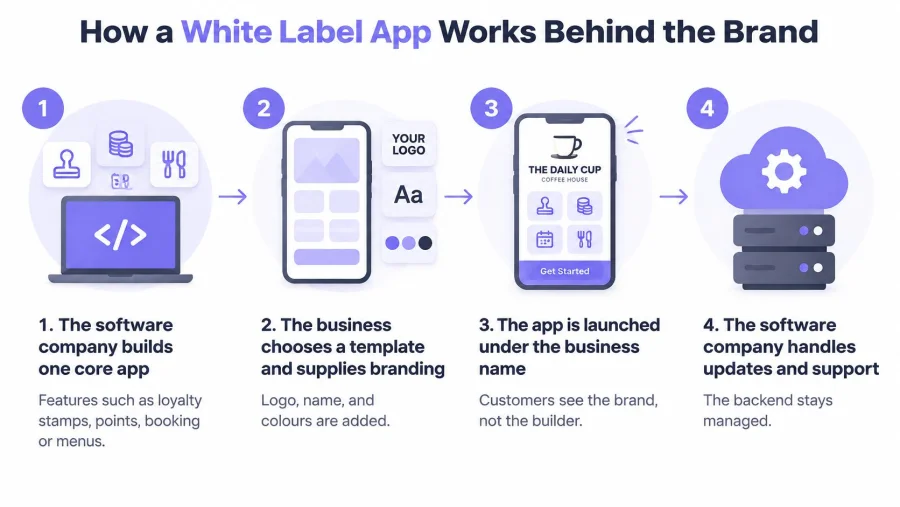
The visible branding is only part of the arrangement. Behind it, the supplier runs the software, while the merchant operates the customer programme.
- The supplier builds the core app. Depending on the platform, this contains loyalty stamps, points, booking tools or menus.
- The merchant chooses an available template and supplies its icon, logo, colours, wording and offers.
- The supplier prepares and publishes the branded build on Google Play and the Apple App Store, following the agreed account arrangement.
- Customers download the app and register. In a loyalty programme, they receive a personal QR code or can use a supported wallet pass.
- Staff scan customer codes and redeem rewards. The merchant reviews visits and manages relevant offers.
- The supplier maintains the shared core. Common improvements can reach multiple clients through managed releases rather than separate development projects.
BonusQR's White Label option is a copy of its loyalty app with the merchant's icon, logo and colours, published under the merchant's brand and ready to use in 14 days. Reusing an existing core removes much of the work involved in commissioning software from scratch.
Who does what in a white label deal
A typical division of responsibilities looks like this, with account ownership expressly settled in the contract.
| Task | Supplier | Your business |
|---|---|---|
| Builds and maintains the core app | Yes | Approves updates |
| Adds your icon, logo and brand colours | Applies them | Provides the assets |
| Publishes under your name on app stores | Uploads the build | Approves the listing |
| Owns the store developer account | Owns it only if the contract assigns it | Owns it if registered to the business |
| Writes loyalty rules and offers | Provides the tools | Decides the rules |
| Collects and stores customer data | Hosts it under contract | Usually the data controller |
| Handles customer data requests | Supports the process | Responds to customers |
| Changes features beyond the template | Only if agreed | Pays for the change |
For merchants assessing a longer-term supplier relationship, Wonderment Apps' guide to building strategic software development alliances offers useful context for treating software delivery as an ongoing partnership rather than a handover.
The merchant is usually the data controller, meaning it decides why and how customer information is used. The supplier often acts as a processor, handling that information under the merchant's instructions.
Those roles require more than a branding agreement. The ownership and data questions under “Advantages and Limits to Weigh Before You Buy” should be resolved before signing.
White Label Compared With Custom and Off-the-Shelf Apps
A white label app starts with a shared platform and presents it under the merchant's brand. A custom app is built to a particular brief, with scope for specific functions and connections. An off-the-shelf app is ready to use under the vendor's identity.
The practical choice concerns more than appearance. Launch timing, connections to existing systems and the customer's surroundings inside the app can matter just as much.
White label, custom and off-the-shelf apps compared
The following comparison uses the publisher's loyalty products as the concrete example, rather than implying that every supplier offers the same terms.
| Option | Typical launch time | Branding | Third-party integrations | Best for |
|---|---|---|---|---|
| White label | About 14 days in this example | Merchant's icon, logo and colours | None in this example | A branded app quickly, without system links |
| Custom build | Scheduled against the agreed brief | Fully bespoke | Possible with POS or CRM | Unusual rules or systems to connect |
| Off-the-shelf | Immediate availability | Vendor's brand | None in this example | Testing a scheme before committing |
POS means point of sale, the till system used to process purchases. CRM means customer relationship management software, which holds customer records and supports customer communication.
A custom app can connect those systems and support custom functions and reward rules. The standard and White Label options in this comparison don't provide third-party integrations, so a merchant shouldn't assume that changing the icon also adds a live till connection.
The differences customers notice
The standard app displays the vendor's brand and shows other nearby businesses. White Label carries the merchant's brand and doesn't show those neighbouring businesses.
For a restaurant considering a loyalty app for restaurant regulars, the decisive question may be whether staff can administer rewards separately or whether the app must receive purchase information directly from the till.
Choose the simplest product that supports the actual workflow, not the longest feature list.
White label suits a merchant needing a branded presence without system links. Custom development suits a business whose systems must communicate or whose workflow can't fit the available rules. Off-the-shelf is a sensible way to test whether customers and staff will use the programme before funding separate branding.
Advantages and Limits to Weigh Before You Buy
- Faster delivery: Existing software reduces the work needed before launch.
- Lower initial development effort: The merchant isn't funding the entire technical foundation.
- Recognisable branding: Customers see the business's own identity.
- Shared maintenance: The supplier maintains the reusable core.
- Visible loyalty progress: Customers can check rewards and available offers on their phones.
The limits matter most for ownership and data. A branded app doesn't automatically give the merchant ownership of the software or unrestricted portability of every record.
Ownership needs written terms
The supplier commonly retains the reusable platform, a distinction explained in Arch's white-label app guide. Bespoke features require an expressly agreed development scope rather than an assumption that anything can be added to a template.
The contract should identify exportable customer profiles, reward histories, consent records and analytics. It should also specify file formats, export charges, backups, custom-work ownership, developer-account control and notice periods.
Before committing, merchants can browse digital rewards plans and assess the ongoing service alongside the exit terms, not just the opening subscription.
Privacy remains the merchant's responsibility
A business deciding why names, contact details and visit histories are collected will usually be the controller. The ICO's privacy-by-design guidance requires protection throughout the product lifecycle, making a merchant-branded privacy notice, minimal collection, retention rules and secure access essential considerations.
Loyalty administration and promotional messaging need separate decisions. The ICO's consent guidance requires active, informed choices where consent is used, not pre-ticked boxes, with withdrawal as easy as giving consent.
Use separate, unticked choices for optional email, SMS and promotional push permissions where required. A supplier's compliance claim doesn't replace the merchant's own assessment.
Before signing, the merchant should put these questions in writing:
- What can leave? Which records can be exported, in which usable formats and at what cost?
- Who controls the app listing? Who owns the developer accounts, and what happens after cancellation?
- Who handles customer rights? Who manages access, deletion, consent evidence and incident support?
Real-World Uses, Including Loyalty Apps
A café might replace paper stamp cards with QR-based stamps at the till. Customers check progress towards a free drink, while staff award and redeem rewards using a phone rather than purchasing dedicated scanning hardware.
A beauty salon could combine a birthday coupon with a rebooking reminder. The recurring purpose is practical: customers can find an available benefit and arrange their next appointment, with promotional communications controlled separately.
Match the mechanic to the visit pattern
- Gym or fitness studio: An attendance reward gives members a visible target after a chosen number of qualifying visits. Staff need a clear rule for what counts as attendance.
- Restaurant: A menu, reservations and a welcome bonus can serve different moments in the same customer relationship. Staff should explain whether the welcome offer can be combined with another discount.
- Retail or grocery store: Spend thresholds and fixed discounts can encourage another qualifying purchase. The scheme should make exclusions, qualifying spend and redemption conditions easy to understand.
These are possible uses of white-label platforms, not features guaranteed by the label itself. A merchant should check that the chosen product includes the required function.
The wider business context is digital adoption. According to the UK Government's Longitudinal Small Business Survey, 74% of UK SME employers used technologies or web-based software to sell to customers or manage the business in 2025, up from 61% in 2023. That measures business software use, not customer app downloads.
Make the next reward obvious
For a loyalty scheme, the useful sequence is straightforward: record a qualifying visit or spend, display progress and show what the customer can earn next. The BonusQR mobile web app also offers a browser-based route for customers who prefer not to begin with a store download.
The merchant should test whether customers have a recurring reason to return. As a planning rule, an app with no reason to open it more than once a month risks becoming an unused icon rather than a useful loyalty tool.
How to Launch a White Label App in Six Steps
A workable budget includes publishing, preparation and promotion, not just the platform subscription.
Cost items to check before launch
| Cost item | What to expect | What to confirm |
|---|---|---|
| Set-up fee | One-off, quoted by the supplier | Whether store-listing work is included |
| Monthly platform fee | Recurring, billed monthly or annually | Whether annual billing lowers the cost |
| Apple developer account | Account charge to verify before purchase | Current fee and account ownership |
| Google Play developer account | Registration charge to verify before purchase | Current fee and account ownership |
| Content and design | Icons, screens, menus and offers | Whether staff or the supplier prepares each asset |
| Customer marketing | Printed QR codes, push or email | Which communications require permission |
No single subscription figure describes the whole project. The merchant should obtain a written quotation showing included work, billing currency, renewal terms and any separate account charges.

From budget to launch
- Set the budget. Calculate the opening-year cost, including set-up, recurring payments, design work, printed materials and staff preparation. Separate unavoidable charges from optional extras.
- Define the recurring customer purpose in a sentence. A café might prioritise stamp progress; a salon might prioritise rebooking and relevant rewards.
- Gather the assets. Prepare the icon, logo, colour references, photographs and current menu or price list. Assign a named approver so outdated content doesn't reach the listing.
- Keep the opening reward scheme small. A stamp mechanic or visit threshold is easier to explain than several overlapping promotions; staff should know how refunds, exclusions and redemptions work.
- Map the customer information. Record what is collected, its purpose, lawful basis, retention period and recipients. The government's business data-protection guidance explains the need to understand and manage personal information; optional marketing permissions should remain distinct from account administration.
- Sign only when the export, ownership, developer-account and notice-period questions are settled. The contract should match the sales explanation rather than rely on informal promises.
Printed QR materials and staff training should be prepared during the supplier's launch window. Before public promotion, staff should practise registration support, awarding a reward and redeeming it on real devices.
Launch check: A successful test ends with the correct reward recorded, not merely an app that opens.
Decide Whether a White Label App Fits Your Business
A white label app fits a business that needs a branded customer experience quickly, wants repeat visits and doesn't require a live connection to its till or CRM. It's less suitable when the essential workflow needs custom engineering from the start.
The decision should begin with operational readiness rather than the appeal of an icon. Someone must maintain offers, brief staff, respond to customers and review whether the rewards justify their cost.
A practical readiness checklist
- A recurring purpose: Customers have a concrete reason to reopen the app, such as checking reward progress.
- A sustained commitment: The merchant is prepared to run and review the scheme for at least three months as a practical trial period.
- A named data owner: Someone is responsible for privacy information, customer requests and marketing preferences.
- A workable staff routine: Awarding and redeeming rewards fits the service counter without confusing customers.
If custom workflows or POS integration are essential on day one, a custom-build comparison is the better next step. Branding can't compensate for a process that staff can't operate reliably.
Start with the scheme before the separate brand
BonusQR's Free plan includes web, iOS and Android apps, Google Wallet and Apple Wallet passes, and a mobile QR scanner that requires no POS integration. It also includes in-app news, visit and reward statistics, and printable QR promotional materials. Signing up requires no credit card.
A sensible starting experiment is to run the free plan for a month. The merchant can review repeat visits, reward issuance and redemptions, while asking staff where customers become confused.
That trial won't prove long-term results, but it can reveal whether the rules are understandable and the counter process works. Moving to White Label makes more sense once the programme is useful enough to deserve its own branded presence.
Start free with BonusQR today, launch a clear reward scheme and give regular customers an easy way to see their progress. Once staff can run it confidently and customers have a reason to return, the business can invest in its own branded app with a clearer purpose and fewer avoidable costs.


