Customer Segmentation Software & Automated Groups

Turn loyalty activity into useful customer groups. BonusQR automatically sorts members by rules you choose, helping you find regulars, returning visitors and customers you have not seen for a while.

Basic · Premium
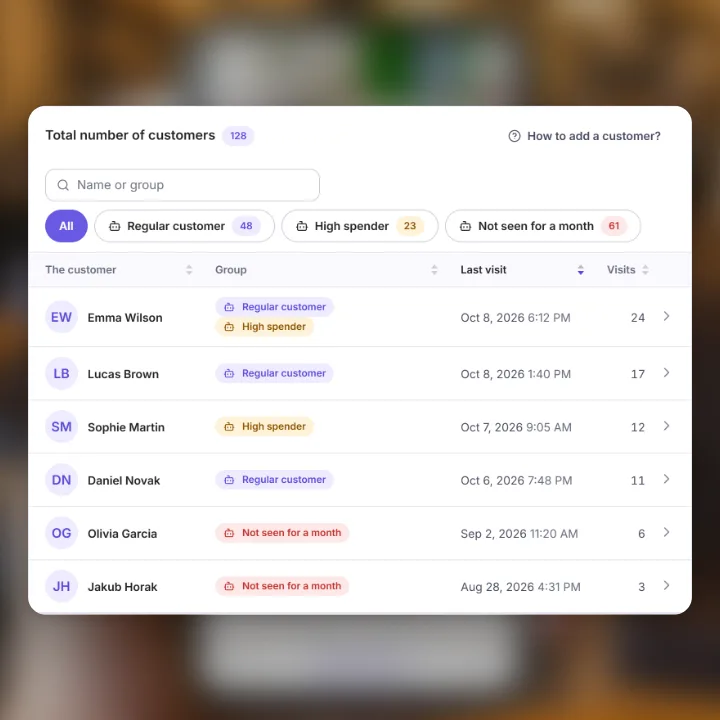
Automated customer groups
Illustrative customer list with demo data.

Customer segmentation that stays up to date.

Set the rule once. BonusQR recalculates active groups every hour, adding customers who qualify and removing automated memberships that no longer match. You can also recalculate immediately.

Start with a group you can act on.

These are sample rules you can adjust to your business, not reported customer results.

Not seen for a month

No recorded scan in the last 30 days.

Find customers to consider for a welcome-back message. Members with no recorded scan can also match.

Regular customers

A visit in each of the last 3 months, allowing 1 missed month.

Recognize a pattern of visits instead of treating every customer as new.

High spenders

At least €100 of qualifying recorded spend.

Use cumulative spending recorded by money-based loyalty modules. This condition has no rolling date window.

Segment customers by the activity you actually record.

  • Regular visits over weeks or months
  • No visit for a chosen number of days
  • Recent activity within a chosen period
  • Visits on a minimum number of distinct days
  • A minimum recorded spending amount
  • Mostly morning or evening visits
  • Purchases in the built-in BonusQR prepaid-item shop
  • Successful customer referrals

* Spending, prepaid-shop purchases and referrals require the related module and the data it records. For the distinct-visit-days condition, several scans on the same day count as one day.

From a rule to a relevant audience.

  1. Choose a starting point

    Open Automated groups and select a prepared example or create your own named group.

  2. Combine your conditions

    Use up to five different condition types. A customer must meet every condition in the rule; this lets you build a more specific audience.

  3. Review and reach the group

    Save an active rule to calculate membership immediately. Open the matched customer list or start a news message with that group already selected.

Questions before you start

Does a group automatically send messages or coupons?

No. Group membership is automated; sending a campaign is a separate action. You choose the group as the audience when preparing a message. Saving a rule does not send anything.

What happens to groups I assigned manually?

Manual assignments are preserved. Changing, pausing or deleting a rule removes only the memberships created by automation. A customer can belong to more than one group.

How quickly do the groups update?

An active rule is applied when saved, and active groups are recalculated every hour. You can also use Recalculate now. This is a scheduled refresh, not an instant update after every interaction.

Does the shop-buyer condition include Shopify orders?

That condition counts purchases in the built-in BonusQR prepaid-item shop. It is not a general filter for every WooCommerce or Shopify order. Other conditions use the loyalty activity recorded by their supported modules.

Do I need a paid plan or an AI model?

Automated groups are available on Basic and Premium. They use explicit rules you set, not AI predictions. You can review the conditions and the matching members before deciding what to send.

Build the rest of your loyalty program

Make the next visit worth coming back for.

Set rules for your business, review your customer groups and choose who to contact next.