Reward for Visit
Give customers a reward for each visit
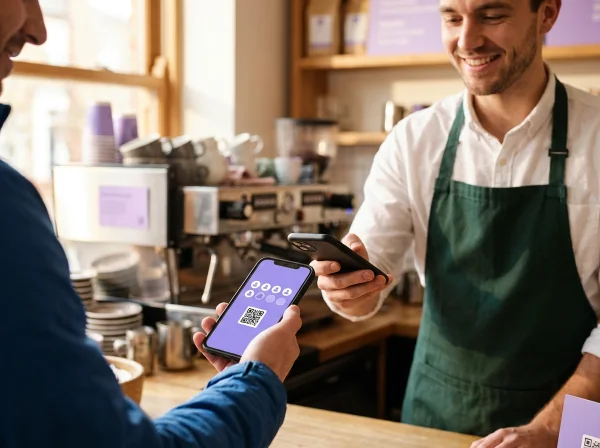
Every time a customer visits, your staff simply scans their loyalty QR code, and one electronic reward point is instantly added - no typing, no delay. Once the customer collects enough points, they automatically receive a reward voucher they can use on their next visit. It’s fast, easy, and keeps customers coming back
Instantly applied
Simple & motivating
Gift coupon
What is a visit-based loyalty program?
A visit-based loyalty program rewards customers for coming back, whatever they buy. You decide after how many visits a customer gets a reward, and the coupon arrives automatically on that visit.
In BonusQR this program is called Reward for Visit. Each time staff scan the customer’s loyalty QR code, one visit is counted – there is nothing to type in. The customer sees how many visits are left, and on every visit that reaches your number they receive the reward coupon.
- Staff only scan – no amounts or items to enter
- A reward on every 2nd, 5th, 10th… visit, as you choose
- Part of the Free plan
What can be set up in the loyalty program Reward for Visit?
Set the Visit Goal
Decide how many visits your customer needs to collect before receiving a reward.
Create the Reward Coupon
Design a digital coupon with a motivating reward. It will be automatically sent to the customer after reaching the required number of visits.
Add Details to Motivate
Customize the coupon with an expiration date or a fun message. Make your loyalty application more personal and boost visit motivation.
Why reward visits
Regular visits are what keeps a local business going. A visit-based reward makes every one of them count.
Rewards the habit
Customers are rewarded for coming back, not for the size of the bill – ideal when visits matter more than basket size.
The fastest at the till
A single scan is all it takes. Staff do not enter amounts or count items, so there is no queue.
Easy to explain
“Every 10th visit is on us” is a rule customers understand at once and remember.
Visible progress
The loyalty card shows how many visits the customer has and how many are left to the reward.
Automatic coupon
The reward coupon is issued on the right visit and also sent by e-mail – nobody has to remember it.
You stay in control
Choose the number of visits, the reward and its validity, and correct the visit count by hand when needed.
Related loyalty programs and features

Customer’s perspective of
Reward for Visit - loyalty module
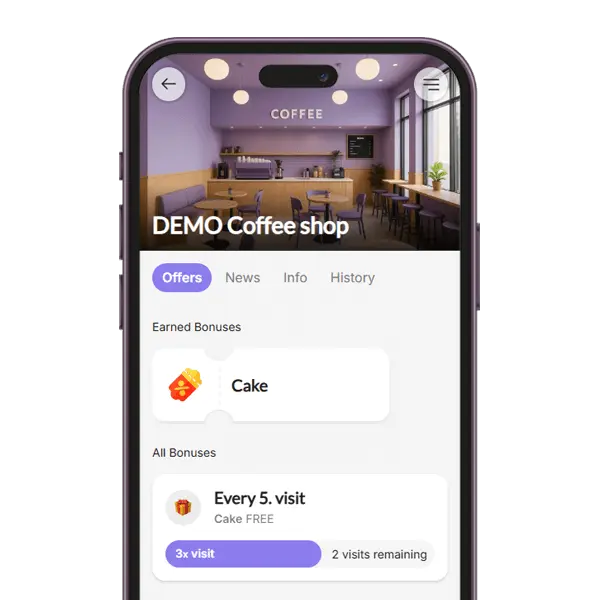
- Customers can clearly see how many visits they need to earn a reward right in the loyalty app.
- Once they reach the visit goal, a digital coupon with the reward appears instantly.
- Customers see all important info about the loyalty program, their points, and their reward.

How will your employees see the
loyalty program: reward for visit
- Scan QR Code: Staff simply scans the customer’s loyalty QR code, and one visit point is added automatically — no need to type anything.
- Redeem the Reward: When the customer earns a reward, they show their digital coupon. Staff scans the unique QR code on the coupon to redeem it instantly.
- Clear Confirmation: The app confirms each action - staff sees if the point was added or the coupon was valid and successfully redeemed.

Manager’s view of
Reward for Visit
- Visit Tracking for Each Customer: See how often each customer visits, how many points they’ve earned, and how many digital rewards or coupons they’ve received.
- Full Visit Overview: Get complete stats on total customer visits and how many rewards were issued or redeemed across your loyalty system.
- Smart Filters & Insights: view most active days, peak hours, or top-performing rewards in your loyalty program.
Reward for Visit compared with a stamp card and Reward for Spend
Three ways to reward regulars – the difference is what counts toward the reward.
Stamp card
Customers collect items – for example coffees – and get a coupon when the card is full.
- ✓Several stamps can be added in one scan
- ✓Great for one signature product
- −Staff enter the number of items at every purchase
Reward for Visit
Every visit counts, and after the number of visits you set the customer receives a reward coupon automatically.
- ✓Staff only scan – nothing to type
- ✓Rewards the visit, whatever the customer buys
- ✓Customers see how many visits are left
Reward for Spend
Customers collect the amount they spend and get a coupon when they reach the target.
- ✓Rewards higher spending
- ✓Extra spending carries over to the next reward
- −Staff enter the bill amount at every purchase
| Comparison | Stamp card | Reward for Visit | Reward for Spend |
|---|---|---|---|
| What counts | Items bought (e.g. coffees) | Each visit | The amount spent |
| What staff enter | Number of items | Nothing – just a scan | Bill amount |
| Best for | One signature product | Services and frequent visits | Bills of varying size |
| Plan | Free | Free | Free |
Where Reward for Visit works well
Wherever customers come often and the visit itself is what you want to reward.
Loyalty program Reward for Visit - suitable for industries











Why Do You Need a Loyalty App?
- Increase Repeat Visits
- Enhance Sales & Customer Spend
- Gain access to powerful features
Loyalty Programs
Choose the loyalty program that fits your business. Points collection, Stamps, Cashback, Rewards for regular visits, Discounts, Coupons ...
– it’s all up to you!
Analytics & Insights
Get to know your customers better. Track visit history, see which offers perform best, and identify your most loyal customers. Build your database and watch your business grow!
Push & Email Notifications
Stay on your customers’ minds. Send them regular updates and news, special discount coupons, or request feedback after repeat visits.
Coupons & Surprises
Automate promo coupon distribution for special occasions – Birthdays, Valentine’s Day, Children’s Day... Or boost sales with pre-sale coupon offers.
Important features of the loyalty application



Frequently asked questions about Reward for Visit
What business owners most often ask before they start.


