Ecommerce loyalty integration means connecting a loyalty engine (points, tiers, stamps, referrals) to the systems you already run: your online store, your POS, your CRM and your email or SMS tools. When the connection works, a purchase earns rewards automatically, the balance matches real spend, and your marketing tools can react to what customers do. When it doesn’t, you get a points balance that disagrees with reality, and customers notice quickly.
This guide is for owners and managers of small and mid-sized businesses who sell online, in person or both. It explains what to connect, in what order, how to measure results and how to choose between a plugin, an API-first platform and a lighter QR-based approach.
Key takeaways
- Integration depth matters more than feature count. A simple program that syncs correctly beats a rich one that shows wrong balances.
- Scope your POS connection separately from the loyalty software. Standard systems can connect in days, while legacy ones can take weeks per terminal.
- Measure active member rate, redemption rate and purchase frequency against non-members. Member count alone tells you little.
- Match the platform to your size: a store plugin, an API-first platform for complex stacks, or a no-POS QR approach when your sales happen across counters, tables and a web shop.
What loyalty integration actually covers
According to AboutMartech’s 2026 platform roundup, loyalty integration links the engine’s functions (points, tiers, referrals) with your existing ecommerce store, POS, CRM and marketing stack so that customer engagement is automated across channels. The same roundup describes a range: Shopify-native plugins such as Smile.io at one end, and API-first platforms such as Talon.One or Antavo, built for enterprise complexity, at the other.
For a small business, it helps to think of integration as four connections:
- Order data in. Every qualifying purchase, return and cancellation reaches the loyalty engine, so points are awarded and reversed correctly.
- Balance and status out. Customers see their points, tier or stamps in their account, at checkout and in their wallet or app.
- Events to marketing tools. A tier change, a birthday or a reward about to expire triggers an email, push notification or SMS.
- Identity in both directions. The same customer is recognized online and in person, so one profile holds the full history.
Most projects that go wrong skip number 4. A shopper who buys in your shop on Saturday and online on Tuesday ends up as two people with half a balance each.
Three integration routes, compared
There is no single best route. The right one depends on your platform, your volume and the number of systems involved.
| Route | How it works | Best for | Watch out for |
|---|---|---|---|
| Store-native plugin | Installed from your ecommerce platform’s app marketplace; reads orders directly | Online-only stores on one platform | Limited in-store support; plugin pricing can grow with order volume |
| API-first loyalty platform | Your developers connect orders, customers and rewards through APIs and webhooks | Larger or multi-channel brands with custom stacks | Build time, maintenance, and developer cost |
| QR-based loyalty layer | Customers scan a QR code to earn points, stamps or cashback; no POS connection required | Small businesses with mixed in-person and online sales | Needs a clear rule for how online orders are credited |
The Shopify guide to loyalty APIs explains the API route well: a loyalty API connects points, rewards, referrals and tiers to the tools and platforms you already use, which lets businesses build more flexible programs across online stores and apps. The trade-off is that flexibility has to be built and maintained by someone.
Start with the data flow, not the feature list
Loyalty architecture specialists at RaftLabs describe a loyalty app that doesn’t connect to your existing systems as a silo: a points balance that doesn’t match what the customer actually spent, which the member discovers within two visits. Their framing is that a loyalty program is retention infrastructure, not a marketing add-on. We agree, and it changes how you plan.
Before you compare vendors, draw your own data flow on one page:
- Where do orders originate? (Web store, marketplace, counter, phone, booking system.)
- Which system holds the customer record today?
- Which events should earn points, and which should reverse them (refunds, cancellations, chargebacks)?
- Which tool sends your email, push or SMS messages?
- Who owns the loyalty balance as the single source of truth?
The last question matters most. A developer playbook on syncing loyalty profiles to an email service provider describes the loyalty platform as the source of truth for transactions, points, tiers and opt-in status, with marketing tools consuming that data rather than keeping their own copy. Even a small shop benefits from the same rule: one system owns the balance, everything else reads from it.
Connecting your online store
For ecommerce, the connection usually happens through webhooks: automatic messages the store sends when something happens, such as a new order. The Shopify webhooks guide from Shopivibe explains the idea simply: instead of your app repeatedly asking the store whether there are new orders, the store pushes a notification the moment one occurs.
If you or a developer are wiring this up, three technical details prevent the most painful failures:
- Verify signatures. Use HMAC signatures so your loyalty system only accepts events that genuinely came from your store.
- Make events idempotent. Attach a unique request ID so a retried webhook doesn’t award points twice.
- Handle data deletion. According to the same Shopivibe guide, apps need privacy webhooks for customer and shop data erasure, and missing them is a common cause of app store rejection. If you serve customers in the EU, this ties directly to GDPR obligations.
If you are not a developer, ask any vendor three plain questions: How do you prevent duplicate points? What happens to a customer’s balance when an order is refunded? How do you handle a customer’s request to delete their data? A vendor who answers clearly has done the work.
The POS question for businesses that sell both online and in person
Many small businesses don’t live purely online. A boutique has a web shop and a counter. A café sells beans online and coffee at the till. A gym sells merchandise and memberships. That is where integration gets expensive.
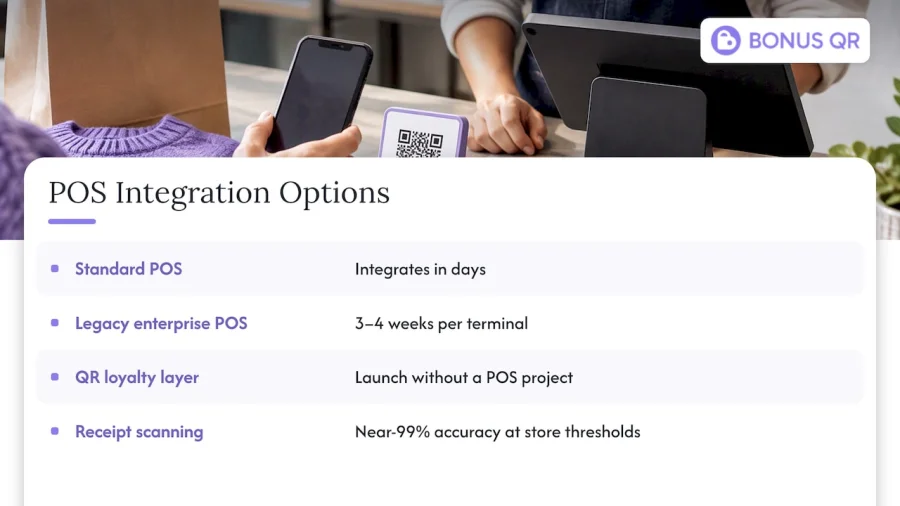
RaftLabs notes that POS integration is the most common real-world blocker. In their experience, standard systems such as Shopify POS can integrate in days, while legacy enterprise POS systems may need custom middleware and mapping of transaction codes, which can take three to four weeks per terminal. Their advice is to scope this work independently of the loyalty platform’s features, and it is sound advice: get a written estimate for the POS connection before you sign for anything.
There is an alternative for smaller teams. A QR-based loyalty layer sits beside your POS instead of inside it. The customer scans a code, the visit or purchase is recorded, and rewards accrue without anyone touching your till software. That is the approach BonusQR takes, and it’s why a small business can launch without a POS project at all. The trade-off is that without a POS feed you need a sensible rule for how a purchase is confirmed. RaftLabs points out that receipt-scanning approaches need anti-cheat rules, such as prohibiting specific line items or requiring a minimum spend, and that production-grade scanning can reach near-99% validation accuracy when configured for specific store thresholds. Whatever method you choose, define the rules before launch, not after the first abuse.
Connecting loyalty to email, SMS and push
The highest-value integration for most small stores is not the cart. It is the link between loyalty status and your messaging. AboutMartech puts it as a test: when a customer moves from Silver to Gold, does that event trigger a Klaviyo flow within minutes? When someone abandons a cart, does your SMS tool know their tier before deciding whether to send a discount?
Useful triggers to set up first:
- Welcome reward after sign-up or first purchase
- Progress nudge when a customer is one purchase away from a reward
- Expiry reminder a week before points or a coupon lapse
- Birthday or anniversary reward
- Win-back message after a set number of days without a purchase
We cover the mechanics in more detail in our guides on how to automate loyalty campaigns for better retention and automating loyalty emails, and in our customer retention workflow article.
When your stack needs an API-led approach
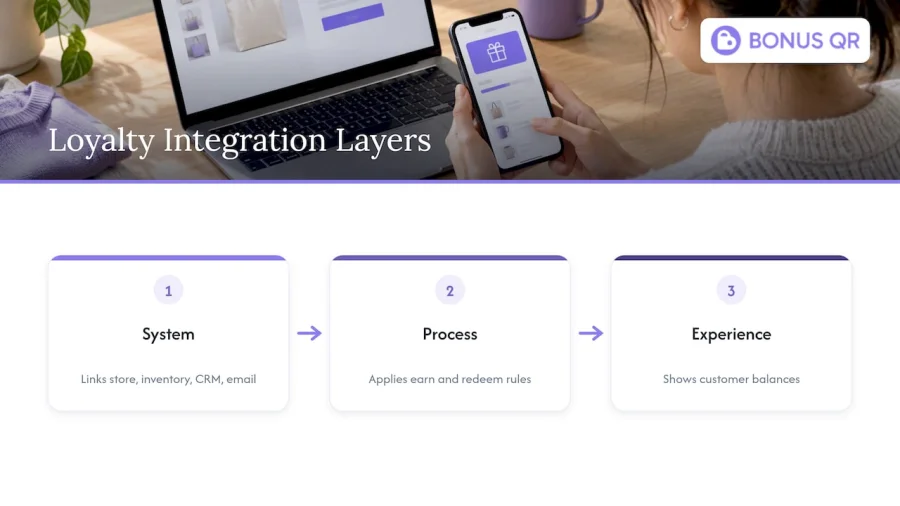
If you have several systems, such as a web store, an inventory tool, a CRM and a separate email platform, point-to-point connections multiply fast. Teams in that position usually move to layers: a system layer that talks to each tool, a process layer that applies business rules like earning and redemption, and an experience layer that shows balances to customers. The principles are explained in this piece on API-led integration layers, which is written about publishing workflows but describes the same architecture idea that loyalty projects rely on.
For most small businesses this is overkill. If your stack is one store, one email tool and a counter, a simple route with clear rules will outperform an elaborate architecture you can’t maintain.
What it costs
Pricing varies widely. AboutMartech reports free tiers for SMB-focused apps, mid-market platforms starting from roughly $135 to $399 per month, and enterprise solutions that are custom and quote-based. Remember to add the cost nobody puts on the pricing page: developer time, POS middleware and ongoing maintenance.
Our own pricing, as published on our pricing page, is:
| Plan | Price |
|---|---|
| Free | No published price |
| Basic | 19 EUR per month |
| Premium | 69 EUR per month |
For businesses that want their own branded app, the white-label option has a one-off setup fee of 690 EUR and a monthly subscription of 69 EUR. A fully custom app starts from 1500 EUR one-off, with monthly maintenance from 69 EUR.
How to measure whether the integration works
A live integration is not a result. RaftLabs lists the standard KPIs for loyalty programs, and they are the ones to track from week one:
- Active member rate: the share of members with a qualifying transaction in a given period.
- Redemption rate: the share of earned rewards that customers actually use.
- Incremental purchase frequency: how often members buy compared with a control group of non-members.
They treat member count alone as a vanity metric, and we’d go further: a growing list with a falling active rate is a warning sign. A low redemption rate is not a saving either. RaftLabs reads it as a signal of friction in the redemption flow or rewards that don’t appeal. If customers earn but never redeem, check how many taps it takes to claim a reward, and whether the reward is worth the effort.
A simple monthly review for a small team:
- Export active members and compare to last month.
- Check redemption rate by reward type and retire the rewards nobody claims.
- Compare average orders per customer for members and non-members.
- Review any balance complaints, which usually point to a sync problem.
A checklist for choosing a platform
Use these questions when you compare options, including ours:
- Which channels does it credit? Web orders, in-store visits, bookings, all three?
- Is a POS connection required? If so, who scopes and pays for it?
- How are refunds and cancellations handled?
- Which reward types are included? Points, stamps, tiered cashback, fixed discounts, referral and review rewards.
- Can messages fire from loyalty events? Push, email, and wallet updates.
- Does it support Apple and Google Wallet? Customers are more likely to use a pass they already carry.
- What do you own? Customer data, export options and exit terms.
- What does it cost at ten times your current volume?
If you’re in food service, our comparisons of restaurant rewards systems and loyalty program examples show how these criteria play out. For a broader view of the architecture, see our guide to the cloud-based loyalty platform.
Our perspective: keep it simple, and let it run itself
We build for small businesses, and the pattern we see is consistent: owners don’t fail at loyalty because their rewards were wrong. They fail because the program became one more job. Someone has to reconcile points, send reminders, and answer “why doesn’t my balance match?” Every manual step is a place where the program quietly stops.
That is why we designed BonusQR around two ideas. First, launch without a POS project: customers scan a QR code and earn points, stamps or cashback, so a café, a salon or a gas station can start without touching its till. Second, automate the rest: rewards distribution, notifications and customer insights run in the platform, so you spend your time on operations.
For businesses with an online shop, we offer an e-shop and booking widget as part of white-label and custom apps, so the same customer profile can follow someone from the counter to the web. We would still tell you what we tell anyone: if you run a complex multi-system enterprise stack with legacy POS terminals, scope that integration on its own before choosing any platform, ours included. And if you are small, start with one reward, one channel and one number to track. Add modules only when the first one is working.
— Michal Palus
Try it without a POS project
If you want to see how a QR-based loyalty program feels in practice, you can start on our Free plan, then move to Basic or Premium when you need more modules. If you want your own branded app in customers’ pockets, the white-label setup is the faster path, and the custom app service covers anything more specific.
FAQ
How long does a loyalty integration take?
It depends mostly on your POS. According to RaftLabs, standard systems like Shopify POS can integrate in days, while legacy enterprise POS may need three to four weeks per terminal. A QR-based approach avoids the POS connection, so setup is much shorter.
Do I need a developer to integrate loyalty with my online store?
Not always. Store-native plugins and QR-based platforms are built for non-technical owners. You need a developer when you connect through APIs and webhooks, or when your stack includes several custom systems.
What should I track after launch?
Track active member rate, redemption rate and purchase frequency compared with non-members. Member count alone is a vanity metric. Review them monthly and adjust rewards that go unclaimed.
Is a free loyalty plan enough for a small store?
Often it is enough to test the idea: one reward, one channel, a few weeks of data. Upgrade when you need more reward types, automation or analytics. Our Free plan has no published price, and Basic starts at 19 EUR per month.


