
 Deutsch
 Español
 Français
 Italiano
 Magyar
 Polski
 Slovenčina
 Čeština
The customer is standing at the till, the coffee is ready, and the paper loyalty card is still at home. The staff member knows the customer has been in plenty of times before, but the free drink stays unclaimed because the card is missing, bent, or buried in a wallet somewhere. That is the gap reward cards for Apple Wallet close, not with theory, but by keeping the loyalty card on the same phone the customer is already holding.
Why Reward Cards for Apple Wallet Matter for UK Small Businesses
The problem is simple. Paper cards are easy to forget, and separate loyalty apps are easy to ignore. A wallet pass sits inside a behaviour customers already use, because 57% of UK adults were registered for at least one mobile-payment service in 2024, up from 42% in 2023, and half of UK adults regularly used mobile-contactless services such as Apple Pay or Google Pay during that year. UK Finance
The moment that gets lost at the counter
A loyalty stamp only works if the customer can present it at the exact point of purchase. That is why cafés, salons, gyms, quick-service restaurants, and local retailers do better when the reward card lives on the phone, not in a drawer or jacket pocket. The pass is visible when the purchase happens, which means fewer missed scans and fewer “I forgot my card” moments.
A wallet pass also fits the way repeat visits happen. Customers do not plan their loyalty redemptions in advance, they decide in the queue, at the counter, or while they are walking past the shop. A pass that can be opened quickly from Wallet, or surfaced when the customer is near the business, keeps the reward in the path of the decision.
Practical rule: if the loyalty card cannot be found in under ten seconds, it is already losing value.
That is the strategic shift. Loyalty is no longer about handing out a plastic card and hoping it survives the week. It is about placing a reward card for Apple Wallet inside an existing mobile habit so the offer stays available at the moment it matters. For operators who want the broader QR-based loyalty model behind that pass, this guide to effortless customer loyalty is the right companion read.
What an Apple Wallet Reward Card Does
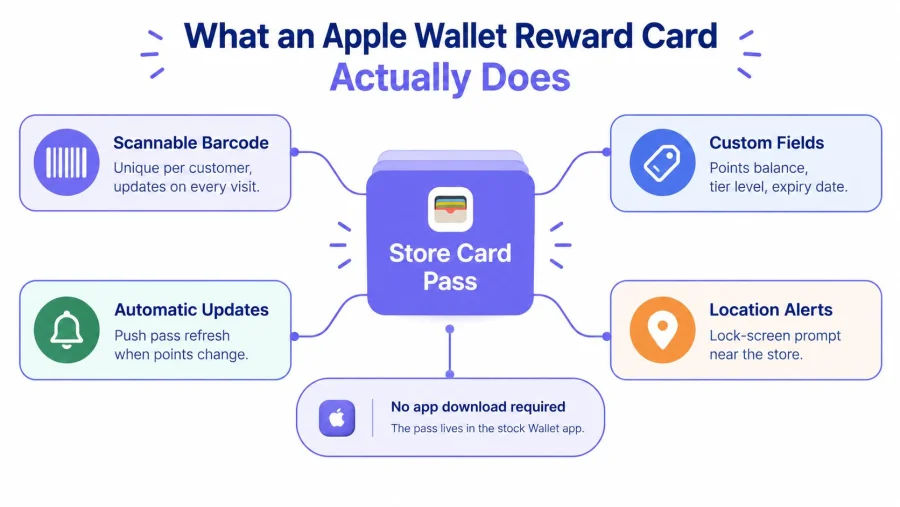
An Apple Wallet store pass gives a customer a live loyalty card they can open in seconds. Apple's developer documentation says the pass can display points, a rewards balance, terms and conditions, and other relevant information in built-in fields, while the business updates the card digitally instead of printing a new stamp sheet every time the account changes. Apple Wallet
What customers see on the phone
On the customer's screen, the pass shows the brand, a scannable code, the current balance, and any terms the business needs to surface. In a café, that can be a visible stamp count. In a salon, it can be a visit-based reward. In a neighbourhood retailer, it can be a discount threshold or a simple member ID.
The value is in the update. Staff do not need to print replacements, hand out a separate app login, or ask customers to remember a code. The card changes on the phone when the account changes in the merchant system, which keeps the process practical for businesses that depend on quick recognition at the till.
What it is for, and what it is not
Some merchants assume the pass should do everything. It does not. It is a loyalty surface, not a payment method, and Apple Pay still handles payment.
A wallet pass also works without a custom app. That matters for small businesses that need a visible card staff can scan, plus a simple system that records the visit in the background. The pass sits at the front of the loyalty flow, while the merchant system still holds the points, stamps, and eligibility rules.
That separation keeps the programme easier to run. It also matters for UK GDPR and consent, because the pass itself should stay light on personal data and rely on the wider QR-based loyalty setup behind it. Keep the card presentation in Wallet, keep customer records in the merchant system, and make sure the enrolment step collects consent cleanly before the pass is issued.
Setting Up a Reward Card for Apple Wallet Without a Developer
A single wrong Pass Type ID can break every pass in your system after launch. Apple Wallet reward cards depend on the correct certificate, and the identifier used to sign the pass must match that certificate exactly. If the match slips during setup or renewal, the passes stop behaving the way they should. Apple Wallet loyalty passes
The practical fix is disciplined setup, not technical heroics. Start with the correct Pass Type ID, sign the pass with the matching certificate, and issue a unique pass record for each customer. Then put a clear Add to Apple Wallet button in front of the customer at the counter, in a receipt, or in an email.
The pass itself should stay lean. Do not expose email addresses or phone numbers inside it. Use an opaque customer token and keep the account data in the merchant system, where it can be updated and revoked without breaking the card in Wallet. For merchants that want a product-led route, BonusQR's reward card software follows that same model without forcing a separate developer project.
A small business has three realistic launch paths.
- Custom build: best for businesses that already have technical staff and want full control over certificate handling, templates, and updates. It also creates the most maintenance.
- Platform-led launch: suited to merchants that want certificate handling, pass templates, and renewal logic managed inside a loyalty platform rather than handled by staff.
- Open-source assembly: workable for technical teams, but every renewal, update, and pass issue stays with the operator.
Apple Wallet should not sit apart from the rest of the loyalty setup. The visible card and the QR loyalty stack must function as one integrated system. That matters because the pass is only one layer of a wider QR-based loyalty flow, and the staff need a process they can use quickly at the till. A small shop does not need a complicated build. It needs a pass that can be issued in a day, renewed without disruption, and tied to the QR process the merchant already runs.
UK GDPR and PECR Rules for Loyalty Wallet Passes
Most wallet guides get sloppy right here. Adding a pass is not the same thing as getting permission to market to someone. The ICO says loyalty-scheme operators must explain what messages members will receive, provide a clear opt-out at sign-up and in later messages, and obtain clear consent for marketing outside the scheme's stated scope. ICO marketing lists guidance
The consent gap businesses keep missing
A points update is operational. A birthday offer is promotional. A “your card is ready” notification can be either, depending on the wording and context. That is why pass enrolment, loyalty administration, and direct marketing need to be separated instead of bundled into one vague checkbox.
The ICO also says loyalty operators must make the message scope clear and offer an opt-out both at sign-up and later. For a café, salon, gym, or retailer, that means the pass can be the reward mechanism, but it cannot automatically become a blanket opt-in for every email, SMS, or promotional reminder the business wants to send.
A sensible enrolment copy is blunt. It should say the customer is joining the loyalty scheme, identify the operational messages they'll receive, and separate any marketing permission into its own choice. That keeps the pass useful without turning it into a compliance headache.
What to record and what to avoid
- Record the scheme purpose: loyalty administration, redemption tracking, and account support.
- Keep marketing separate: birthday offers, seasonal campaigns, and re-engagement messages need their own permission where required.
- Add a visible privacy notice: the customer should see how data is used before joining.
- Make the opt-out obvious: it should be available at sign-up and in later communications.
- Limit retention: delete loyalty data when it is no longer needed.
The direct lesson is simple. A wallet pass is a convenience layer, not a consent shortcut. If the business handles that distinction cleanly, the pass can stay lean, useful, and legally tidy.
Choosing How Customers Add the Pass to Apple Wallet
Apple supports app, App Clips, SMS, email, NFC tags, and QR codes as distribution routes for loyalty passes. It also says contactless loyalty passes that combine payment and loyalty check-in need terminals certified for Apple's Value Added Services, which is a much heavier lift than a QR enrolment flow. Apple loyalty passes
Which route makes sense first
A counter QR code is the easiest path for most independents. Staff can point customers to one visible code, and the customer can join while standing at the till. A receipt QR code works well when the business wants passive enrolment after purchase. Email and SMS are better when the customer already has a relationship with the business, especially for appointment-based operators like salons or gyms.
NFC and contactless loyalty look slick, but they are not the first move for most small merchants. They demand more infrastructure, more testing, and more terminal compatibility than a local café or boutique usually has. App Clips help when the customer journey already starts on iPhone, but they are still more complex than a QR enrolment page.
Distribution routes for an Apple Wallet reward card
| Route | Setup effort | Best for | Key requirement |
|---|---|---|---|
| QR code | Low | Counter enrolment, receipts, posters | A clear Add to Wallet flow |
| SMS | Low to medium | Appointment businesses, returning clients | A phone number and compliant messaging |
| Low to medium | Post-purchase follow-up, member onboarding | A simple link and clear call to action | |
| App Clip | Medium | App-led customer journeys | Apple-compatible setup |
| NFC tag | Medium to high | High-traffic in-person touchpoints | Compatible tap setup |
| App | High | Larger programmes with extra features | Ongoing app maintenance |
For a UK independent, the first win is not fancy distribution. It is making the add flow visible and obvious. One QR on the counter can do more than a complicated rollout that nobody promotes properly.
If the business wants the pass to sit inside a broader QR loyalty journey, BonusQR's Apple Wallet integration is the kind of setup that keeps the enrolment path simple while still supporting a wallet pass on the customer's phone.
How Redemption Works at the Till
The till-side flow should be boring. The customer opens Wallet, often by double-clicking the side button on a compatible iPhone, staff scan the barcode or QR, and the merchant system checks the token server-side before the reward is issued. That is the point where speed matters and cheating gets expensive if the system is weak. ICO UK GDPR guidance
The failure modes that break real campaigns
The usual problem is not the pass itself. It is the bad scan logic around it. A screenshot can be forwarded. A barcode can be duplicated. A reward can be redeemed twice if the system trusts the image instead of validating the token. Deleted accounts can still scan if revocation is handled badly.
That is why the pass should carry an opaque identifier or rotating token, not customer data. The merchant database should hold the points, the visit history, and the reward status. The till should confirm redemption in real time, then reject replayed or revoked codes immediately.
The controls that keep it honest
- Server-side validation: never accept the barcode as proof on its own.
- Atomic redemption: the reward should be issued once, not twice.
- Short-lived challenges: useful when you want tighter control at redemption.
- Explicit revocation: deleted or expired memberships need a clean stop.
- Proper logging: record the redemption time, merchant location, reward rule, and operator ID.
The ICO's guidance is clear that pseudonymised identifiers are still personal data, so hashing a customer ID does not remove compliance duties. That means the business still needs fairness, transparency, retention controls, and sensible security around the loyalty record.
For operators who want a practical redemption reference, Sambapay redemption support is a useful resource to compare against their own till-side flow. The point is not to mimic every workflow, it is to make sure the redemption step is fast, auditable, and hard to replay.
Putting It Together With BonusQR and Measuring What Matters
The cleanest setup is a QR-based loyalty stack with Apple Wallet layered on top. BonusQR can hold the system of record for stamps, points, cashback, visit and spend thresholds, fixed discounts, welcome bonuses, birthday offers, and seasonal coupons, while the wallet pass acts as the visible card the customer carries. That keeps the pass simple and the loyalty logic in one place.
What to measure, and what to ignore
Do not report one blended pass-add number and call it done. Measure pass-add rate by age band and acquisition channel, then track activation as members with at least one scan divided by passes added. After that, calculate redemption as completed rewards divided by activated members.
A straight 30-day split test is enough for a small business. Show matched customers either an Apple Wallet call to action or a control reminder, then compare activation, repeat visits, and reward redemption. If the business lawfully collects age data, segment by age, because 65% of UK adults were registered for at least one mobile payment service in 2025, up from 57% in 2024, with adoption at 89% among 25 to 34-year-olds and 29% among people over 65. UK Finance 2025 payment update
The point is not to obsess over the pass alone. The point is to build one loyalty loop that the customer can join in a minute, use at the counter, and return to without friction. A small business that wants that working quickly can start free with BonusQR, then move into a white-label app under its own icon or a fully custom build once the process is proven.
If a café, salon, gym, or local retailer wants a wallet pass that gets used, the next step is to map the current loyalty flow, choose the simplest QR enrolment route, and launch a clean Apple Wallet pass behind it. BonusQR is a practical place to do that because it keeps the loyalty record, the QR scan, and the wallet pass connected without forcing a separate app project.