To migrate a loyalty program, you export member records, balances and reward history from the old platform, map them to the rules of the new one, test with a small pilot group, tell members what is changing, and then cut over on a set date. The technical part is usually the easy part. The hard part is keeping every member’s balance, status and trust intact so that nobody feels punished for having been loyal.
This guide is written for owners and managers of small businesses: cafes, shops, gyms, salons, hotels, grocery stores and similar. If you run a program with a few hundred or a few thousand members, you do not need an 18-month enterprise project. You need a clean inventory, a clear mapping, and a calm communication plan.
Key takeaways
- Treat migration as four jobs: moving member identity and consent, balances, tier or stamp status, and transaction history. Reconcile all four before you switch anyone over.
- Decide what to preserve, simplify or retire before you export a single row. A migration is the cheapest moment you will ever get to fix a confusing program.
- Check that your existing consent covers the new platform’s way of processing data and messaging members. Do this before import, not after.
- Pilot with a small group, announce the change early, and keep the old system readable for a short overlap period so you can settle disputes.
- Smaller programs on standardized import templates can move in weeks, not months, but the timeline depends on how many systems you connect.
When switching platforms is worth the disruption
Every migration costs you something: staff time, a few confused customers, and a risk of data errors. So the case for moving should be clear. Common good reasons include:
- You pay for a POS or integration you do not need. Many small businesses run a loyalty tool that only works when it is wired into a specific cash register. If you change registers or add a second location, the program breaks.
- Your program is manual. If someone has to stamp paper cards, approve rewards by hand or export spreadsheets to send a promotion, the program is consuming the time it was supposed to save.
- You cannot see what works. Without redemption rates, visit frequency and customer segments, you cannot tell whether the program pays for itself.
- Your customers have stopped using it. Plastic cards left in wallets and apps nobody opens are signs the experience is too heavy.
- The pricing no longer fits. A plan built for a chain may be far more than a single cafe needs.
Switching for a marginally different feature set is rarely worth it. Switching because the program has become a chore or a blind spot usually is. If you are still comparing options, our guide on how to choose the best loyalty platforms for growth lays out the criteria.
What actually has to move
Before you open any export screen, list everything the old program knows about your customers and the rules it applies. Most small business programs hold more than the owner remembers.
| Data category | What it includes | Why it matters |
|---|---|---|
| Member identity | Name, phone or email, join date, language | Lets members log in and be recognized |
| Consent records | Marketing opt-ins, date and source of consent, terms accepted | Determines whether you may message them on the new platform |
| Balances | Current points, stamps or cashback; ideally lifetime earned and redeemed | The promise you made to every member |
| Status | Tier or level, plus the activity that earned it | Avoids demoting your best customers |
| Reward history | Redeemed and pending rewards, coupons, expiry dates | Prevents lost or doubled rewards |
| Transaction history | Visits, purchases, amounts, locations | Feeds analytics and lets you reconcile balances |
| Program rules | Earning rates, expiry, exclusions, bonus campaigns | You must recreate or deliberately change them |
A useful habit: ask what you would regret losing. For most small businesses the answer is balances, consent records and the list of your top 50 customers. Everything else can be summarized rather than imported row by row.
A step-by-step migration plan
1. Audit the current program
Write down how the program works in plain language: how members join, how they earn, what they can redeem, when rewards expire, and who can adjust balances. Then pull a full export from your old tool and look at it honestly. Look for duplicate members, missing phone numbers or emails, negative balances, test accounts and staff accounts. Programs that have run for years often hold undocumented custom fields and legacy rules that nobody remembers setting up.
2. Decide what to preserve, simplify or retire
This is the decision that makes a migration worthwhile. Go through each rule and tag it:
- Preserve: anything members rely on, such as the balance itself, the free coffee at ten stamps, a birthday reward.
- Simplify: rules that confuse staff or customers, such as three different point values depending on the day.
- Retire: rewards nobody redeems and campaigns that stopped making sense.
Be careful with the third category. Reducing the value of what members already earned is where trust breaks. Retire rules going forward, not balances already banked.
3. Map old rules to the new platform
Mapping means deciding how each old element becomes a new one. The table below shows common cases.
| Old program | New platform | Mapping approach |
|---|---|---|
| Paper punch card, 10 punches | Digital stamp card | Count the punches on each card and load the number as stamps. Offer an in-store handover for card holders. |
| Points with a fixed value | Points system | Keep the same ratio (for example, 1 point per $1) so balances keep their meaning. |
| Points, new platform uses stamps | Stamps or cashback | Convert at a rate that is equal to or better than the old value, and publish the rate. |
| Tiers by annual spend | Tiered cashback or levels | Place each member at the level their past spending qualifies for, not at the bottom. |
| Coupons with expiry | Coupons and rewards | Re-issue active coupons with their original expiry dates. |
When the structure differs, round in the member’s favor. Customers rarely complain about getting slightly more than they had, and they never forget getting less. One case study of a large enterprise program described converting existing punch-card balances into loyalty points as a way to give members a reason to join the new program, rather than simply moving them over. The same logic applies on a small scale: make the new program look like an upgrade, not a reset.
4. Clean the data
Before import, standardize phone number formats (including country codes if you serve tourists or an international clientele), lowercase email addresses, merge duplicates and remove obvious test records. Decide how to treat members with no contact details: if the only identifier is a card number, you may need a claim-your-balance step at the counter.
5. Check consent and privacy
This step deserves its own section, so see below. The short version: confirm that you may carry the data over and message these people from the new system.
6. Build the new program and import a test batch
Set up the program in the new platform first: stamp card or points rules, rewards, branding, notification templates. Then import a small batch, 20 to 50 members, including yourself, a few staff and a few regulars who would not mind helping. Check that each person sees the correct balance, status and active rewards.
7. Reconcile
Compare totals between the old export and the new system: number of members, total outstanding points or stamps, number of active rewards. If transaction history is imported, check that balances equal the sum of earned minus redeemed. Differences found now cost minutes to fix. Differences found after launch cost customer goodwill.
8. Pilot, then announce
Let the pilot group use the new program for a week or two in real conditions: scanning at the counter, redeeming a reward, receiving a notification. Staff should practice the new flow. Once it works, announce the change to everyone (see the communication section below).
9. Cut over and keep a fallback
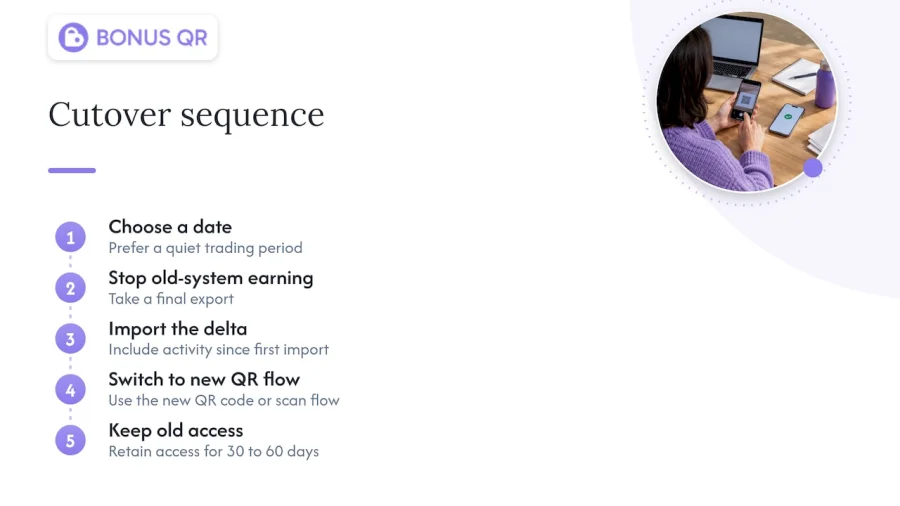
Choose a specific date, ideally in a quiet trading period rather than the week before a holiday. On that day, stop earning on the old system, take a final export, import the delta (any activity since the first import), and switch the counter to the new QR code or scan flow. Keep the old system accessible for 30 to 60 days if your contract allows, so you can resolve any balance disputes against the original record.
Handling consent and privacy
Moving customer data is processing personal data, and it can trigger obligations that did not exist when members first signed up. Two questions matter.
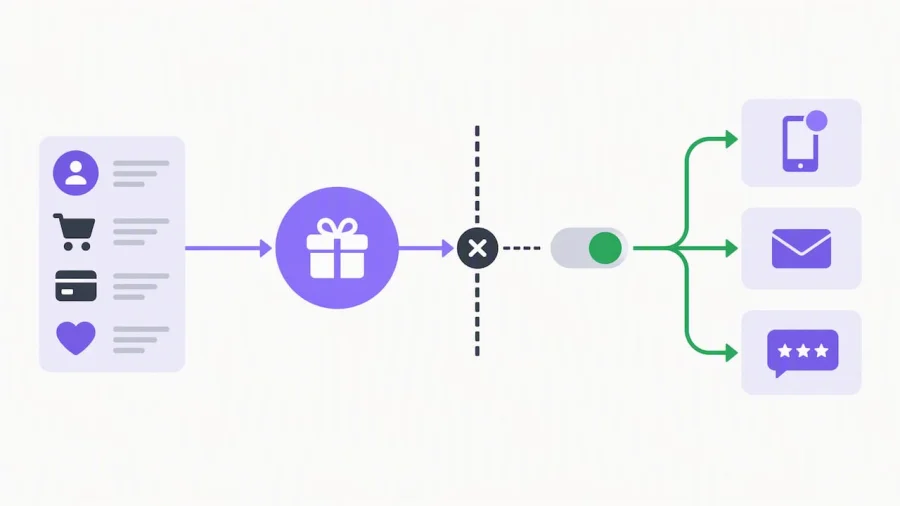
Can the data move? Your privacy policy and program terms need to cover the new platform as a processor, and you need a data processing agreement with the vendor. Review the terms members accepted: if they allowed you to use their details for running the loyalty program, that does not automatically stretch to new kinds of marketing.
Can you message them? Marketing consent is only valid when it is freely given, specific, informed and unambiguous, as Article 4(11) of the GDPR defines it, according to a Nordic law firm’s analysis of a loyalty club enforcement case. If your new platform adds push notifications, automated email journeys or review requests, check whether your existing consent covers them. If it does not, ask members to opt in again at their first login rather than assuming.
A marketing-compliance checklist on loyalty merges makes the same point from a project angle: map first, migrate second, and verify that existing consents remain valid for the new platform’s purposes. Its warning about regulatory fines refers to European enforcement actions, so apply it if you have members in the EU or UK. In the United States, rules vary by state and by channel (for example, text messaging has its own consent requirements), so have a lawyer review your terms and your SMS practices before you move phone numbers into a platform that sends texts.
Practical safeguards that cost little:
- Export only the fields you need. Do not carry over data you never use.
- Store the export in an encrypted location and delete local copies after import.
- Record the consent date and source for every member you import.
- Give members an easy way to see, correct or delete their data.
Communicating the change to members
Members should hear about a migration before they notice it. A short, three-touch plan works well for small businesses:
- Two to three weeks before: announce at the counter, on receipts, on social media and by email if you have consent. Say what is changing, what stays the same and the date.
- At cutover: tell members how to access the new program, such as scanning a QR code or adding the card to Apple or Google Wallet. Staff should be ready to help in person.
- One week after: send a confirmation showing their balance, plus a small welcome incentive.
Four lines should always appear in the message: your balance is safe, here is how to check it, here is the date, and here is who to ask if something looks wrong. A migration is also a legitimate reason to send a thank-you bonus. A modest extra stamp or double points for the first visit on the new system turns an administrative change into a reason to come back.
Studies of program changes find that how members perceive the change affects their expectations and loyalty, as shown in one Swedish university thesis on program redesign. That is one student paper, not a rule of nature, but it matches common sense: surprise is the enemy.
How long a migration takes
The answer depends on scale. Industry case material describes enterprise loyalty integration projects running from 6 to 18 months, depending on the number of integrations and the redesign involved, with standardized data imports on SaaS platforms taking around 10 to 15 business days. A single-location business with no POS integration sits at the very short end of that range.
A realistic small-business timeline looks like this:
| Stage | Typical effort |
|---|---|
| Audit and decisions | 2 to 3 days |
| Cleaning and mapping | 2 to 5 days |
| Platform setup and test import | 2 to 3 days |
| Pilot | 1 to 2 weeks |
| Announcement period | 2 to 3 weeks (runs alongside the pilot) |
| Cutover and follow-up | 1 day plus a monitoring week |
These are planning estimates, not guarantees. A messy export, a missing phone number column or a staff holiday can add days. Adding a POS integration changes the picture completely, which is one reason QR-based programs that need no register connection are quicker to switch to.
Use the migration to improve the program
A move is a rare chance to reset your design. Modern programs are shifting from simple discount engines to tools for understanding customers, and academic work on customer loyalty programs points to metrics such as customer lifetime value and share of wallet, rather than just visit frequency, as the way to judge them. For a small business that means asking different questions after migration: who are my most valuable regulars, who has stopped coming, and which reward actually brings people back?
To get there, plan three upgrades while you are rebuilding anyway:
- Segment from first-party data. Your own purchase and visit data is the most reliable basis for targeting. A guide to building audience segments from first-party data shows how to group customers and act on those groups quickly.
- Automate the routine. Birthday rewards, welcome offers and win-back messages should run without anyone remembering to send them. See how to automate loyalty campaigns for better retention.
- Set a baseline and measure. Record visit frequency, redemption rate and repeat purchase rate before you cut over, so you can compare afterward. For ideas on what to track, see this overview of relationship marketing strategies for customer loyalty.
If you want to rethink the reward structure itself, our overview of loyalty program modules for SMB success explains which mechanics fit which type of business.
Common migration mistakes
- Skipping the audit. You import dead accounts and duplicate balances, then wonder why numbers do not match.
- Lowering the value of existing balances. Even a small devaluation sends your best customers to look at competitors.
- Forgetting expiry dates. Imported points without their original expiry dates either expire immediately or never expire, and both create disputes.
- Migrating on a busy weekend. Staff will be too busy to help members, and mistakes will be noticed in public.
- Ignoring paper card holders. If a share of your regulars still hold physical stamp cards, plan an in-store conversion and give it a deadline.
- No fallback. Cutting off access to the old system on day one removes your only way to verify disputed balances.
- Assuming consent carries over. See above.
Our perspective: keep the program simple enough to move
We built BonusQR for small businesses that do not have an IT department, and the pattern we see is consistent: the more a loyalty program depends on special hardware or a connection to the register, the harder it is to change later. Businesses end up staying with tools they have outgrown because leaving looks like a project.
Our view is that a loyalty program should be portable. Rules should be simple enough to write on one page, customer identity should rest on a phone number or email rather than a proprietary card, and the platform should not require a POS integration to function. When those conditions hold, migration is a matter of days of careful work, not a transformation program.
We also think the first decision in any migration is not technical. It is deciding what you owe your members. Their balances are a promise. Honor them at full value, make the new experience easier than the old one, and the migration becomes a retention moment instead of a risk. Customers who see their points arrive intact and a smoother way to collect them tend to read the change as a sign that you care about the relationship.
Finally, measure. A program that moves data but does not track repeat visits, redemptions and segment behavior is a stamp card with a better logo. The point of a platform is that the system handles rewards distribution, notifications and insights while you run the business.
— Michal Palus
Moving to BonusQR
BonusQR is a QR-based digital loyalty platform for small businesses, with stamps, points and tiered cashback that work without a POS system. You can start on the Free plan, step up to Basic at €19 per month or Premium at €69 per month, and see what each includes on the BonusQR pricing page. If you want a branded app, white-label setup is €690 one-off with a €69 monthly subscription. For a fully custom build, custom app development starts from €1500 one-off. To see how members join and collect, read our digital loyalty card guide.
FAQ
Will my customers lose their points if I switch loyalty platforms?
Not if you plan for it. Export balances, status and reward expiry dates, import them to the new system, and reconcile totals before you cut over. Keep the old system readable for a short overlap so you can settle any disputed balance against the original record.
How do I move paper stamp cards to a digital program?
Set a conversion period at the counter. When a member brings a card, count the stamps, load the same number into their digital card and retire the paper one. Announce an end date for paper cards so the process does not drag on indefinitely.
Do I need new consent from members when I change platforms?
Possibly. If the new platform processes data or sends messages in ways your existing consent did not cover, such as push notifications or automated email journeys, ask members to opt in again. Rules differ by country and U.S. state, so have a lawyer review your terms, especially if you send text messages or have EU customers.
How long does it take to migrate a loyalty program?
Large enterprise projects with many integrations can run for many months, but a small business without POS integration can often complete the work in a few weeks, including a pilot and an announcement period. Budget more time if your data is messy or if you are redesigning the rewards at the same time.
Can I change the rewards while I migrate?
Yes, and it is often the best time to do it, but protect what members have already earned. Change rules going forward, convert old balances at equal or better value, and explain the change plainly before it takes effect.


