Push notifications win for urgent, time-sensitive messages, while email marketing wins for longer-form content that builds relationships over time. Neither channel beats the other outright because they solve different problems. The strongest loyalty and engagement programmes use both together, sending a quick push for immediacy and a follow-up email for depth and context.
TL;DR:
- Cap push at two messages per customer per day, and lead with the deadline or benefit; repeated alerts can prompt customers to turn notifications off.
- Send newsletters weekly or fortnightly, reserve promotional emails for specific triggers, and give each message one clear call to action.
- For cart abandonment, send an immediate push, then follow with email within a day if the customer has not acted.
- Compare conversion and revenue per message with unsubscribe rates and notification permissions withdrawn, and tag messages across campaigns using both channels to track assisted conversions.
Push vs email: a quick side-by-side comparison
Before you commit resources to one channel, it helps to see how they stack up across the dimensions that matter most to small business owners.
- Best for: push suits flash sales and same-day reminders; email suits newsletters, loyalty updates and detailed offers.
- Timing and immediacy: push arrives instantly on a locked screen; email sits in an inbox and may be read hours later.
- Typical engagement: push tends to get noticed fast but read briefly; email supports longer reading sessions and repeat clicks.
- Creative needs: push requires tight, short copy; email allows images, layout and multiple calls to action.
- Opt-in friction: push asks for a device permission; email asks for an address, which many customers already share at checkout.
- Cost and effort: push campaigns are quick to send with minimal design work; email campaigns need more creative and copywriting time.
A flash sale ending in two hours calls for push. A monthly round-up of loyalty rewards and new offers calls for email. Mixing the two by channel strength, rather than habit, is where most programmes leave engagement on the table.
Email marketing: strengths, limits and how to make it work
Email remains the channel for depth. It supports long-form messaging, detailed segmentation and lifecycle flows that nurture a customer from first visit to repeat buyer, and you keep more control over deliverability and formatting than any other owned channel.
The limitations are real too. Email moves slower than push, competes against a crowded inbox, and depends heavily on strong subject lines and clean sending practices to avoid the spam folder.
To get the most from email:
- Send newsletters on a predictable cadence, such as weekly or fortnightly, so customers expect them.
- Reserve promotional campaigns for specific triggers, like a seasonal offer or loyalty milestone, rather than sending them on the same schedule as your newsletter.
- Test subject lines on small segments before sending to your full list.
- Clean your list regularly to remove inactive addresses and protect your sender reputation.
- Keep every email built around one clear call to action rather than several competing ones.
Pro Tip: Put your main offer in the first two lines of the email body, since many readers decide whether to keep reading before they scroll.
Push notifications: when they work and how to write them well
Push notifications exist for immediacy. They land directly on a customer’s lock screen, which makes them well suited to transactional alerts, same-day promotions and anything genuinely time-sensitive, like a reward about to expire.
That visibility comes with risk. Overusing push drives opt-outs quickly, message length is tightly limited, and both Apple and Google control the permission step, so a poor first impression can cost you the channel entirely for that customer.
Write pushes that respect the format:
- Keep copy to a single, clear sentence with no filler.
- Lead with the benefit or deadline, not your brand name.
- Include one obvious action, such as “Tap to redeem” rather than a vague prompt.
- Limit sends to avoid fatigue, generally no more than two push messages per user per day to keep opt-out risk low.
- Test send times across a small segment before rolling a campaign out fully.
Pro Tip: Send your first push for any time-sensitive offer, then follow with a single email summary rather than a second push, since repeated pushes raise opt-out risk faster than they raise conversions.
Choosing, sequencing or combining channels by goal
The right channel depends on what you are trying to achieve, not which one feels easier to send.
- For acquisition and awareness, lead with email, since it carries more detail about who you are and what you offer.
- For retention and loyalty updates, alternate between a short push nudge and a periodic email recap of points or rewards.
- For transactional or urgent messages, such as an expiring reward, send push first.
- For deep content, like a seasonal campaign or new programme launch, use email as the primary vehicle.
- For cart abandonment, send an immediate push reminder, then follow with a detailed email if no action is taken within a day.
- For onboarding, use push nudges to prompt first actions, then move to email for programme education once the customer is engaged.
Escalate from push to email when a message needs more explanation than a few words can carry; escalate from email to push when a deadline is approaching and the message has gone unopened.
Measuring push and email fairly
Comparing channels only works if you track the right numbers for each. Push and email share some KPIs but differ in what matters most.
- Open or view rate: tells you whether the message was seen at all.
- Click-through rate: shows whether the content or offer was compelling enough to act on.
- Conversion rate: the number that ties the message to actual revenue or redemption.
- Unsubscribe or opt-out rate: an early warning sign of message fatigue on either channel.
- Revenue per message: useful for comparing cost-effectiveness between a push blast and an email campaign.
Monitoring unsubscribe and opt-out rates alongside conversion per message is essential to catch fatigue early and judge ROI across channels, since a channel that drives short-term clicks but steady opt-outs is losing long-term value. For multi-channel flows, tag each message so you can see assisted conversions rather than crediting only the last channel touched before purchase.
Implementation checklist: opt-in, segmentation and cadence
Getting the mechanics right protects both channels from burning out your list.
- Ask for permission with a clear value exchange, such as “Get notified the moment your reward is ready” rather than a generic sign-up prompt.
- Segment by lifecycle stage, separating new customers from loyal repeat buyers.
- Segment by behaviour, such as recent purchases or dormant accounts, so messages stay relevant.
- Set cadence rules in advance: a maximum send frequency for push and a fixed schedule for email newsletters.
- Throttle promotional sends during busy periods to avoid overlapping campaigns hitting the same customer.
- Keep privacy basics in place, including an easy opt-out and transparent data use, since opt-in quality and message relevance are consistently linked to lower long-term opt-out rates across both push and email.
Pro Tip: Review your segmentation quarterly, since customer behaviour shifts and a segment built six months ago may no longer match how people actually use your loyalty programme.
How a loyalty platform like BonusQR coordinates both channels
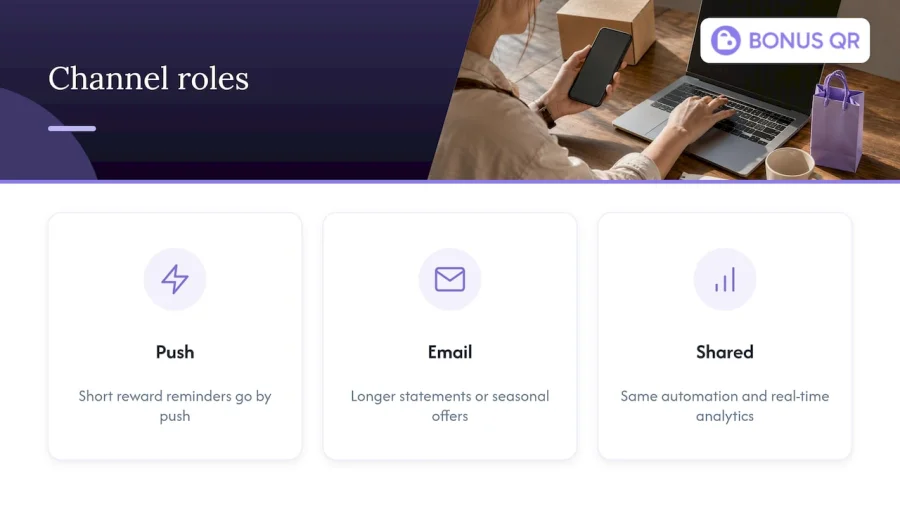
A loyalty platform that handles both channels in one place removes a lot of the manual sequencing work. BonusQR builds push and email notifications directly into its loyalty and engagement features, so short reward reminders go out by push while longer statements or seasonal offers go out by email, both tied to the same automation and real-time analytics. That consolidation makes it easier to sequence a push first, email second flow without juggling separate tools.
A pragmatic rule for choosing your channel mix
In practice, the biggest mistake we see is treating push and email as competitors rather than a sequence. One useful campaign pattern pairs an immediate push for a 24-hour offer with a same-day email explaining the full loyalty benefit behind it. When resources are tight, pick push for anything with a deadline and email for anything you want remembered.
— Michal
Run both channels from one loyalty platform
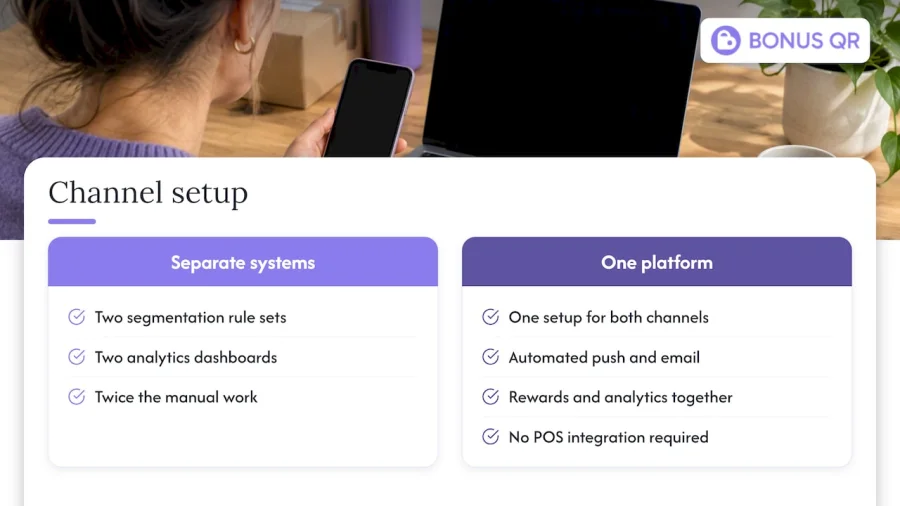
Running push and email as two separate systems usually means two sets of segmentation rules, two analytics dashboards and twice the manual work. We build a loyalty platform so that automated push and email campaigns, loyalty rewards and real-time analytics all live in one setup, with rapid onboarding and no POS integration required.
If you are weighing plans, our Free, Basic and Premium tiers outline which automation and analytics features come at each level, and larger businesses can look at our white-label setup for a branded app with faster time to market. Start by comparing plans on our pricing page to see which tier fits your current send volume.
FAQ
Is email an online marketing platform?
Email itself is a communication channel, not a platform, but it is delivered and managed through online marketing platforms that handle sending, segmentation and analytics. Most businesses use a dedicated email service or a loyalty platform with built-in email features rather than sending manually.
What is the purpose of push notifications?
Push notifications exist to deliver short, time-sensitive messages directly to a customer’s device, such as a reminder, alert or limited-time offer. They work best when the message needs to be seen quickly rather than read in depth.
How do I turn on push notifications for email?
Push notifications and email are separate channels, so email itself does not have a push notification setting. If you want push alerts for new emails, that permission is managed through your device or email app settings rather than through the sender.
Which tool is best for email marketing?
The right tool depends on whether you need standalone email software or a platform that combines email with loyalty and push features. Businesses running a loyalty programme often prefer a combined platform like BonusQR so that email and push campaigns share the same customer data and automation.


