Loyalty Program Without a POS: How to Launch One
Yes, you can run a loyalty program without a POS system. A QR-based platform sits beside your register instead of inside it: customers scan a code, earn stamps, points or cashback on their own phone, and you manage rewards, customer data and promotions from a dashboard. That is the approach we built BonusQR around, and it suits cafes, restaurants, salons, gyms, small shops, hotels and gas stations that have a basic till, a tablet, or no connected system at all.
This guide covers how a POS-independent program works day to day, what to check before you pick a platform, how to design the rewards, what it costs, and a launch plan you can finish in about two weeks.
Key Takeaways
- A loyalty program does not need POS integration. QR-based stamps, points and cashback run on the customer’s phone and your dashboard, so any business can start, whatever register it uses.
- The deciding factors are how customers join (one scan, no forced app download), which reward models you can run, and whether the platform automates notifications and reporting.
- Keep the reward simple at launch: a visible goal reached in a handful of visits beats a clever scheme nobody understands.
- Budget for the program in tiers: BonusQR has a Free plan, Basic at €19 per month and Premium at €69 per month, with branded apps available when you outgrow a shared one.
- Whatever you send to members, email marketing carries legal rules in the US, so build consent and an opt-out into the program from day one.
Why a POS is not a prerequisite
The idea that a loyalty program needs a connected point-of-sale system comes from how the big retail programs were built: the register recognized the customer, calculated points on the basket and stored the balance. For a business with thousands of transactions an hour, that makes sense. For a café with 200 visits a day, a hair salon with 12 appointments, or a gym with a front-desk tablet, it is far more machinery than the job requires.
A loyalty program has to do four things:
- Identify the customer when they visit.
- Record the visit or the spend.
- Show the customer their progress toward a reward.
- Let the customer claim the reward and let you confirm it.
None of these requires the register to be involved. A QR code at the counter, on the table, on the receipt or on a tent card can identify the customer and log the visit. The customer’s phone shows the progress. Your team confirms the reward at the moment it is claimed. Because the program is separate from the till, you can change registers, add a second location or run pop-up events without rebuilding anything.
There is a practical business reason too. Many owners we describe in this guide use a payment terminal that was never meant to store customer records. Waiting to replace it before you start rewarding repeat customers means months of regulars who were never encouraged to come back.
How a QR-based loyalty program works
The customer journey is short, and that matters, because every extra step costs you enrollments.
Joining
The customer scans your QR code with their phone camera. They land on your branded loyalty page, enter minimal details and have a card. With BonusQR the program can also be offered through mobile and web apps and Apple and Google Wallet support, so the card can live where customers already keep their cards and passes.
Earning
Earning depends on the model you choose. Stamps are given per visit or per purchase, points per amount spent, and cashback as a percentage returned as credit. In a QR setup, the visit is confirmed when the customer scans a code or when a staff member approves it, so the reward logic is enforced by the platform and not by a cashier remembering to punch a card.
Redeeming
When the customer reaches the goal, the reward appears in their account. They show it at the counter, your team confirms it, and the balance resets or rolls forward. Coupons, fixed discounts and special occasion rewards work the same way.
Staying in touch
This is where digital beats paper. A paper stamp card in a wallet cannot tell the customer they are one visit away from a free coffee. A digital program can send push or email notifications, welcome new members with an onboarding promo and mark birthdays or other occasions with a reward. The system does this automatically, so you are not running a marketing calendar by hand.
What you can track without a POS
POS integration is often presented as the only route to useful data. In a QR-based program the data comes from the loyalty platform itself, and for most small businesses it answers the questions that actually drive decisions:
- Enrollment: how many customers joined, and from which channel or location.
- Visit frequency: who comes weekly, who has gone quiet.
- Reward activity: how many rewards were earned and redeemed, which tells you what the program costs.
- Campaign response: whether a notification or promotion brought people back.
- Referrals and reviews: who is bringing in new customers, and who is leaving feedback.
BonusQR tracks customer behavior and provides analytics so you can adjust offers and measure results in sales and loyalty. The practical habit is to look at the dashboard weekly for the first two months, then monthly, and to change one thing at a time so you know what caused a change.
What to check in a loyalty app that works without a POS
Whether you choose us or compare several platforms, evaluate the same short list. Each item protects either your customer’s experience or your own time.
| What to check | Why it matters | What good looks like |
|---|---|---|
| Join flow | Each extra step loses sign-ups | One scan, short form, card ready at once |
| Reward models | Your business may need stamps today and points later | Stamps, points, tiered cashback and fixed discounts in one platform |
| Wallet support | Customers forget apps, not wallets | Apple and Google Wallet support |
| Automation | You have no time for manual campaigns | Push and email notifications, onboarding promos, occasion rewards |
| Analytics | You must see what the rewards cost and return | Behavior tracking and reporting in the dashboard |
| Branding | The program should look like your business | Your logo, colors and name on the card and app |
| Growth path | A free-standing app is a different project | Option for a white-label or custom app later |
| Price clarity | Hidden per-message or per-location fees break the budget | Published monthly tiers |
BonusQR covers each row of this table: rapid setup with no POS required, multiple customizable loyalty modules, automated marketing and review tools, referral and review modules, analytics and published prices.
Several established tools exist in this space, among them Smile.io, LoyaltyLion, Stampme and Loopy Loyalty. Many of them are built around an online shop or a particular card format. If you serve people in a physical location, a QR-first platform designed for counters, tables and front desks is the closer fit.
Choosing the reward that fits your business
The platform is the easy part. The reward is what customers respond to. Match the model to how your customers actually buy.
Digital stamp cards
Best for frequent, similar-value visits: coffee, lunch, a car wash, a haircut, a weekly class. The goal is easy to grasp: collect a set number of stamps, receive a reward. Pick a number your regulars can reach in four to six weeks. A card that takes a year to complete feels unreachable and gets ignored.
Points
Best when purchase size varies: restaurants with different check sizes, grocery stores, retail. Customers earn points in proportion to spend, which rewards your bigger baskets. Keep the arithmetic obvious. If the customer needs a calculator, the program is too complicated.
Tiered cashback
Best for businesses with a core of heavy repeat customers: gyms, wellness centers, hotels, gas stations. Cashback rises as the customer moves up tiers, which gives your best customers a reason to concentrate their spending with you.
Fixed discounts, onboarding promos and occasion rewards
These are the accelerators. A welcome offer gets the first scan, a birthday reward brings a lapsed customer back, and a fixed discount on a quiet weekday can shift demand toward the hours you want to fill. BonusQR supports all of these alongside the stamp, points and cashback modules, so you can combine a basic card with a couple of targeted offers.
For more examples by business type, see our customer loyalty program examples for restaurants and the list of restaurant rewards program ideas. Retailers will find a comparison of reward systems for small retail stores useful.
Worked example: a café
A café sells a $4.50 latte. A ten-stamp card with the tenth drink free gives back about 10% of what a loyal customer spends on drinks. If a customer who used to visit twice a week now visits three times to reach the reward sooner, the extra visits and the food and add-ons that come with them can cover the cost of the free drink. The numbers are illustrative: replace them with your own average ticket, margin and visit rate before you commit, and check them against the reward activity in your dashboard after a month.
Restaurants: QR loyalty on the table
Restaurants have an advantage with QR programs, because guests are already used to scanning a code at the table. Put your loyalty QR on the table tent, the check presenter and the takeout bag. A guest who scans while waiting for the check is enrolled before leaving, which is the moment they are most likely to say yes.
A few things work well in a restaurant setting:
- A welcome reward on the next visit, so the first scan pays off quickly.
- Points for spend, since checks vary widely between a lunch special and a family dinner.
- A review prompt after a visit, using a review module, to turn good experiences into public ratings.
- A referral reward for guests who bring a friend.
If you want a wider view, our guides to restaurant loyalty program software and restaurant customer retention strategies go further. If you want to see what repeat guests mean for your numbers, the step-by-step logic in this guide to fostering customer loyalty helps you tie the program to business results.
What a POS-independent program costs
The cost has three parts: the platform, the rewards you give away and your staff’s time.
On the platform, BonusQR publishes its tiers on the pricing page:
| Plan | Price | Best for |
|---|---|---|
| Free | No published price | Trying the QR approach with your first customers |
| Basic | €19 per month | A single-location business running its core program |
| Premium | €69 per month | A business that wants the fuller feature set for automation and growth |
If you want the program to live in your own branded app, there are two further routes. White-label is a branded app with a one-off setup fee of €690 and a monthly subscription of €69. A custom app starts from €1,500 one-off, with monthly maintenance from €69. Both include the option of e-shop and booking widget features.
On rewards, the real cost is the margin you give up on redeemed rewards. Set a ceiling before launch, for example no more than 5% to 10% of the revenue from enrolled members, and compare it to the reward activity report each month.
On time, the point of automation is to keep your involvement small. Once the card, the rewards and the welcome promotion are configured, the platform handles distribution of rewards and sends notifications on its own.
A 14-day launch plan
Days 1 to 3: decide the goal. Choose one number to move: visits per customer per month, average ticket or reviews collected. Write down today’s figure so you can compare later.
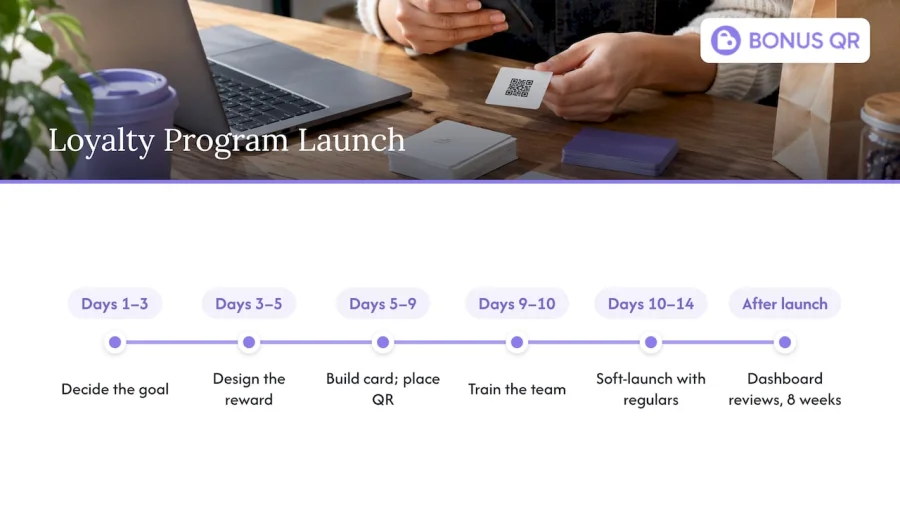
Days 3 to 5: design the reward. Pick one model, stamps for visit-led businesses or points for spend-led ones. Set the threshold so a regular reaches it in a month or so. Decide the welcome offer.
Days 5 to 7: build and brand the card. Add your logo and colors, set the reward rules and create the onboarding promotion.
Days 7 to 9: place the QR code. Counter, tables, receipts, takeout bags, window sticker, front desk. Test each one yourself with a phone before you print.
Days 9 to 10: train your team. Staff need one sentence to invite a customer and one routine to confirm a reward. Brief everyone, including part-timers.
Days 10 to 14: soft-launch with regulars. Invite your most frequent customers first. Their feedback will show you where the join flow or the wording needs a tweak before you promote it widely.
After launch: review the dashboard weekly for eight weeks. If enrollment is slow, improve the invitation at the counter. If redemption is rare, lower the threshold. If it is too fast, raise it.
Email and messaging: the rules to build in
Notifications are one of the main reasons to go digital, and in the US email has specific legal requirements. The FTC’s CAN-SPAM compliance guide explains that the law applies to all commercial email, not only bulk mail. Its main requirements include honest header and subject lines, a valid physical postal address in the message, and a clear way for recipients to opt out. Build these into your templates and your sign-up wording from the start, and honor opt-outs promptly. Text messaging carries its own consent rules, so if you plan to add it, check them with a qualified attorney before you send.
When your program grows
A QR-based program stands on its own, and it scales with you. As you add locations, you can run the same rewards across them. When you want your own icon on customers’ home screens, a white-label app takes the same loyalty engine and puts your brand on it. Larger or more specific needs can be handled with custom app development. Nothing about starting without a POS locks you out of those steps.
Our view: start with the customer, not the hardware
We built BonusQR for owners who run small businesses and do not have a spare week to integrate systems. Our position is simple: the customer’s phone is the loyalty card, the QR code is the connection, and the platform does the administration.
That is why we focus on rapid setup with no POS required, on modules you can customize to your business, and on automation of the work that usually gets dropped: rewards distribution, promotional notifications, review requests and reporting.
The most common mistake we would help you avoid is waiting. A customer who visits you ten times this quarter and is never invited to a program is a customer you may as well have been rewarding. Launch simply, watch the data, and add complexity when the numbers justify it.
Michal Palus
Ready to launch
If you want to see the program on your own counter this month, start on the BonusQR Free plan and upgrade to Basic or Premium when you want more automation. If your plan is a branded app from the start, the white-label option is the faster route. Our comparison of restaurant rewards systems can help you set the program next to the alternatives.
FAQ
Can I run a loyalty program if I have no POS at all?
Yes. A QR-based platform identifies customers through their phones and records visits through a scan, so no register connection is involved. You need a QR code in a visible place and a team that knows how to confirm a reward.
Is there a free loyalty app for a small business?
BonusQR has a Free plan, which lets you start a QR-based program without a monthly fee. Paid tiers, Basic at €19 per month and Premium at €69 per month, add more of the platform’s features as your program grows.
Do customers have to download an app?
Not necessarily. Customers join by scanning a QR code, and BonusQR supports mobile and web apps as well as Apple and Google Wallet, so a customer can keep the card where they prefer.
What can I measure without POS data?
You can track enrollments, visit frequency, reward earning and redemption, campaign response, referrals and reviews. BonusQR’s analytics are designed to show how customer behavior changes after you adjust your offers.
What reward should I start with?
Use a stamp card if customers buy similar items often, and points if ticket sizes vary. Set the goal so a regular customer can reach it within about a month, then adjust based on what the dashboard shows.


