Google Wallet Loyalty Passes: How to Launch One in 2026
A Google Wallet loyalty pass is a digital card that sits in a customer’s phone wallet and shows their points, stamps or tier. For a small business there are three realistic ways to offer one: build it yourself on Google’s Wallet API, use a dedicated pass platform, or run a loyalty platform that already handles the passes for you, like BonusQR. This guide compares the three on setup effort, cost, features and fit, then walks through what customers see and how a restaurant, cafe or shop can use the pass to bring people back.
Key Takeaways
- A Google Wallet loyalty pass is built from a class (the template) and an object (one customer’s card), signed with credentials from Google’s console. Doing that directly takes developer time.
- The customer side is simple: tap “Add to Google Wallet” from a link, a QR code or an app, then confirm. No separate app download is needed for the pass itself.
- BonusQR plans start free, with Basic at 19 EUR per month and Premium at 69 EUR per month, and the platform works without a POS integration.
- A pass is only as good as the program behind it: clear rewards, easy sign-up and updates that give people a reason to open the card.
- Android version and API limits are real planning factors, so check them before you promise a rollout date.
What a Google Wallet loyalty pass actually is
The pass is a card in the Google Wallet app that replaces a plastic or paper card. It can carry a member name, a points balance, a second balance (for example, a tier or reward credit) and custom lines such as visit count or member-since date. According to Google’s pass customization guide, a loyalty pass can show an account name, loyaltyPoints and secondaryLoyaltyPoints balances, and custom text modules, with rows holding one, two or three data items.
The same guide advises checking the predefined fields before inventing a custom one. Standard fields can unlock features across Google surfaces, such as proactive notifications, updates on the Pixel home screen and discoverability in Search. In practice that means a business should resist the urge to cram everything into free-text lines. Use the built-in points and tier fields wherever they fit.
What the pass can represent in a real program:
- Points: a running balance that grows with each purchase.
- Stamps: a visit count shown as text or a barcode-linked card, such as “7 of 10 coffees”.
- Tiers: a status label (Silver, Gold) tied to spend or visits.
- Cashback or credit: a balance the customer can redeem on a later visit.
- A scannable code: a barcode or QR code that staff scan to identify the member.
The pass itself is a container. The rewards logic (how many points per dollar, when a stamp card completes, what the tier thresholds are) lives in whatever system issues and updates it. That is the main thing to understand when comparing options.
How customers add a loyalty card to Google Wallet
Customers have more than one route in, and the easier you make it, the more passes get saved. Google Wallet Help describes the in-app path: open Google Wallet, tap “Loyalty card,” find the merchant, then scan an existing card, sign up for a new account or find an existing account. Cards can also be added from a partner issuer’s website or app, or imported automatically with Gmail.
The path most businesses rely on is the “Add to Google Wallet” button. Per Google’s guide to managing items, the customer taps that button on a site or app, reads and accepts the terms, chooses a device and taps “View in Wallet.” Loyalty and gift cards can also be added through the Google Wallet website in supported countries or regions.
For a counter-service business, the practical version looks like this:
- A QR code on the receipt, table card or counter sign.
- The customer scans it with their phone camera.
- A short sign-up page asks for a name, and sometimes an email or phone number.
- The customer taps “Add to Google Wallet” and the card is saved.
- The first stamp or points award happens at the same visit.
The whole thing should take well under a minute. Every extra field or screen costs you sign-ups, so keep the first-visit form short and ask for more later through the program.
Three ways to offer Google Wallet loyalty passes
Before choosing, be clear about what you need to own. Some businesses want only a card in the wallet. Others want the card plus rewards logic, customer insights, notifications and a reporting view. The cost and effort difference between the routes comes from that gap.
Option 1: Build directly on the Google Wallet API
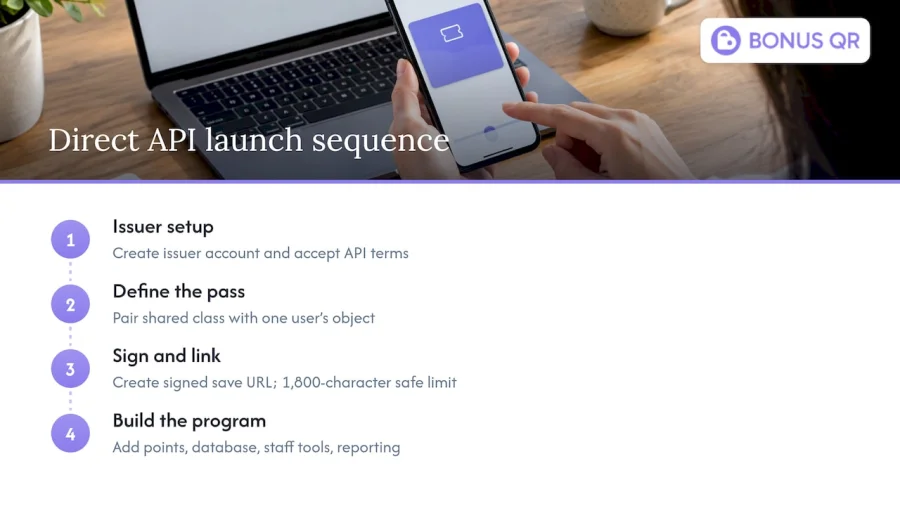
The most flexible path is to issue passes yourself. Google’s documentation lays out the requirements. A business signs up for a Google Wallet API issuer account in the Google Pay & Wallet Console, supplies its public business name, agrees to the Additional Terms of Service and privacy policy, clicks “Create a pass” and then accepts the API terms, as set out in the issuer onboarding guide.
After that comes engineering. According to the add-to-wallet flow documentation, every pass must reference a pass class (a JSON template of shared properties) and a pass object (a unique instance for one user), both encoded in a JSON Web Token signed with credentials from the console. The save link is a generated URL that can be placed in a website, email or SMS, and Google’s web issuing guide gives 1,800 characters as the safe length of an encoded token, beyond which browsers may truncate the link and the save may fail.
The API itself is capable. The API FAQ says it covers loyalty cards, offers, boarding passes, event tickets, transit passes and a generic type, supports grouping, partial updates and batch creation, and provides Smart Tap for NFC interactions. It also states a rate limit of 20 requests per second and recommends a 10-second timeout.
Who it suits: a business with in-house developers or a retained agency that wants full control and is happy to build the rest of the program (points logic, database, staff scanning, reporting) around the pass.
What to budget for: developer time for the pass, plus the loyalty engine, customer database, staff interface and a way to push balance updates. The pass is the smallest part of the project.
Option 2: A dedicated wallet-pass platform
Several software tools exist purely to design and distribute Apple Wallet and Google Wallet passes. PassKit, for instance, publishes step-by-step material on making loyalty cards for both wallets. These tools take care of the JWT and issuer plumbing and give you a designer and a distribution link.
Who it suits: businesses that already have a CRM, e-commerce platform or point-of-sale system handling rewards, and only need a way to put cards into wallets.
What to check before you commit: whether the tool calculates points and stamps itself or expects another system to feed it, how staff will scan and redeem, and how pricing scales as your member count grows. Ask each vendor for its current price list, because plans differ by pass volume and features.
Option 3: A loyalty platform with wallet passes built in
This is where BonusQR sits. It is a QR-based digital loyalty platform designed for small businesses. Customers earn points, stamps or cashback, and the business does not need an additional POS system to run it. Beyond the pass, the platform automates reward distribution, tracks customer behavior and sends promotional notifications, so the rewards logic, the customer data and the card live in one place.
The modules available include customizable digital stamp cards, points systems, tiered cashback, fixed discounts, onboarding promos, special occasion rewards, coupon and reward management, referral and review modules, analytics, and push and email notifications. Apple and Google Wallet support is part of the offering, along with brand and app customization and mobile and web app integration.
Who it suits: owners and managers of restaurants, cafes, retail shops, gyms, wellness centers, hotels, grocery stores, gas stations and service businesses who want a working program quickly and do not want to manage code, tokens or databases.
Side-by-side comparison
| Criteria | Build on Google Wallet API | Dedicated pass platform | BonusQR |
|---|---|---|---|
| Setup effort | Highest: issuer account, JWT signing, custom code | Moderate: design and connect to your rewards system | Low: configure modules and brand, no POS required |
| Rewards logic (points, stamps, tiers) | You build it | Often supplied by another system you already run | Included: stamps, points, tiered cashback, discounts |
| Customer data and analytics | You build it | Depends on the tool and your CRM | Included analytics and behavior tracking |
| Notifications and promotions | You build it on top of the API | Varies by tool | Push and email notifications and automated marketing |
| Developer needed | Yes | Sometimes | No |
| Cost structure | Developer time plus hosting | Subscription, vendor-specific | Free plan, Basic 19 EUR per month, Premium 69 EUR per month |
| Best for | Teams with engineering capacity | Businesses with an existing rewards back end | Small and mid-sized businesses wanting a complete program |
The honest summary: if you want the card and the whole program without a build project, a platform with the loyalty engine included is the shortest path to your first customer signing up.
What BonusQR costs
BonusQR is sold as a freemium and tiered subscription. The published plans, read from the pricing page:
| Plan | Price | Good to know |
|---|---|---|
| Free | No published price | A way to get started with the platform |
| Basic | 19 EUR per month | Entry paid tier |
| Premium | 69 EUR per month | Premium loyalty features |
For businesses that want their own branded app, there are two further routes:
- White-label app: a one-off setup fee of 690 EUR plus a monthly subscription of 69 EUR per month. Details are on the white-label page.
- Custom app development: from 1500 EUR one-off, with monthly maintenance from 69 EUR per month. Details are on the custom app page. Custom builds can include an e-shop and a booking widget.
Prices are listed in euros as published by BonusQR. Check the pages above for the current plan contents before you decide.
Designing a pass that people keep
Saving the pass is step one. Keeping it, and opening it, is where retention comes from. A few design choices matter more than any feature list.
Make the reward obvious
A card that says “Loyalty Member” tells people nothing. A card that shows “6 of 8 stamps” or “240 points, 60 to your next reward” gives a reason to come back. Use the predefined points fields where they fit, as Google recommends, and use custom lines for things like visit count or member-since date.
Start the card with a reward
An onboarding promo, such as a free item or bonus points after the first scan, makes the first save feel worthwhile. BonusQR includes onboarding promos and special occasion rewards (birthdays, anniversaries) as modules, so you can set these up without extra tools.
Keep the sign-up short
Name first, email or phone second, everything else later. The aim is for a customer to be holding a saved card before they have finished their coffee.
Use updates sparingly and with purpose
Google Wallet supports field update notifications, which fire when a particular field changes, and Nearby Passes notifications for users near a point of interest, as described on the Google Developers Blog. The post gives examples such as a points balance crossing a threshold or a tier upgrade. The sensible takeaway for a small business: notify when something good has happened (a reward is unlocked, a tier is reached), not on a fixed schedule.
How restaurants and cafes can use wallet passes
Food and drink businesses are a natural fit because visits are frequent and the transaction is quick. A few patterns work well.
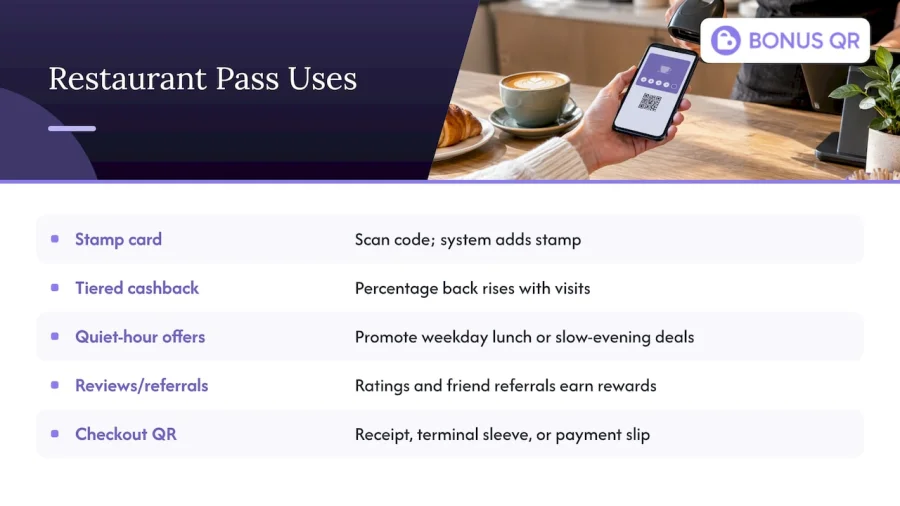
The stamp card replacement. A “buy nine, get the tenth free” card becomes a digital card that cannot be lost in a coat pocket. The staff scan the customer’s code, the system adds the stamp and the customer sees the update.
Tiered cashback for regulars. Offer a percentage back that rises with visits. Regulars climb tiers, and the pass shows their status every time they open the wallet.
Quiet-hour offers. Use notifications to promote a weekday lunch special or a slow-evening discount to people who already have your card.
Review and referral prompts. A review module asks happy customers to leave a rating after a visit, and a referral module rewards them for bringing a friend. BonusQR includes both, which keeps these steps inside the same program as the pass.
Guest check-out flow. If a table or counter payment is the last step of the visit, put the QR code where the guest is already looking: on the receipt, on the card terminal sleeve or on the payment slip. Our partner reading on card payments in restaurants covers how terminals fit into that final moment of the visit.
Planning around device and technical limits
Google Wallet is an Android-centered product, and Google’s release notes state that it required Android 9 or higher on phones and Wear OS 2.x or higher on watches as of June 10, 2024, and that Android 5 and 6 stopped working by May 21, 2023. Most customers will be on supported versions, but it is worth knowing the cutoff when you write your sign-up instructions.
Two more planning notes:
- Offer both wallets. Your customers use different phones. A program that also supports Apple Wallet covers iPhone users with the same QR code. We cover that side in our Apple Wallet engagement guide.
- Mind the scale limits if you build yourself. The API’s 20 requests per second limit is generous for a single cafe, but a large promotion that triggers thousands of updates at once should be spread out. A managed platform handles that scheduling for you.
For a fuller walk-through of the business side, see our guides on the Google Wallet loyalty card for mobile retention and the digital loyalty card for Google Wallet.
Choosing the right option for your business
Use these questions to decide.
- Do you have developers on hand? If yes and you want total control, the direct API is viable. If no, choose a platform.
- Do you already run a rewards back end? If a CRM or e-commerce system already calculates rewards, a pass platform may be all you need. If not, pick a platform that includes the loyalty engine.
- How fast do you need to launch? A platform with no POS requirement can be configured and tested in a day or two of focused work, while a build takes planning, development and testing. We cannot promise a fixed timeline for your setup, so plan a pilot at one location first.
- Do you want your own app? White-label or custom development is for larger businesses that want a branded app icon on the home screen, with the wallet pass as one touchpoint.
- What is your budget model? A monthly subscription is predictable. A custom build is a one-off project with ongoing maintenance.
For most independent restaurants, cafes, salons, gyms and shops, option 3 matches the resources they have: little time, no developer and a need to see results in sales.
Our perspective
Small businesses rarely lose customers because the coffee was bad. They lose them because the customer simply forgot to come back. Repeat visits are the lifeblood of any small business, and a loyalty program is the cheapest reminder you can build.
We designed BonusQR around one idea: the owner should spend time on the business, not on loyalty plumbing. That is why a customer can join with a QR scan, why no POS integration is required, and why rewards, customer insights and notifications run automatically in the background.
A wallet pass is the best place for that program to live, because the card is already in the customer’s pocket and one tap away. But the pass is a surface. What makes it work is the engine behind it: the stamps, points and tiers, the onboarding promo that makes the first scan worthwhile, the analytics that show which offers bring people back.
If you want a complete program, start on the free plan, move to Basic or Premium as your member base grows, and consider a white-label app when your brand is ready for its own icon. That is the path we built for small and growing businesses.
Michal Palus
Launch Google Wallet loyalty with BonusQR
If you want a stamp card, points program or tiered cashback on your customers’ phones without a developer or a POS integration, BonusQR gives you the program and the wallet support in one platform. Compare the Free, Basic and Premium plans on the BonusQR pricing page, or look at the white-label option if you want your own branded app.
A simple launch plan for your first 30 days
- Week 1: decide the reward. Pick one simple mechanic, such as a stamp card or a points rate. A reward the customer can reach in four to six visits is easier to understand than a distant one.
- Week 1: brand the card. Add your logo, colors and a short program name. Keep wording plain.
- Week 2: place the QR code. Put it on the counter, receipts, table cards, takeaway bags and your window. Train staff to say one sentence at the till: scan this to start collecting rewards.
- Week 3: add an onboarding promo. Give new members a small bonus on the first scan so there is an immediate payoff.
- Week 4: read the numbers. Look at sign-ups, repeat visits and redemptions in the analytics. Adjust the reward threshold and the notification timing based on what you see.
The goal in the first month is not a perfect program. It is a working one that staff understand and customers can join in seconds.
FAQ
How do I add a loyalty card to Google Wallet?
Open the Google Wallet app, tap “Loyalty card,” find the merchant, and then scan your existing card, sign up or find your account. You can also tap an “Add to Google Wallet” button on a merchant’s website or app, accept the terms and tap “View in Wallet.” Google describes both routes in its Wallet Help pages.
What can a Google Wallet loyalty pass show?
A pass can show the member’s name, a points balance, a second balance such as a tier or credit, and custom lines like visit count or member-since date. Rows can hold one, two or three data items, according to Google’s customization guide.
Do I need a developer to create Google Wallet loyalty passes?
If you use the Google Wallet API directly, yes, because passes require a class, an object and a signed token. If you use a loyalty platform such as BonusQR, the platform handles that work and you configure the program in a dashboard. This is the main reason small businesses choose a platform.
How much does BonusQR cost?
BonusQR has a Free plan, Basic at 19 EUR per month and Premium at 69 EUR per month. A white-label app costs 690 EUR one-off plus 69 EUR per month, and custom app development starts from 1500 EUR one-off with maintenance from 69 EUR per month. Current details are on the pricing page.
Sources
- Customize Google Wallet passes (Google for Developers)
- Loyalty cards and gift cards (Google Wallet Help)
- Manage items in Google Wallet (Google Wallet Help)
- Setting up a Google Wallet API issuer account
- Add to Google Wallet flow (Google for Developers)
- Issuing passes for web, email, SMS (Google for Developers)
- Google Wallet API FAQ
- Explore the latest updates on Google Wallet (Google Developers Blog)
- Wallet release notes (Google Pay and Wallet)


