Global email volumes reached 381 billion messages in 2023, a 14% year-on-year increase, according to the DMA's Email Benchmarking Report 2024. A café, salon or shop doesn't need to add more noise. It needs to send something customers can use.
Good email marketing for small business starts with a smaller, permission-based list connected to visits, rewards and preferences. The owner's job isn't to collect the most addresses. It's to bring willing customers back at a sensible cost, then stop mailing people who never respond.
What Good Small Business Email Looks Like
The DMA's 2025 Email Benchmarking Report, based on anonymised data from seven leading UK email service providers, recorded 98% overall delivery, 99.2% business-to-consumer delivery, a 35.9% average open rate and a 2.3% unique click rate for 2024. Those figures provide useful reference points before a business writes its first offer. But none proves that a customer bought a coffee, booked a treatment or returned to the gym.
Bookings, redemptions and profitable return visits pay the bills. Delivery makes those outcomes possible. Clicks show interest. Opens deserve much less attention because Apple Mail Privacy Protection can inflate or distort them.
A benchmark card for each send
UK email benchmarks for a small consumer business
| Measure | 2024 UK figure | What it means | Owner action |
|---|---|---|---|
| Overall delivery | 98% | Nearly all properly managed messages were delivered, though delivery doesn't guarantee inbox placement | Investigate anything under 98% before the next send |
| Business-to-consumer delivery | 99.2% | The relevant comparison for individual customers | Use this as an ambition for a permission-based, cleaned list, not a guarantee |
| Average open rate | 35.9% | About one in three messages may register as opened | Treat as a weak signal because Apple Mail can inflate it |
| Unique click rate | 2.3% | About two clicks per 100 delivered emails | Use as the first engagement check, not the final one |
| Outcome that matters | Visit, booking or redemption | Opens don't prove a customer came back | Track an in-store or online action on every campaign |
The owner should save this table beside the campaign report. Industry averages aren't promises, and a small list can produce uneven results. Their value is diagnostic: weak delivery needs a different response from strong clicks with no purchases.
Set targets before designing the email
A practical starting scorecard has three targets:
- Delivery: Meet or exceed the overall delivery benchmark before increasing sending volume.
- Engagement: Aim towards the unique click benchmark, while checking whether the action requires a click.
- Commercial outcome: Set a minimum goal of a tracked visit or redemption from each campaign, then raise that goal as campaign costs become clear.
That last target is a starting discipline, not a profitability test. A single redemption won't justify an expensive campaign, but an untracked campaign leaves the owner guessing.
Practical rule: When delivery is weak, clean the list before redesigning the template.
For a counter business, the simplest measurement starts with a campaign-specific reward. Staff redeem it when the customer returns. A booking business can use a tracked booking link, while a retailer can connect a coupon to the sale. The campaign should have a measurable destination before it has a colour scheme.
How to Build a Lawful Customer List
A coffee purchase isn't automatic permission to send marketing. Neither is joining a loyalty scheme. The Information Commissioner's Office guidance on electronic mail marketing says unsolicited marketing email to individual subscribers normally requires consent unless every condition of the soft opt-in applies.
The collection process should work consistently at the counter, on a QR join screen and on a website. Staff shouldn't have to invent an explanation while a queue forms.
Put permission into the signup process
- Leave the email checkbox unticked and optional. The customer must take a positive action. Silence and inactivity aren't consent.
- Name the business and the channel. The wording must explain that the business will send marketing emails, not merely account updates.
- Separate marketing from everything else. Keep the request apart from general terms, Wi-Fi access and loyalty membership. Refusing marketing shouldn't disadvantage the customer.
- Store the consent record. Record the timestamp, exact wording, collection source and subscriber identity. A checkbox without evidence is a poor operational record.
- Include a working unsubscribe mechanism. Every marketing message needs an easy exit.
- Suppress withdrawals immediately. An unsubscribe must stop queued promotions and automated marketing, not just the next newsletter.
A suitable checkbox might describe optional email offers from the named café and explain that unsubscribing is available at any time. The surrounding form should also make the privacy information easy to find.
Treat the soft opt-in as a test, not a shortcut
The soft opt-in requires all these conditions:
- Collection during a sale or negotiation: The business obtained the contact details in that context.
- Similar products or services: The later marketing concerns the business's own similar offerings.
- An opt-out at both stages: The customer received a clear opportunity to refuse at collection and in every subsequent email.
For a new QR signup, explicit consent is usually easier for staff to explain and the owner to document.
Reject purchased lists and vague partner lists. The ICO's guidance on electronic and telephone marketing requires purchased-list consent to cover the business using it and the intended communication type. Permission for text messages doesn't automatically cover email.
Ask for a simple preference alongside consent: weekly offers, or birthday and seasonal notes only. Keep push permission separate. Place the QR where customers already wait, such as a counter sign or table stand, and explain the loyalty benefit without making the email tick compulsory.
For owners budgeting for outside help, Carlos Alba Media's guide to email marketing pricing for small businesses provides a useful starting point for comparing scope. Any quote should identify who maintains consent records, handles unsubscribes and tests forms.
Before printing the full batch of signs, run a 20-person trial as a practical usability check. If staff can't explain the checkbox in a sentence, the wording needs rewriting.
How to Automate the Five Core Campaigns
Skip the general newsletter until the basic customer journeys work. A welcome reward sent while the customer remembers joining is more useful than a polished monthly update with no clear reason to return.
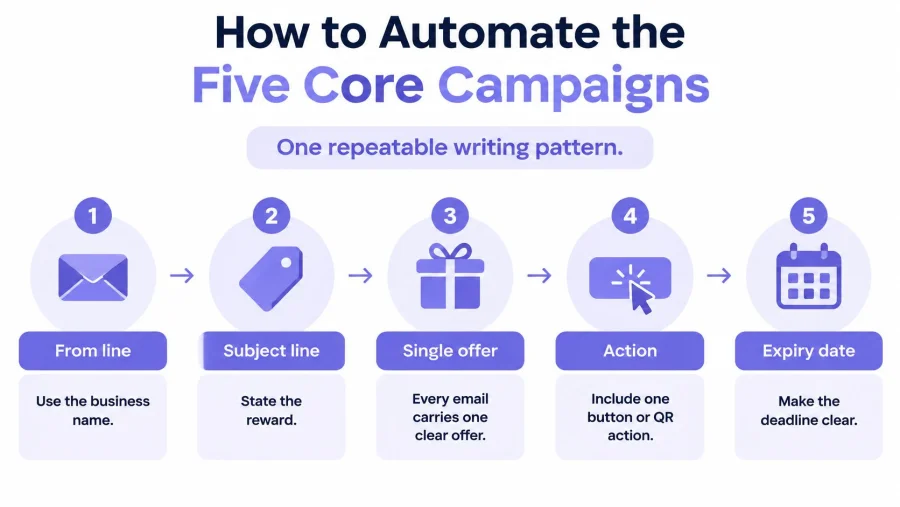
Use a repeatable writing pattern: the business name in the from line, a subject stating the reward, a single offer, a button or QR action, and a clear expiry date. For a non-promotional points update or review request, state the purpose plainly and don't invent a deadline.
Start with a workable timing template
The following timings are recommended starting settings, not proven industry-wide optimums. They should be adjusted to the business's visit cycle, customer preferences and available automation controls.
Five automations a small business should run first
| Campaign | Trigger | When to send | Offer | Success signal |
|---|---|---|---|---|
| Welcome | Lawful signup | Immediately | One signup reward, such as a drink or 10% off | Reward redeemed on the next visit |
| Birthday or seasonal | Stored date such as a birthday | 7 days before | One reward expiring in 14 days | Visit during the expiry window |
| Reward expiry | Stamp reward or coupon due to lapse | 3 days before expiry | Reminder of the reward already earned | Redemption before expiry |
| Post-visit | Recorded visit | Next morning | Points update or a short review ask, no extra discount | Review, reply or another visit within 14 days |
| Win-back | No recorded visit for 30 days at a café, or 45 days at a salon or gym | One email only | A specific reason to return, then silence | A visit; if none, suppress the contact after the response window |
Welcome emails should remove uncertainty. Explain what the customer received, where it works and how staff redeem it. A free filter coffee is easy to understand. A salon could test the discount example against its treatment margins before using it.
Birthday and seasonal rewards need enough notice for customers to plan. Collect only the date information the campaign needs, and make optional fields optional. A birthday-only subscriber shouldn't enter a weekly promotion sequence.
An expiry reminder should describe something already earned. It shouldn't replace the reward with a fresh discount or restart the deadline every time the customer ignores it. Staff need to see the same expiry information as the customer.
Match the message to the customer's situation
A post-visit message has a different job. A points update can reassure the customer that the visit counted; a review request can gather feedback. Combining both with another discount makes the purpose muddled and trains customers to expect an offer after every purchase.
Win-back timing needs more judgement. A gym member may attend without making a fresh purchase, so the trigger should use recorded attendance rather than payment alone. A salon customer with a future appointment shouldn't receive a message suggesting the business hasn't seen them for too long.
Consider a café trying to improve a quiet trading period. It could test a Tuesday email offering a free pastry with any hot drink before 11:30, sent only to subscribers who selected weekly offers. That offer targets the morning, not lunchtime. If lunch is the problem, the owner should change the redemption window rather than hope breakfast customers stay.
A useful offer names the reward, the purchase required and the time it can be used. Staff shouldn't need to translate it.
The loyalty campaign automation guide can help an owner map these journeys before switching them on. The essential control is a collision rule: no customer receives overlapping automations on the same day. Prioritise an earned reward approaching expiry, and delay or cancel the less useful promotion.
How to Judge Results and Cut the List
Consider a hypothetical comparison: a 1,000-person broadcast brings 20 visits, a 2% visit rate. A targeted 200-person offer brings 18 visits, a 9% visit rate. The smaller send produces almost as many visits with far fewer recipients, though the owner still needs margin and cost figures before declaring it more profitable.
That's the right argument for list cutting. A smaller database isn't automatically better. A smaller, relevant audience that produces stronger commercial results is.
Use a short check and a commercial review
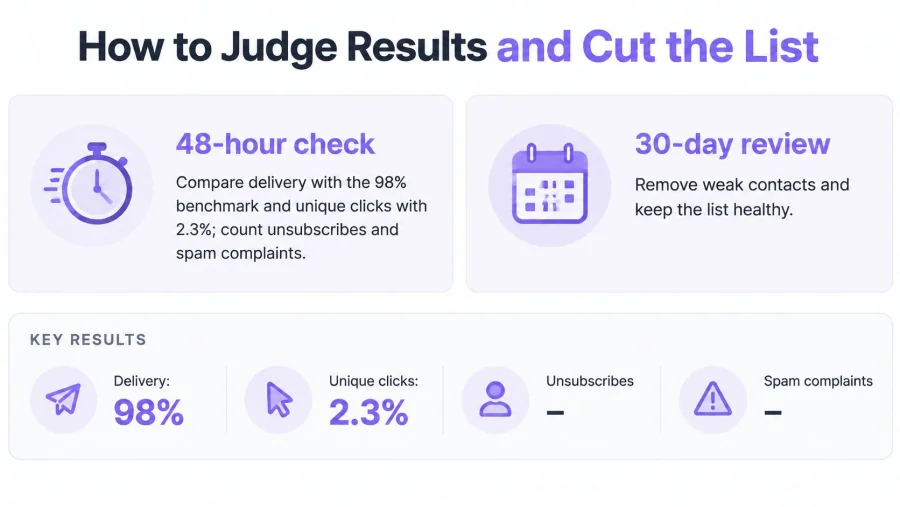
Adopt a 48-hour check as an operating routine. Compare delivery and unique clicks with the benchmark card, then count unsubscribes and spam complaints. Investigate unexpected changes before allowing the next scheduled send.
A 30-day review should connect the campaign to sales and visits:
- Revenue per recipient: Divide attributable sales revenue by the number of people mailed.
- Revenue per engaged customer: Divide that revenue by distinct customers who clicked or visited, removing duplicates.
- Profit per active recipient: Deduct product costs, reward costs and campaign costs before dividing by active recipients.
Reward face value isn't revenue. A redeemed free drink is a cost attached to a visit; the accompanying purchase may generate revenue. Counting the face value as money earned would flatter the report and mislead the owner.
SumUp's small-business email marketing guide cites the DMA's 2024 average estimated return of £35.41 for every £1 spent by UK email marketers. That's an industry reference, not a forecast for a first café campaign or a substitute for calculating profit.
Diagnose the weak result before changing the offer
What a weak email result usually means
| Result | Likely cause | Change before the next send |
|---|---|---|
| Delivery under 98% | Old, mistyped or bought addresses | Remove invalid addresses and stop any unverified imported list |
| High opens, almost no clicks | Vague message or an offer with no clear action | Name one reward and one deadline |
| Clicks but no visits | Redemption friction or an offer customers can't use | Add a scannable reward staff can redeem |
| Unsubscribe spike | Same offer sent too often | Mail weekly fans and birthday-only fans separately |
| Win-back gets silence | No current interest or a changed customer routine | Suppress after that one email and its response window |
For an initial operating definition, classify someone as active after a click, redemption or visit within the last 90 days. That's a chosen housekeeping rule, not a legal threshold. A customer who visits regularly shouldn't be removed just for ignoring email links.
Remove invalid addresses promptly. After an unanswered win-back, suppress further marketing rather than repeatedly increasing the discount. Keep the necessary consent and suppression records under an appropriate retention policy so an import doesn't accidentally reactivate the address.
MD TECH TEAM's guide to customer data management for small businesses is useful when records sit across disconnected systems. The customer retention metrics guide adds context for judging return behaviour.
Schedule a monthly 15-minute list review. Give a named staff member responsibility for bounces, suppression flags and campaign outcomes.
Tips for Email, Push and the Till
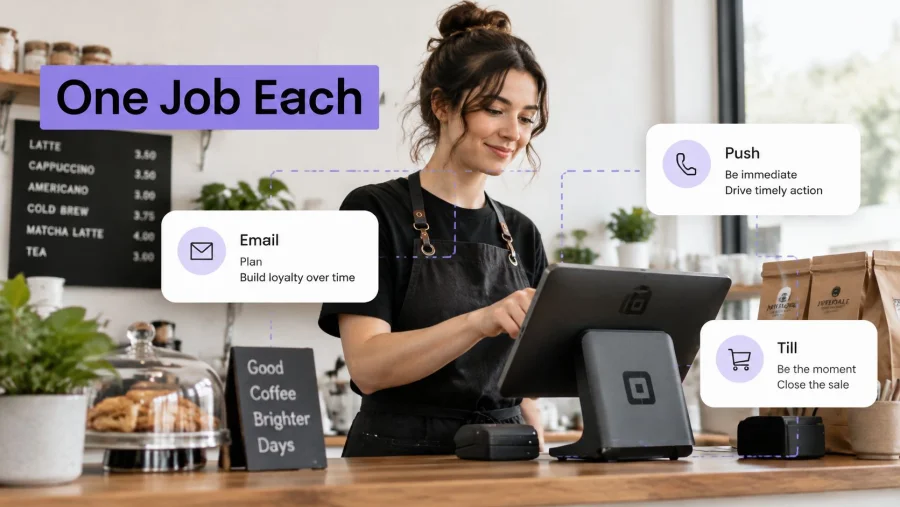
A channel needs a job, not a quota. Email suits a reward customers can save and plan around. Push suits something happening today. Staff make the offer understandable and redeemable when the customer arrives.
A 2026 report covered by Retail Gazette found that 55% of British consumers unsubscribe when content feels irrelevant, 40% don't trust brands with their personal data, and 56% of those remaining subscribed want content that provides value. That supports a clear recommendation: send less when there isn't a useful reason to send.
Give each channel a distinct role
- Email handles planned rewards. Welcome offers, birthday treats and earned-reward reminders give customers time to arrange a visit.
- Push handles immediate availability. A quiet-hour pastry offer or a class with spare places needs a short response window.
- The till handles explanation and redemption. Staff confirm eligibility, scan the reward and record the visit without delaying payment.
Push should reach only customers who accepted that channel separately. The options described in push alerts for loyalty members are worth considering for time-sensitive communication, not as an excuse to repeat every email.
Never send identical wording through both channels in the same afternoon. If the customer already redeemed the offer, exclude them from further reminders. If a class fills, stop promoting availability that no longer exists.
Make the counter experience match the email
After payment, staff can ask: Want offers by email? Totally optional. The question should be an invitation, not the start of a sales pitch. A refusal ends the conversation.
Keep the signup QR within the customer's natural waiting area. Avoid a clipboard that mixes loyalty registration, marketing permission and unrelated terms. The customer should see the benefit and the optional choice on the same journey.
Where the tool allows it, staff should redeem the emailed reward through the same scan used for loyalty stamps. That reduces the need to type codes, search inboxes or maintain a separate paper tally. Before launch, a staff member should test a valid reward, an expired reward and a reward already used.
Counter check: If a customer can't explain the reward in a sentence, it isn't ready to send.
Subject lines deserve the same restraint. Sentence case is a sensible default for a local business; excessive capitals and punctuation make an ordinary offer harder to read. MailGenius's guide to email subject line capitalization offers useful style considerations, but clarity should come before cosmetic testing.
A weekly-offer subscriber can receive a relevant trading update. A birthday-only subscriber should stay out of that send. Accepting that distinction means accepting a smaller audience, which is preferable to repeatedly contacting people outside their stated preferences.
Launch the First Loyalty Email This Week
The first decision is the welcome reward, not the template. The next is the preference question. A café owner should choose something staff can serve quickly; a salon owner should choose something that protects treatment margins and fits appointment capacity.
A short launch schedule keeps the work manageable. It also exposes problems while staff can still fix them, rather than after customers arrive with unusable coupons.
A five-day launch schedule
- Day 1, choose the reward and permission wording. Name the signup benefit, write the optional email choice and decide which customer preference to collect. Keep the first offer simple enough to explain at the counter.
- Day 2, test the join journey. Print a trial QR and complete signup on a staff phone. Check that loyalty membership and marketing consent remain separate, including when the checkbox stays unticked.
- Day 3, activate the welcome journey. Test delivery, the reward display and redemption. Configure an expiry reminder for three days before the deadline where the available controls support it.
- Day 4, prepare the audience groups. Separate weekly-offer and birthday-only preferences. Draft the lapsed-visit message using the proposed café or salon and gym timing, then check that an intervening visit cancels it.
- Day 5, brief the team and agree the scorecard. Practise the optional invitation and reward scan. Assign responsibility for checking redemptions, return visits, failed delivery and withdrawals.
Keep the first setup small
BonusQR provides a practical starting point for the welcome and lapsed-visit steps: creating an account takes under a minute and needs an email address and business name; after customer registration, the system automatically sends the chosen welcome coupon, and automated email and push reminders can prompt customers who haven't visited for a while.
The owner should still test the consent step before relying on any automated marketing. Available settings must match the intended schedule, and a successful test includes both a customer who opts in and a customer who declines.
Start this week with a single welcome reward, an optional email choice and a tested redemption process. Put the QR at the counter only after staff complete the join journey themselves. Judge the first send by customers returning and rewards redeemed, then improve the offer before trying to grow the list.


