The café closes, the chairs are stacked, and the till is balanced. The owner can see how many lattes sold, but not which pastry disappointed customers, which table waited too long, or why one regular didn't come back.
That gap is where customer feedback automation helps. Instead of hoping people remember to complain later, a simple system asks at the right moment, sorts the replies, and sends the right next step to the right person. For a café, salon, gym, or small shop, that can mean fewer missed signals and less guesswork.
This guide breaks the idea down in plain English, from the basic moving parts to lean workflows, sample templates, and the bias traps that can distort feedback. For businesses already using loyalty programmes, tools such as QR rewards for cafés and salons can place feedback prompts inside the same customer journey, so asking and rewarding happen together.
Understanding Key Concepts
A useful way to think about customer feedback automation is as a self-sorting suggestion box. A customer leaves a comment, the system recognises when it was sent, decides what it means, and moves it into the right follow-up path without someone checking every message by hand.
For a café, salon, gym, or small shop, that matters because the ask can happen while the visit is still fresh. A short survey after a haircut, a coffee order, or a booking gives cleaner answers than a message sent days later, because the customer is still reacting to the specific interaction.
Core System Functions
The software usually handles four jobs together, not one. It collects responses from different channels, groups similar comments, flags the urgent ones, and sends alerts or follow-up actions to staff.
That matters because a review on one platform, a survey response in email, and a comment after an appointment all need to land in the same pipeline. Guidance on multi-channel feedback pipeline guidance describes feedback automation as software that gathers, consolidates, analyses, and acts on responses with minimal manual effort, and recommends live alerts for negative comments plus categorisation by themes such as product, support, or pricing to reduce triage time and speed response.
Why the trigger matters
The strongest feedback systems are event-driven, not calendar-driven. A survey sent right after checkout or after an appointment ends captures fresh reactions while the experience is still easy to remember, and event-triggered survey guidance supports that approach.
Practical rule: the closer the ask is to the actual interaction, the cleaner the answer usually is.
That rule also helps staff avoid reading too much into vague feedback. A customer who writes “fine” two days later may have forgotten the detail that mattered, while a prompt delivered immediately can still capture the exact issue, whether it was slow service, a missing item, or a rushed handover.
Why the tech is no longer unusual
In the UK, 71% of businesses had adopted at least one AI technology by 2024, up from 26% in 2023, according to the UK Office for National Statistics, which shows that the infrastructure behind automated classification and routing is now widely available (ONS-based AI adoption data). Larger firms were ahead, with 39% of businesses with 250+ employees using AI in 2024 versus 21% of medium-sized firms and 14% of small firms in the same source, so the market is moving, but not evenly.
For a small operator, that means the system does not have to feel futuristic. It can work like a well-labelled filing tray, with one lane for praise, one for service recovery, and one for themes that need a weekly look.
Benefits for Small Brick and Mortar Businesses
For a café owner or salon manager, the value isn't “more data”. It's fewer blind spots. When feedback arrives automatically after a visit, the business can catch a bad experience before the customer disappears, and it can also turn happy comments into something useful instead of letting them sit in a inbox.
Faster recovery, lighter admin
If a guest marks a visit badly, the system can alert a manager right away instead of waiting for someone to read a spreadsheet later. That matters in hospitality and personal service, where a quick apology or correction often feels more human than a delayed response after the customer has already cooled off.
The upside is operational, not theoretical. Retail counters, salon desks, and gym receptions don't need another manual task. They need a short list of clear actions, such as a thank-you note for a happy customer, a follow-up for a complaint, or a weekly summary of repeated themes.
Practical rule: automate the response that saves the visit, not the response that creates more admin.
Better use of good feedback
Positive comments are easy to waste. A customer says the coffee was excellent, the cut was perfect, or the class was welcoming, and the message sits untouched in a review feed. When that response is routed into a loyalty or referral action, the business gets a second outcome from the same moment.
That's where a loyalty workflow helps. A promoter can receive a thank-you, a small reward, or an invitation to return, while the owner gets a clearer sense of what customers value enough to mention voluntarily. In a small business, that's often more useful than a long survey dashboard.
Less staff frustration
Front-of-house staff already juggle greetings, payments, questions, and complaints. Automated feedback can remove the need to manually chase replies or copy comments from one system into another. That saves time, but it also reduces the risk of messages being ignored on a busy day.
The bigger benefit is consistency. Customers notice when the same service issue gets handled differently depending on which staff member is on shift. Automation makes the first response more predictable, which helps a small team look organised even when the day is chaotic.
For owners who want a simple place to compare customer activity, analytics for loyalty programs can help connect visits, rewards, and feedback patterns in one view.
Automated Feedback Workflows
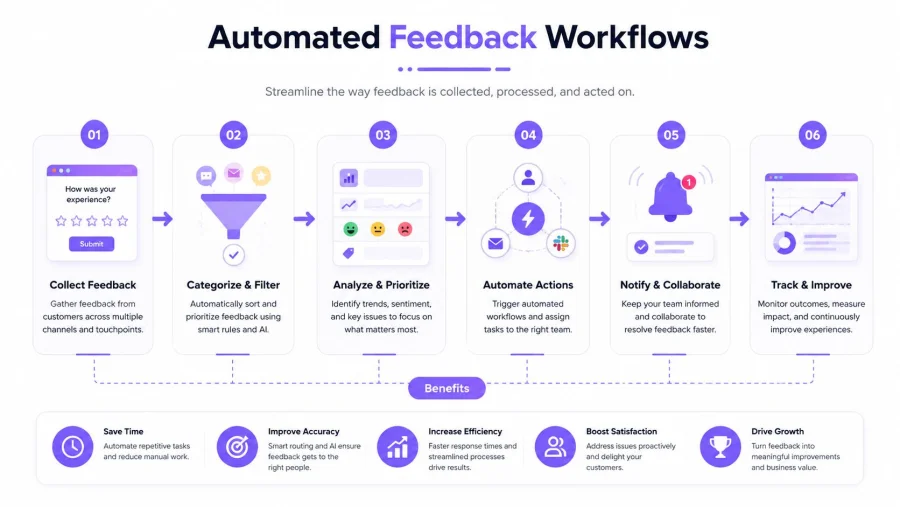
A café owner, salon manager, or studio operator usually gets feedback at the moment a visit ends, not later in the day. That timing matters because the best workflow matches the trigger to the moment, so the ask feels natural and the answer stays tied to a real experience. A guest leaving a coffee run, finishing a treatment, attending a class, or paying for a retail order each creates a different chance to ask for input, and each one calls for a different channel.
QR code prompts at checkout
A QR code works well when staff can point customers to it without slowing the line. In a café, it can sit on the receipt, counter card, or table sign. In a salon, it can appear at the front desk after payment or appointment check-out. The setup is a bit like placing a suggestion box where people already stand, so the request appears at the right moment without adding extra steps.
The main benefit is speed. Customers scan while the visit is still fresh, and the business can keep the survey short, usually one rating plus one optional comment. That also helps reduce sampling bias, because the people who respond are drawn from the same group of guests who just used the service, instead of a broader audience that may not remember the visit clearly. If the score is negative, the system should send an alert or recovery task immediately rather than waiting for a weekly report.
Email surveys tied to receipts
Transactional email suits customers who have already shared an address and expect a follow-up. It works well after a purchase or booking confirmation, especially when the message can be tied to a specific visit or service. For a small business, that is useful because the request feels connected to the transaction, not like a generic marketing blast.
Timing matters here. Event-triggered surveys work better than fixed schedules because the response is anchored to a real action, and post-interaction survey guidance supports sending the request right after the interaction rather than later in the day. That order helps the customer remember what happened, and it keeps the answer from drifting into vague general impressions. It also makes the workflow easier to pair with loyalty campaigns, since the receipt can carry both a feedback request and a simple return-visit prompt without crowding the message.
Push and in-app prompts
For gyms, booking apps, and repeat visit businesses, push notifications and in-app prompts can catch the customer while they're still engaged. A class ends, a booking closes, or a check-in completes, and the app asks for a quick rating before the moment fades. That works well for businesses that already have an app-based habit, because the request feels like part of the visit rather than a separate task.
These prompts should be narrow and direct. If the visit was smooth, a promoter flow can thank the customer and invite a review. If the rating is poor, the detractor flow should alert a manager or route the case to service recovery. That split keeps praise and complaints from being handled in the same way, which matters when staff need a clear next step rather than a mixed inbox.
Routing negative feedback cleanly
Thresholds make the system easier to trust. Guidance on threshold-based escalation guidance recommends treating low scores as negative and triggering the next action right away, so feedback does not sit in a dashboard while the customer cools off. For a small service business, that works like a front desk handoff, one person notices the issue, another person takes over, and the guest does not have to repeat the story.
That can be as simple as a red flag for poor service and a separate path for praise. The key is to split the flows before launch, not after complaints start arriving. A business that does that avoids the common mistake of collecting feedback but leaving everyone to guess what to do next.
Implementing Feedback Automation
A small business doesn't need to automate every touchpoint at once. The safer move is to start with one route, check whether it works, and only then widen the system. That keeps the setup manageable and gives staff time to trust the results.
Start with one channel
A post-purchase email survey is often the easiest entry point because it needs little explanation and no change to the front desk process. The business can send a short rating request, capture the reply, and confirm that alerts land in the right place.
One practical workflow guide recommends starting with a single touchpoint, then expanding after verifying response rates and routing accuracy, while splitting positive and negative flows from the outset (feedback automation rollout guidance). That order matters. If the first channel is messy, adding another only multiplies the confusion.
Use short templates
Keep the ask simple. A customer who's just left the shop won't read a long message, and staff won't use a complicated script.
| Channel | Template Example |
|---|---|
| Thanks for visiting today. Please rate your experience and leave one comment if something stood out. | |
| QR code | Quick feedback on today's visit. Tap once to rate your experience, then add a note if you'd like. |
| In-app | How was your class or appointment today? Choose a rating, then tell the team what worked. |
These templates are short on purpose. They reduce friction and make the next step obvious.
Choose tools that fit the workflow
The right tool is the one staff will use at the counter, not the one with the longest feature list. A loyalty platform can help when feedback and repeat visits need to sit together, especially if it can trigger a prompt after purchase or reward redemption, and can also store notes, menus, reviews, or visit history in one place.
For teams comparing broader marketing support, SEO that books more jobs can be a useful reference for how search visibility and customer follow-up sit in the same growth path, but the feedback system itself should still stay lean.
Roll out in phases
Phase one should prove that the trigger works, the wording is clear, and the routing is correct. Phase two can add another channel, such as in-store QR scanning or an app prompt, once the first flow behaves properly.
Practical rule: a small workflow that runs cleanly beats a large workflow nobody trusts.
That's also the point where the owner should decide who owns each alert. If a complaint arrives, one person should receive it, know what to do next, and close the loop. Without that ownership, even a good survey becomes just another inbox item.
KPIs and Compliance to Avoid Pitfalls
Good feedback systems can still produce bad decisions if the sample is narrow or the routing is sloppy. The owner may see a stack of responses and assume the story is complete, when in fact only the most motivated customers replied.
What to measure
Three metrics matter most: response rate, sentiment accuracy, and resolution speed. Response rate shows whether the ask is landing at the right time. Sentiment accuracy shows whether the tagging makes sense. Resolution speed shows whether staff are doing something with the alerts.
Those checks should sit beside, not instead of, customer experience scores such as CSAT, NPS, or CES. The numbers are only helpful if the survey is short enough to get used and clear enough to produce reliable labels.
Why sample bias happens
Smaller UK firms often lack advanced digital systems, which can skew feedback samples; designing sampling rules to avoid overrepresenting unhappy or highly engaged customers is critical (UK small business sampling bias guidance). That warning matters because a café with only one digital touchpoint may hear mostly from the loudest customers, not the average ones.
The fix is to broaden the capture logic where possible. A business can ask after purchases, bookings, and service completion, not only after complaints. It can also watch for repeated non-response from certain customer groups, which may mean the survey is missing them rather than they're perfectly satisfied.
GDPR and clean consent
Consent wording should be clear and specific, especially if the message is tied to marketing, rewards, or future contact. If a customer is being asked for feedback after a purchase, the business should separate operational follow-up from promotional messaging wherever possible.
Retention also needs discipline. Feedback data shouldn't be kept forever just because it's easy to store. The owner should decide who can see it, how long it stays accessible, and when it's removed from active use.
How to avoid the usual mistakes
- Too many questions: Long surveys lower completion and blur the core issue.
- Weak triggers: Asking too late turns fresh experience into vague memory.
- No ownership: If nobody is assigned, the reply goes nowhere.
- No bias check: A small set of angry responses can look bigger than it is.
The point of the system isn't to collect the most comments. It's to collect the right comments, from enough different customers, and turn them into a decision the business can act on.
Real Use Cases with BonusQR Integration
A useful loyalty system doesn't sit apart from feedback, it can carry the feedback request inside the visit flow. That matters for small service-led businesses, because the same customer who earns a stamp or reward is already in the right moment to leave a response.
The café
A local café places a QR code on the receipt and on a small table sign. After checkout, the customer taps through a quick rating, and a positive answer sends a thank-you plus a loyalty prompt.
The owner keeps it simple. No long form, no extra device, and no staff member needed to chase replies. BonusQR can sit in that flow by pairing the feedback request with reward logic, so a completed survey and a visit reward happen as one experience instead of two separate tasks.
The salon
A salon uses a post-appointment message to ask for a service rating. If the score is positive, the customer gets a polite follow-up and a birthday offer for future booking.
That works well because the salon doesn't need a complicated CRM setup to keep the loop alive. It can ask after the visit, tag the response, and keep the next action lean. Hospitality and personal-service businesses need that kind of approach, because automating just thank-you messages for promoters and instant alerts for detractors drives service recovery without extra admin (lean follow-up guidance).
The gym
A gym sends an in-app prompt after class check-in. The question is short, the timing is immediate, and the response can be used to route complaints about booking issues, cleanliness, or class quality.
When the feedback is good, the gym can turn it into a testimonial request or a social post permission flow. The value is not in creating more admin for the front desk. It's in catching repeat patterns early and rewarding the members who already speak well of the place.
The retail shop
A small retail store uses seasonal campaigns to bundle a review request with a reward reminder. Customers who engage get a simple feedback prompt first, then a loyalty message tied to their last visit.
That's where displaying reviews with BonusQR can be useful, because the business can connect customer comments with public-facing trust signals in one flow. The shop doesn't need to overbuild anything. It just needs to make sure the happiest customers are invited to speak while the unhappy ones are routed to a human fast.
Conclusion and Next Steps
Customer feedback automation works best when it stays close to the actual visit. A café, salon, gym, or shop doesn't need a giant system to get value. It needs one clean trigger, one short question, and one clear next action for praise or complaints.
The safest rollout starts small. Use one touchpoint, check whether the routing is correct, watch for sample bias, and keep the follow-up lean. Once that works, the business can add more channels without turning feedback into another admin burden.
For owners who also want loyalty and feedback in the same customer journey, BonusQR can place survey prompts inside QR-based rewards, with simple rules for ratings, rewards, and follow-up messages. A free trial is the easiest next step for any small business that wants to test the workflow without adding hardware or a complicated setup.
Start with one visit flow this week, whether that's a receipt QR code, a post-appointment message, or a reward redemption prompt. Then review the replies, fix the follow-up, and let the first set of customer comments shape the next version of the system.


