GS1 DataBar, specifically the Expanded and Expanded Stacked variants, is the contemporary standard for coupon barcodes, whilst EAN-13 and UPC-A still appear on simple money-off vouchers. If you spot Application Identifier 8110 or a Global Coupon Number (GCN), you are looking at a DataBar coupon carrying a GS1 company prefix and an offer code. Which symbol a retailer uses comes down to point-of-sale capability and how much data the offer needs to carry.
TL;DR:
- AI(8110) payloads require a company prefix and offer code; optional expiry dates and serial numbers add automatic expiry checks and redemption controls.
- Choose Expanded for wide, shallow print areas; Expanded Stacked fits narrow, tall panels, but older single line laser scanners may not read multiple rows.
- Server lookup codes let businesses change offer terms without reprinting coupons, disable suspicious codes individually, and log scans by store, register, and time.
- Static EAN and UPC coupon codes cannot distinguish individual copies; without separate tracking, retailers see only aggregate redemptions for each offer.
- For mobile coupons, favor single row Expanded symbols when space allows; stacked variants can scan less reliably on phone screens across mixed scanner fleets.
1. Coupon barcode types: GS1 DataBar family, EAN-13 and UPC variants explained
Coupon barcodes fall into two broad camps, and recognising which one you are looking at tells you a lot about how that coupon will behave at checkout.
The GS1 DataBar barcodes family covers several symbol types built on the same underlying structure, defined technically by ISO/IEC 24724:2011. For coupons, the two variants that matter are DataBar Expanded and DataBar Expanded Stacked, because only these carry enough capacity for the Application Identifier structure that modern coupon data needs. The wider family also includes Omnidirectional, Stacked, Stacked Omnidirectional and Limited, which are mostly used for small retail items such as fresh produce rather than coupons.
- DataBar Expanded: a single-row symbol built for high-capacity coupon data and reliable scanning at standard checkouts.
- DataBar Expanded Stacked: the same data split across two or more rows, used when the printable area is narrow or tall rather than wide.
- DataBar Omnidirectional, Stacked, Limited: variants aimed at point-of-sale item marking, rarely used for coupon distribution.
EAN-13 and UPC-A sit at the other end of the spectrum. Both are purely numeric, fixed-length symbols with no room for Application Identifiers, so they suit simple fixed-value coupons where the discount amount is baked into the number itself using a restricted-circulation prefix rather than looked up from a database. A retailer running a straightforward “£1 off” paper coupon with no serial tracking will often still use EAN-13. A brand running a multi-tier offer with an expiry date, a purchase requirement and fraud controls needs the extra capacity that only DataBar Expanded or Expanded Stacked can provide.
2. How coupon barcodes are structured: application identifiers, GCN, company prefix, offer code and save value
GS1 Application Identifiers (AIs) are short numeric prefixes inside a barcode that tell the scanning system what each following block of digits means. For coupons, AI(8110) signals a GS1 North American coupon payload, whilst AI(255) carries the Global Coupon Number (GCN), a structure described in GS1’s own guidance on coupon barcodes. Reading a DataBar coupon payload in order usually looks like this:
- Application Identifier: AI(8110) marks the data that follows as a GS1 coupon record.
- GS1 company prefix: identifies the brand or manufacturer issuing the offer.
- Offer code: a short number distinguishing one promotion from another run by the same company.
- Family code: groups related products that qualify for the discount.
- Purchase requirement: the quantity or spend threshold needed to trigger the offer.
- Save value: the discount amount, encoded with an implied decimal position.
- Check digit: a calculated digit that lets scanning software confirm the rest of the number was read correctly.
The North American Coupon Application Guideline sets out which of these fields are mandatory and which are optional. Company prefix and offer code are always required because they uniquely identify the promotion, whilst fields such as expiration date and serial number are optional extensions that let a brand add fraud protection or tracking without changing the base structure. Retailers print the company prefix and offer code as a human-readable line beneath the symbol, separated by a dash, so staff can key the number in manually if a scan fails.
3. Symbology choice, POS compatibility and practical scanning constraints
The symbol a brand chooses depends almost entirely on what the point-of-sale system can read and how the coupon will be validated. Older or offline checkout systems need the discount value encoded directly inside the barcode, because there is no live connection to check it against a database. Connected, modern POS systems can instead treat the barcode as an identifier, scanning a unique number and pulling the real offer details from a server in real time, an approach the GS1 US guideline associates with DataBar Expanded’s larger payload capacity.
- Omnidirectional scanning: DataBar Omnidirectional and Stacked Omnidirectional variants are built to be read from any angle, which matters for busy checkout lanes.
- Stacked symbols: need a scanner capable of reading multiple rows in sequence, so older single-line laser scanners may struggle.
- Quiet zone and print resolution: both must meet the margins set out in the GS1 specifications, or the symbol risks misreads regardless of which variant is chosen.
Pro Tip: If print space is wide but shallow, choose DataBar Expanded; if the panel is narrow but tall, Expanded Stacked keeps the same data readable in less width.
4. Practical examples and human-readable formatting to help identification
A textual DataBar coupon payload typically reads as AI(8110) followed by a GS1 company prefix, an offer code, a family code and a save value, all run together as one continuous digit string with a check digit at the end. You will not see spaces between these fields in the raw barcode data, but the human-readable text printed beneath the symbol usually breaks the company prefix and offer code apart with a dash so a cashier can read it at a glance.
A simple EAN-13 money-off coupon looks different again: a fixed thirteen-digit number where the first digits often sit inside a restricted-circulation or coupon-specific prefix range, followed by the product or offer identifier and a single check digit at the end.
- DataBar human-readable line: company prefix, then offer code, separated by a dash for quick manual lookup.
- EAN-13 human-readable line: the full thirteen digits printed beneath the bars, with the check digit as the final character.
5. How modern loyalty platforms typically use barcode IDs
Many loyalty platforms sidestep the value-encoded approach altogether. Instead of printing the discount amount inside the symbol, as offline systems require, the barcode becomes a lookup key that points to offer logic held on a server. Some loyalty tools take this identifier-based route, which lets a business change an offer’s terms without reprinting a single coupon.
- No reprints: updating an offer’s value or expiry happens server-side, not on the barcode.
- Serialisation: each coupon can carry its own unique identifier, making individual redemptions traceable and harder to duplicate.
- Campaign analytics: every scan ties back to a specific offer and customer, giving far richer reporting than a static value code ever could.
Coupons built this way can go out through a mobile app, a printable PDF, or a batch of printable barcodes, with redemption checked and logged centrally each time one is scanned.
6. Security features to prevent coupon fraud within barcode types
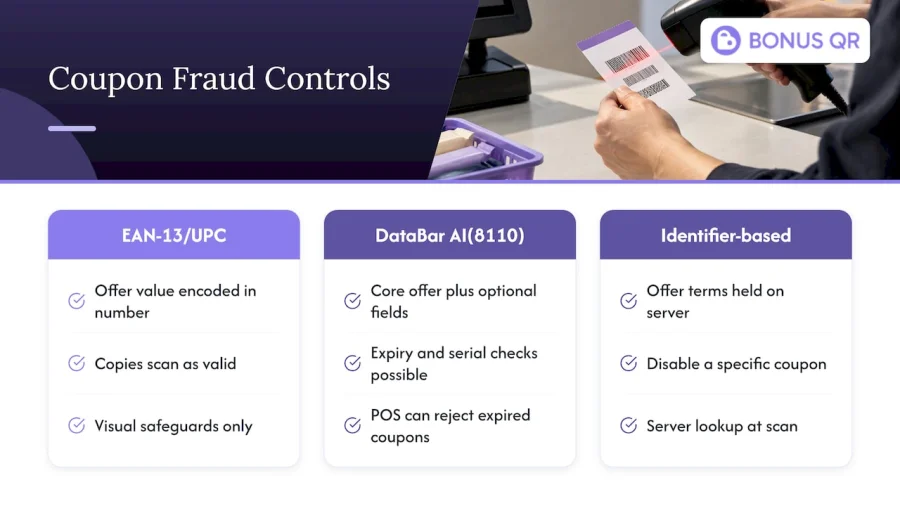
Fraud resistance depends heavily on which barcode approach a brand chooses. A value-encoded EAN-13 or UPC-A coupon has limited built-in protection: the number is static, so once it is photocopied or photographed, every copy scans as valid at any till that accepts it. The only real safeguards are visual, such as printing on coloured stock or adding a one-time redemption stamp at the register.
DataBar coupons using AI(8110) and the Global Coupon Number structure allow for far stronger controls, because the payload can include optional fields such as expiration dates and serial numbers alongside the core offer data. A serialised coupon can only be redeemed once if the retailer’s system checks the serial number against a database at the point of scan, which closes off the copy-and-reuse problem that plagues static codes. Expiry fields encoded directly in the barcode let a connected POS reject an expired coupon automatically rather than relying on a cashier to check a printed date.
Identifier-based coupons, where the barcode is simply a key to server-held logic, go a step further still. Because the real offer terms live on a server rather than in the printed symbol, a business can disable a specific coupon the moment suspicious activity appears, without needing to withdraw every printed copy still in circulation. This is one of the clearer practical advantages of moving away from fully value-encoded symbols once a POS system supports the lookup.
7. Best practices for barcode placement and scanning in mobile apps
A coupon barcode displayed on a phone screen behaves differently from one printed on paper, and a few habits make the difference between a smooth scan and a frustrated queue.
- Brightness and contrast: screens need to be set bright enough that the scanner’s light source reflects cleanly off the bars.
- Static display, no auto-lock: the screen should stay on and the barcode visible without scrolling or a lock-screen interruption mid-scan.
- Adequate on-screen quiet zone: leave clear margin around the symbol in the app layout, matching the same quiet zone rules that apply to printed barcodes.
- Avoid screen protectors with heavy glare: matte or anti-glare finishes scan more reliably than glossy ones under bright store lighting.
- Test on the scanners you expect customers to meet: a barcode that reads perfectly on an in-house tester can still fail on an older handheld scanner, so checking against common retail hardware before launch avoids embarrassing redemption failures.
Retailers running mixed fleets of handheld and fixed scanners sometimes find that stacked DataBar variants read less reliably from a phone screen than single-row Expanded symbols, simply because screen glare interacts differently with multiple rows. Where a mobile wallet or app is the primary delivery channel, favouring the single-row layout where print space allows tends to produce fewer failed scans at the till.
8. How barcode types influence redemption tracking and analytics
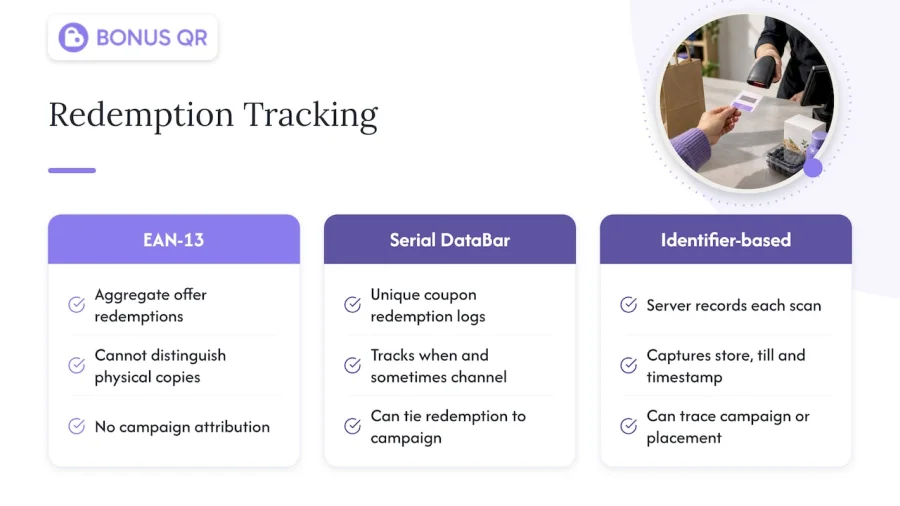
The symbology behind a coupon decides how much you can learn once it is scanned. A static EAN-13 coupon tells you only that a given offer number was redeemed somewhere, with no way to distinguish one physical copy from another unless the retailer bolts on a separate tracking system.
DataBar coupons carrying a serial number change that picture entirely. Each redemption can be logged against a unique identifier, which means a brand can see exactly how many individual coupons were used, when, and in some cases through which channel they were distributed, rather than relying on an aggregate count. Identifier-based coupons, where the barcode is a lookup key rather than a value store, push this further again, since every scan triggers a server-side record that can capture the store, till and timestamp in one pass.
This difference matters most when a business runs several campaigns at once. A fixed-value EAN-13 code makes it hard to tell which marketing channel drove a given redemption, whilst a serialised DataBar or app-based identifier can be tied back to the exact campaign, email send or in-app placement that generated it. For a business trying to work out which promotions are worth repeating, that level of detail is often the real payoff of moving beyond a simple static barcode.
9. Author’s practical perspective on choosing a coupon barcode approach
DataBar and the Global Coupon Number structure suit offers that need flexibility, serialisation or fraud control; EAN-13 still earns its place for a simple, offline, fixed-value coupon with no tracking requirement. Before choosing, check your POS connectivity, whether you need per-coupon serial tracking, how much print space you have, and whether your scanner fleet actually supports stacked or omnidirectional reads.
— Michal
10. A discreet alternative: how a loyalty platform can reduce barcode complexity
If managing GS1 payloads, serial numbers and reprint cycles sounds like more than your business wants to handle in-house, a loyalty platform can carry that weight instead. We store offer logic on our servers and use the barcode purely as a lookup key, so an offer’s value, expiry or eligibility can change without a single coupon being reprinted.
Our pricing plans range from a Free tier through to Premium at €69 per month, covering coupon distribution modules alongside the stamp card, points and cashback tools many small businesses already run side by side. Businesses wanting their own branded app can add white-label setup from €690 one-off, or go further with custom app development from €1,500 for deeper integration needs.
FAQ
What does a barcode number represent?
A barcode number is a structured sequence of digits where specific positions carry defined meaning, such as a company or manufacturer prefix, a product or offer identifier, and a check digit used to confirm the number was scanned correctly. In GS1 coupon barcodes, Application Identifiers mark which section of the number represents which field, as set out in GS1’s coupon guidance.
Can you give me some examples of coupon codes?
A DataBar coupon typically combines AI(8110) with a GS1 company prefix, an offer code, a family code and a save value in one continuous payload. A simple EAN-13 money-off coupon, by contrast, is a fixed thirteen-digit number using a restricted-circulation prefix range, with no Application Identifier structure.
What are different types of QR codes?
QR codes are a 2D matrix symbology, separate from the GS1 DataBar and EAN/UPC families covered here, and they can encode plain text, URLs or structured data depending on how a business sets them up. Loyalty and coupon platforms sometimes use QR codes alongside DataBar for mobile-first distribution, though the underlying data structure is not governed by the same GS1 Application Identifier rules.
What is the barcode type identifier?
The barcode type identifier, in GS1 terms, is the Application Identifier itself, a short numeric prefix such as AI(8110) that tells scanning software what kind of data follows. For coupons, AI(8110) for the GS1 North American coupon and the Global Coupon Number are the identifiers to look for, as detailed in the GS1 General Specifications.


