A coupon QR code is a scannable image that opens a mobile offer, applying a discount instantly through a code, a barcode or a save-to-wallet action. For any campaign you plan to measure, update or protect against overuse, choose a dynamic QR code rather than a static one. It costs little extra and gives you the tracking data a static code simply cannot provide.
TL;DR:
- Dynamic QR codes are essential for measuring, updating, or limiting campaigns because they offer real-time scan analytics, redemptions control, and the ability to change destinations after printing.
- Ensuring proper campaign setup involves testing scanning distances on different devices and keeping landing pages simple, fast-loading, and tailored to a single call-to-action.
- Placement and benefit-first copy significantly influence redemption rates, with high-visibility locations and clear, incentive-driven CTAs outperforming vague instructions.
- Tracking scan-to-conversion ratios, setting redemption caps, and applying geo-limits help prevent fraud and measure actual campaign effectiveness.
- Using platforms like BonusQR simplifies managing multiple offers, providing real-time analytics, single-use codes, and streamlined distribution without requiring POS integration.
How do coupon QR codes work?
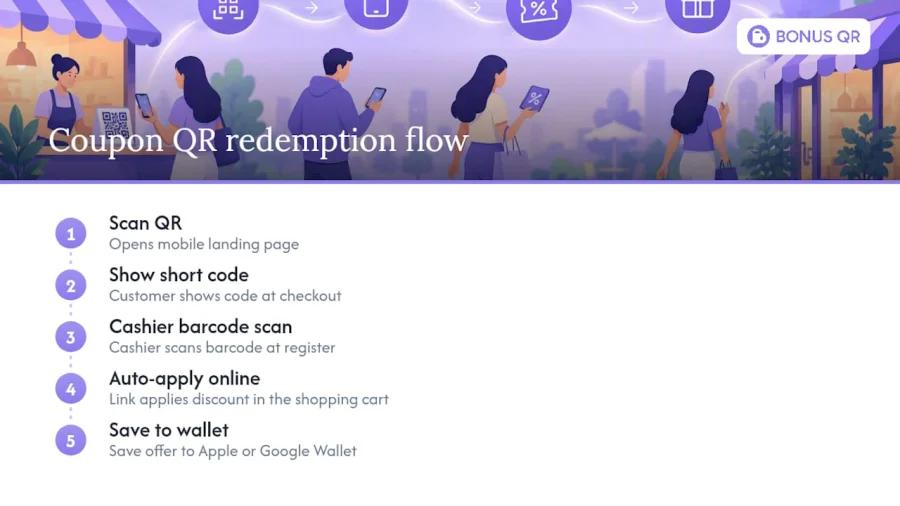
Scanning the code opens a mobile landing page carrying your offer. From there, redemption happens one of four ways: the customer shows a short code at checkout, a cashier scans a barcode, an online cart applies the discount automatically through a link, or the offer saves straight to Apple Wallet or Google Wallet for later use.
You’ll see coupon QR codes on print materials (flyers, posters, packaging), on till receipts, in email footers, and stitched into social posts. Wherever you place them, the underlying rule stays the same: one clear offer, one visible code or button, and a landing page that loads fast on mobile. A page that takes six seconds to load loses customers before they’ve even seen the discount.
Why should you use coupon QR codes over paper coupons?
QR coupons remove the friction that kills paper coupon redemption. Customers scan instead of clipping, hunting for a code, or typing it in manually, and that convenience shows up directly in redemption numbers. Industry data suggests QR coupon campaigns commonly achieve redemption rates in the 8 to 15% range, against under 2% for paper coupons.
The advantages compound once you factor in what a QR code lets you do afterwards:
- Real scan data. You see when, where and on what device customers scanned, so you can spot which placement is actually working.
- No reprint costs. Change the offer or fix a typo without touching a single physical asset.
- Retention hooks. Pair the coupon with a loyalty programme and turn a one-off discount into a repeat visit.
- Lower staff friction. Auto-applied discounts and wallet passes mean less manual code entry at the till.
Static vs dynamic coupon QR codes: which one do you need?
A static QR code encodes a fixed destination that never changes once printed. It’s cheap, permanent, and fine for genuinely info-only uses like linking to a menu. But it gives you zero scan data and no way to fix a broken link or swap an expired offer.
A dynamic QR code points to a short redirect URL you control, meaning you can change the destination after printing, cap redemptions, and track scans by time, location and device. That tracking layer is what turns a coupon from a guess into a measurable channel.
| Feature | Static QR code | Dynamic QR code |
|---|---|---|
| Destination after printing | Fixed, cannot change | Editable anytime |
| Scan analytics | None | Time, location, device |
| Single-use or expiry controls | Not supported | Supported |
| Best for | Permanent, info-only content | Any campaign you’ll measure or update |
| Typical cost | Free, generate once | Often requires a paid or platform tier |
The decision rule is simple: if you intend to measure, update, or limit a coupon, use dynamic. Reserve static codes for things that truly never change, like a fixed “visit our website” link on a business card.
How do you create, test and publish a coupon QR campaign?
Building a coupon QR campaign properly takes five steps, and skipping the testing stage is where most SMBs lose money on a botched print run.
- Build a focused landing page. One offer, one call to action, and a redemption method stated clearly (auto-apply link, short code, or single-use claim). Strip out navigation menus and anything that isn’t the offer.
- Choose your redemption mechanism. Decide upfront whether staff will scan a barcode, customers will type a short code, or the discount applies automatically online. Mixing mechanisms across channels confuses both customers and till staff.
- Generate a dynamic QR code and brand the call to action. Use benefit-first copy on the artwork itself, something like “Scan for 20% off,” not a bare instruction to scan.
- Test scanning on both iOS and Android, at the actual distance customers will stand from the code. A poster scannable at arm’s length on your desk might fail completely at three metres on a shop window.
- Deploy with tracking attached. Give each placement its own unique landing URL or UTM-tagged link before printing anything, not after launch.
Skipping step four is the single most common mistake. A code that scans perfectly on a laptop screen can fail on a curved bottle label or a glossy till receipt under shop lighting.
What makes people actually scan and redeem your coupon?
Placement and copy decide most of your redemption rate before the QR code itself even enters the equation. Receipts, packaging inserts, table tents, shelf tags, window posters, and email footers all work, provided the code sits somewhere a customer is already looking, not somewhere they have to search for it.
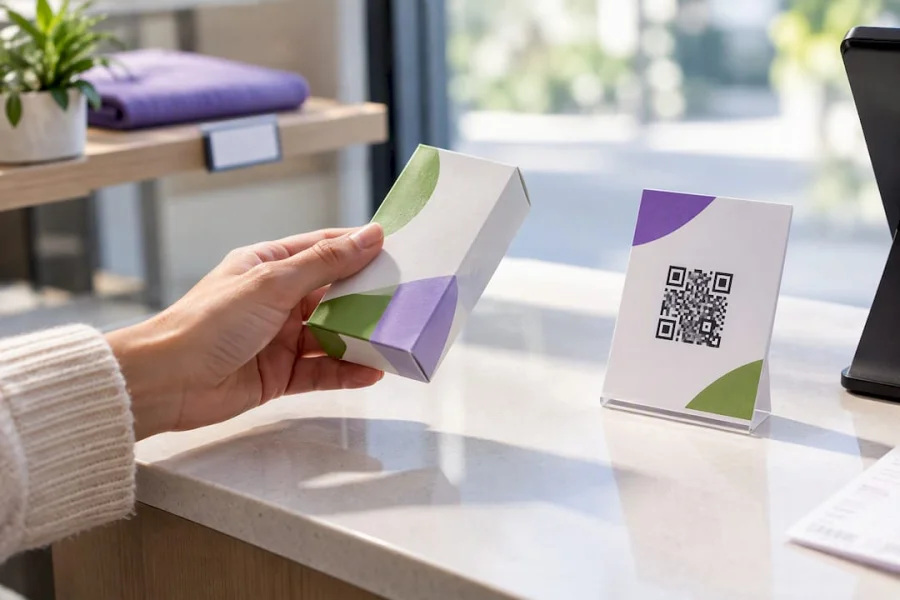
Copy matters more than most business owners expect. Benefit-first CTAs like “Scan for 20% off” consistently outperform vague instructions like “Scan me”, because the customer knows exactly what they get before they lift their phone.
Print rules that protect your scan rate:
- Size the code for the expected viewing distance. A window poster needs a far bigger code than a till receipt.
- Leave a quiet zone (blank margin) around the code so scanners can lock on.
- Use high contrast, dark code on light background, and avoid printing on glossy or curved surfaces.
- Never shrink a code below roughly 2cm square for close-range materials like receipts.
Campaign tactics worth testing on a small budget: a 48-hour flash offer tied to a single placement, a follow-up coupon tucked inside packaging to reward the second purchase, and a social-only exclusive that never appears in print at all.
Pro Tip: Run your flash offers with a separate landing URL from your evergreen coupon. Mixing the two on one page makes it impossible to tell which one actually drove the redemptions.
How do you measure results and stop coupon fraud?
Treat every scan as the entry point to a funnel, not the finish line. You have four practical ways to attribute activity: a unique landing page per placement, UTM parameters on a shared page, a redirect layer you control, or a vendor dashboard that handles it automatically. Comparing scan-to-conversion rate by placement tells you far more than raw scan totals ever will, since a poster with 200 scans and a 2% conversion rate is doing worse than a receipt code with 40 scans and 25% conversion.
Track device mix and drop-off alongside conversion, and watch where people abandon the landing page.
- Cap redemptions per code and set expiry dates to limit sharing beyond your intended audience.
- Use single-use claim codes wherever the offer has real margin risk.
- Apply geo-limits if your platform supports them, particularly for location-specific promotions.
- Review results on a fixed cadence and A/B test one variable at a time, usually the CTA wording or the placement itself.
How BonusQR supports coupon QR campaigns
Running this whole workflow by hand, spreadsheets, manual code generation, chasing redemption counts, gets unwieldy fast once you’re running more than one offer at a time. BonusQR is built to handle the create, issue, track and reward cycle in one place, with:
- Coupon distribution and single-use codes to prevent uncontrolled sharing
- Stamp cards and cashback modules if you want to bolt loyalty onto your coupon strategy
- Real-time analytics so you see redemptions without exporting a single spreadsheet
- Push notifications to remind customers before an offer expires
- Rapid setup with no POS integration required, plus white-label or custom app options for larger operations
It slots directly into the workflow already covered: you still create the offer and design the CTA, the platform handles issuing, tracking and enforcing the rules around it.
When should you actually run a QR coupon campaign?
Coupon QR codes earn their place fastest for retailers, hospitality venues, and FMCG brands with real in-person touchpoints, receipts, packaging, tables, shelves, where a scan sits naturally in the customer’s existing behaviour. If you’re testing the water, keep it small: one offer, one print run, one placement, before you scale.
Where the coupon carries real margin risk or you plan to run it repeatedly, integrate single-use enforcement and loyalty tracking from day one rather than retrofitting it later. Pick two or three placements, measure scan-to-conversion honestly, and let the weakest placement die before you reprint anything.
— Michal
Ready to run your own coupon QR programme?
Spreadsheets and one-off QR generators get you a working coupon, but they won’t tell you which placement is actually converting or stop the same code being shared past its limit. BonusQR is built specifically for that gap: coupon distribution, single-use codes, and real-time analytics sit in one dashboard, with no POS integration needed to get started.
You can begin on the Free plan or move straight to Basic at €19 a month or Premium at €69 a month, depending on how many modules you need; full details sit on the BonusQR pricing page. Larger operations wanting a branded app can look at the white-label setup at €690 one-off plus a €69 monthly subscription. If you’re ready to stop guessing which coupon placement works, register for BonusQR and set up your first campaign this week.
Sources
For deeper detail on tracking methods, dynamic versus static trade-offs, and multi-channel placement ideas, see Bitly’s QR coupon strategies, Fast QR’s scan-tracking guide, and BonusQR’s own QR code marketing ideas. For distribution beyond print, this email marketing guide covers embedding offers into newsletters.
- How to Use QR Code Coupons, Discounts, and Promotions: 10 Strategies to Drive Sales in 2026 - Bitly
- How to Track QR Code Scans (Without Guesswork) | Fast QR
- How to Use QR Codes for Coupons, Discounts, and Promotions: 10 Strategies to Drive Sales in 2026 - QR Dex
- QR Code Coupon Generator: Free, Trackable & Editable - QRKIT
FAQ
How do you create a QR code for a coupon?
Build a mobile-friendly landing page with your offer and redemption method, then generate a dynamic QR code pointing to that page using a generator or a platform like BonusQR. Test it on both iOS and Android before printing, and give each placement its own tracked link.
Where do extreme couponers get their coupons?
Dedicated couponers typically source paper and digital coupons from manufacturer websites, store loyalty apps, newspaper inserts and dedicated coupon aggregator sites. Coupon QR codes have largely replaced clipped paper coupons in this space because scanning is faster and retailers can track and cap usage per customer.
What is the best app for scanning coupon codes?
Most modern smartphone cameras scan QR codes natively without a separate app, on both iOS and Android. For businesses managing their own coupon distribution rather than scanning others’ codes, a platform like BonusQR handles code generation, redemption and analytics in one place.
What’s the best free QR code option for a small business?
Several tools offer free entry-level QR code generation, though advanced features like single-use claim codes and bulk generation usually sit behind a paid tier. BonusQR’s Free plan covers basic coupon distribution, with paid Basic and Premium tiers unlocking single-use codes and deeper analytics as your campaigns grow.


