Trigger a short SMS or email with a one-tap review link within an hour or two of service completion, then send exactly one reminder after a few days. That single workflow, aimed squarely at Google reviews, typically lifts review volume several-fold within a couple of months. Such a system can be running for your business inside a day, with no point-of-sale integration required.
TL;DR:
- Automated review requests can increase review volume three to five times within 90 days by consistently triggering SMS or email prompts after service completion.
- Timing best practices vary: within 30 to 90 minutes for restaurants, one to three hours for home services, and two to five days after delivery for e-commerce.
- Using direct links to review forms and filtering out disputed or refunded jobs before sending requests improves conversion rates and maintains review quality.
- Google prohibits incentivizing reviews and review gating, making honest, consent-based requests and prompt responses to negative reviews essential.
- The typical software cost is modest, starting around €19 per month, with faster ROI often achieved through quick setup and volume increases in review counts.
What automated review requests do for a small business
Manual asking fails for a simple reason: staff forget, get busy, or only ask customers they already like. Automation removes that inconsistency by firing the same request every time a job closes or an order ships, which is exactly why businesses that switch to automated review requests see review counts climb three to five times within 30 to 90 days when the sequence is correctly configured.
That gain isn’t free. A study of 700,000 TripAdvisor and Expedia listings found solicitation drove a 34.3% jump in total monthly reviews, but solicited reviews ran 16.9% shorter, and organic (unprompted) reviews fell by 15.5% as customers leaned on the easy nudge instead of writing unprompted feedback. You gain volume; you risk depth.
Automation suits some businesses more than others:
- Newer listings with few reviews, where any consistent flow moves the needle fast.
- Lower-volume businesses that struggle to hit review thresholds manually.
- Teams with patchy manual habits where “we’ll ask next time” never happens.
How automated review requests work step by step
The mechanics are straightforward once you separate the trigger from the message.
- Pick the trigger event. Job completion, checkout confirmation, or appointment end all work; e-commerce should wait until delivery is confirmed, not at checkout.
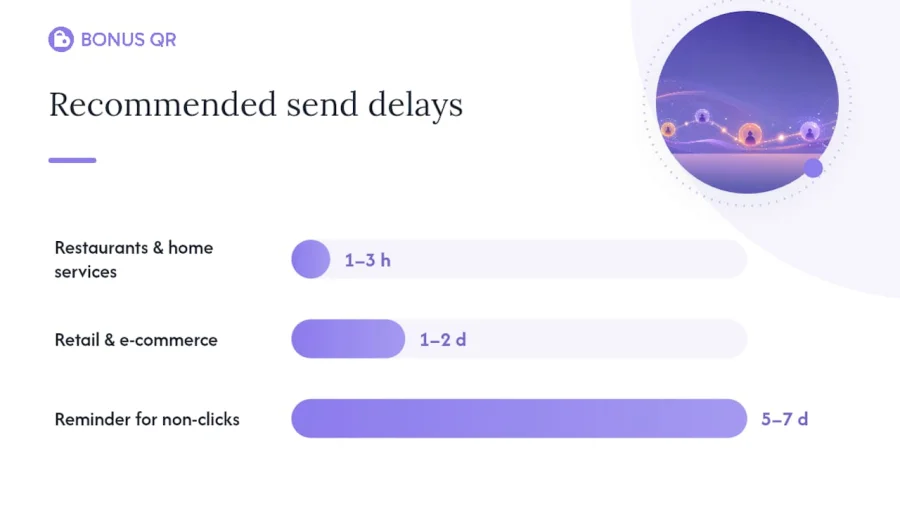
- Set the delay. Restaurants and home services do best sending within one to three hours; retail and e-commerce often wait a day or two so the product has actually been used.
- Send a short, personalised message with a single direct link straight to your Google review form, not your homepage.
- Queue one reminder five to seven days later for anyone who hasn’t clicked through.
- Connect the data source, whether that’s a CRM webhook, a CSV upload after each shift, or a no-POS setup where staff simply enter a phone number or scan a QR code at checkout.
Pro Tip: Filter out disputed jobs, refunds, and complaints before the request fires. A short conditional rule that suppresses sends for flagged transactions saves you from automating your way into a bad review.
Direct links matter more than most owners assume. A generic “leave us feedback” message converts poorly next to a one-tap link that drops the customer straight into the star-rating screen, which is part of why SMS-first sequences with direct links are consistently the highest-converting setup for local and service businesses.
Which channel and timing actually convert?
SMS wins on speed and open rates for most local and service businesses, but it isn’t the only tool worth running.
Recommended timing windows by business type:
- Restaurants and cafés: within 30 to 90 minutes of the bill being paid.
- Home services: within one to three hours of job sign-off.
- Retail: same day to next day, once the customer has left the store.
- E-commerce: two to five days after delivery confirmation, giving time to actually use the product.
- Professional services: within 24 hours of the engagement closing.
SMS converting fastest doesn’t rule email out. Adding a secondary email follow-up alongside an SMS-first sequence often produces the best combined results for home services and retail, while QR leave-behinds add a modest, single-digit lift as a supplemental capture channel. Test one variable at a time: swap the delay window, then the message copy, then the channel order, so you know what actually moved the needle.
What not to do: policy and legal cautions
Google allows businesses to request reviews from genuine customers, but it draws a hard line at rewarding or filtering those requests. Offering a discount for a positive review, or routing unhappy customers away from the public review form (a practice known as review gating), breaches Google’s own policy and can get reviews removed or listings suspended. Automate the ask, never the outcome.
Message phrasing matters too. A generic “please review us” invites a lazy star rating; asking what went well and what could improve nudges customers toward longer, more useful feedback rather than one-line praise.
Basic compliance checklist:
- Collect explicit consent before sending marketing SMS or email, and record how it was given.
- Give every message a clear, working opt-out and honour it immediately.
- Never offer money, discounts, or freebies in exchange for a positive review.
- Never suppress or redirect negative feedback away from the public review page.
- Keep customer data (numbers, emails) only as long as the request workflow needs it.
How to measure success without fooling yourself
Star rating alone hides the trade-off. Track requests sent, open and click rate, review completion rate, average rating, and average review length side by side.
The review length figure is the one most businesses skip, and it’s the one that catches trouble early: solicited reviews run 16.9% shorter on average, so a falling word count alongside rising volume tells you automation is crowding out the detailed, organic reviews that actually help buyers decide.
Worth testing:
- Shifting the send delay by an hour or a day.
- Two message variants, one asking generically, one asking for a specific detail.
- Reordering channels: SMS first versus email first.
- Adding or removing the single reminder to see its real effect on completion.
Implementation checklist: go live this week
- Collect consent at the point of sale or booking, and store it against the customer record.
- Map your trigger (job done, order delivered, appointment closed) and set the delay per service type.
- Generate your direct review link so customers land on the star-rating screen, not your homepage.
- Write two or three message templates and one reminder rule capped at a single follow-up.
- Assign an owner to monitor incoming reviews daily, especially anything under three stars.
- Filter disputed or refunded jobs out of the send queue before switching the automation live.
What does automated review collection actually cost?
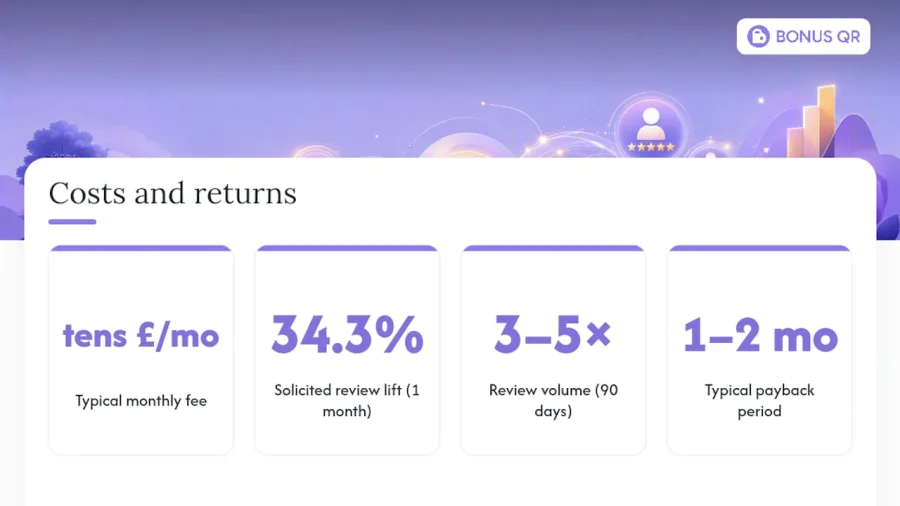
Software fees for review request automation typically sit inside a monthly SaaS subscription rather than as a standalone charge, and the range varies with how much sending volume and integration depth you need. Entry-level plans built around SMS and email templates tend to sit in the tens of pounds per month; platforms bundling review automation with loyalty, CRM, or booking integrations move into higher tiers as volume and features scale.
The bigger cost is usually implementation time, not the software itself. A no-POS setup where staff manually enter a phone number after each sale can be running the same day; a CRM or booking-software webhook integration takes longer to configure but removes the manual entry step entirely.
ROI tends to arrive faster than owners expect. Because solicited review volume can jump 34.3% in the first month of consistent asking, and vendor data shows three to five times the review count within 90 days, most SMBs see their star count and review total move visibly inside the first billing cycle. The payback calculation is simple: weigh the monthly fee against the value of one extra booking, sale, or client each month, since that’s roughly the bar most businesses need to clear to justify the subscription. Businesses converting even a small share of extra reviews into new bookings usually recover the cost within one to two months, based on how quickly review volume responds according to industry benchmarks.
Handling negative reviews after you automate
Automation doesn’t filter tone, so a bad experience will generate a bad review through the same pipeline as a good one, and that’s actually correct behaviour, not a bug. The moment you configure a system to skip or slow-walk unhappy customers, you’re back in review-gating territory and risking the same platform penalties mentioned earlier.
The better approach is a response protocol, not a suppression rule. Assign someone to check new reviews daily, respond to every negative one within 24 to 48 hours, acknowledge the specific complaint by name, and offer a concrete next step (a refund, a callback, a fix) rather than a generic apology. Public responses matter almost as much as the review itself. Prospective customers reading a one-star review with a calm, specific, helpful reply from the owner often trust the business more than they would a page of unbroken five-star praise.
Route recurring complaints back into operations. If three customers in a month flag the same issue, whether that’s a slow kitchen or a confusing checkout, that pattern is more valuable than the star rating itself. Pair review monitoring with a feedback collection process so recurring problems surface before they show up publicly, and treat automated requests as one input into a wider reputation habit rather than a fire-and-forget script.
Why balanced automation beats blind automation
Most guides treat automated review requests as a pure volume game, and that’s where they lead SMBs astray. The HKUST research is the part everyone skips past: solicitation grows total reviews while quietly shrinking the organic ones that carry the most detail. Chase volume alone and you can end up with a higher star rating and a thinner, less convincing review page.
The fix isn’t to automate less. It’s to automate the send and stay deliberate about the ask, which is precisely why review collection pairs so naturally with loyalty automation rather than replacing it. BonusQR’s own retention data shows automated rewards and reminders work because they’re consistent, not because they’re clever, and the same principle governs review requests. A no-POS setup means a café or a mobile detailing business can have SMS-triggered requests live within a day, without waiting on a technical integration.
— Michal
How BonusQR can help: quick summary and next step
BonusQR is the alternative to hiring an agency or building a custom review pipeline from scratch. It runs your review requests, loyalty rewards, and customer communication from the same dashboard, so you’re not stitching together separate SMS, email, and QR tools by hand. Send review requests by SMS or email, generate direct-link QR codes for the counter, and launch the whole workflow without any point-of-sale integration.
Start with the Free plan or step up to Basic at €19 a month to test a real request sequence on your own customer list. Track the metrics covered earlier, open rate, completion rate, and average review length, then adjust delay windows and message copy from there. Larger operations managing several locations can look at a branded white-label app once the workflow proves itself.
Sources
The HKUST feature on the hidden cost of soliciting reviews is the core evidence behind the quality trade-off discussed throughout this guide. Plaudit’s review automation guide supplies the timing and volume-lift benchmarks. Astucia’s tactics guide backs the follow-up cadence recommendations, and Endigita’s policy guide covers Google’s compliance rules. Babylovegrowth’s revenue research supports the ROI framing in the costs section.
- Hidden cost of asking for reviews — HKUST feature (2026)
- Review Automation for Small Businesses: 2026 Guide | Plaudit
- Automated customer reviews (2026): 7 tactics that work | Astucia
- Google review automation for local businesses (2026 guide) | Endigita
FAQ
What are automated reviews?
Automated reviews are review requests triggered without manual staff involvement, typically an SMS or email sent automatically after a purchase, appointment, or delivery, containing a direct link to leave a rating. The review itself is still written by a genuine customer; only the invitation is automated.
Is review gating illegal?
Review gating, filtering customers so only likely positive reviewers reach the public review page, breaches Google’s review policies and most other platforms’ terms, risking review removal or account suspension rather than criminal liability in most jurisdictions. It’s a policy violation with real business consequences, even where it isn’t a specific criminal offence.
Does Amazon send review requests automatically?
Amazon has its own built-in “Request a Review” button and automated email prompts sent directly to buyers on a seller’s behalf, separate from third-party tools. Sellers cannot personalise these Amazon-native requests or incentivise the outcome, which is stricter than the flexibility available through platforms like BonusQR for Google review requests.
What companies pay you to write reviews?
Legitimate businesses do not pay customers to write positive reviews. Paid or incentivised reviews violate the terms of Google, Amazon, and most major review platforms, and services offering payment for reviews are typically running schemes that risk account bans for the businesses using them.
How much does review request software typically cost?
Pricing varies by provider and feature depth, though entry-level plans commonly sit in the tens of pounds per month. BonusQR’s Basic plan starts at €19 a month, with a Free tier available to trial the workflow first.


