The popular advice is simple: generate a QR code, point it at a PDF, and remove printed menus. That approach creates more problems than it solves. A QR code for a restaurant menu is a customer-service channel, an operational record, and potentially a loyalty entry point. If the page loads slowly, hides allergens, requires an app, or leaves a customer without help, the code has only moved friction from the table to the diner's phone.
A practical deployment keeps digital access fast while preserving hospitality. The menu should update without reprinting, work on a range of devices, support accessibility needs, and produce useful evidence about customer behavior.
Rethinking the Restaurant QR Menu
A QR code is only the doorway. The important system sits behind it: the menu content, ordering path, allergen data, analytics, staff process, and fallback for customers who don't scan.
The UK's most significant restaurant QR-menu milestone came during the COVID-19 reopening period in 2020. English restaurants had to collect customer contact details for NHS Test and Trace, while shared physical menus created a repeated-touch hygiene concern. A table code could open an online menu and, in some venues, support digital visit registration. Contemporary reporting described QR codes moving from uncommon in restaurants and bars to widespread within only a few months of reopening. One UK printing-industry account estimated that QR codes appeared on about 40% of business orders during the pandemic, compared with less than 1% before COVID-19, an increase of at least 39 percentage points, or more than 40 times the earlier level. (Read the UK QR-code history)
That history explains why diners associate QR menus with contactless access, check-in, ordering, and reduced reliance on shared printed material. The technology began as an operational response to public-health restrictions, then became a broader digital dining interface.
A living menu beats a static file
A PDF can display a menu, but it often behaves like a photograph. Text may not reflow properly, screen readers may struggle, and a price or unavailable dish can remain visible until someone replaces the file. A mobile-first HTML menu gives operators a controlled destination where categories, prices, ingredients, images, translations, promotions, and availability can change without replacing every printed code.
That distinction matters during a busy service. If a dish sells out, the team should edit one destination rather than remove dozens of table stands. The printed code should point to a permanent redirect, not a temporary seasonal URL.
A useful restaurant marketing framework should also connect the menu with the rest of the guest journey. The Brisbane restaurant marketing guide offers relevant context for operators planning how menus, promotions, reviews, and repeat visits fit together.
Practical rule: The QR code should disappear into the experience. Customers should notice the menu, not the technology.
Setting Up Your Digital Menu System
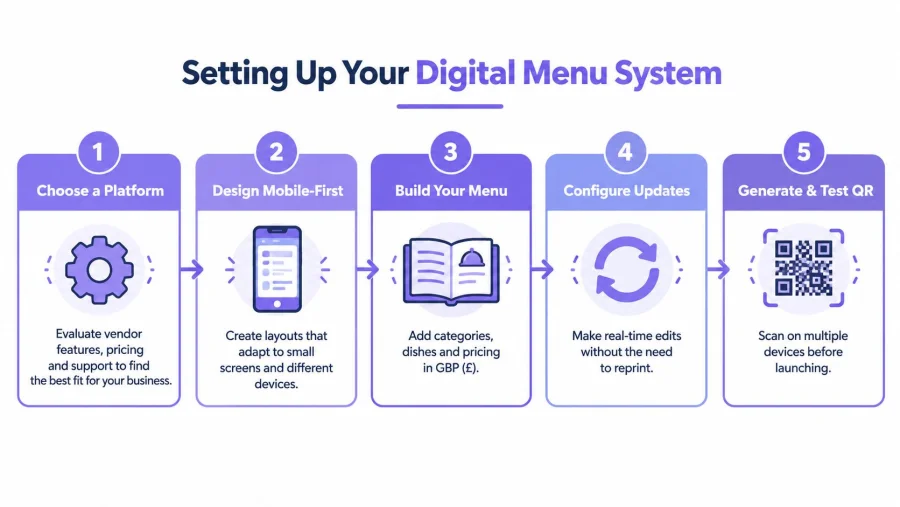
A reliable setup starts with the destination, not the graphic. Operators should choose a system that lets staff update dishes quickly, works in a mobile browser, and keeps the printed code unchanged when the menu evolves.
Build the destination first
The first step is a short, permanent redirect URL. It should lead to the current menu and remain stable if the operator changes categories, prices, or ordering software. This prevents a common and costly failure, where a restaurant prints a new batch of stands because the original link was tied to a temporary page.
The menu itself should use readable HTML rather than a scanned image or PDF-only presentation. Dish names, prices, descriptions, ingredients, and allergen information need to remain selectable, resizable, and compatible with assistive technology.
Generate a code that survives service
The QR code should use high error correction, preferably level H, with a clear quiet zone around the pattern. That margin isn't decoration. It helps cameras distinguish the code from nearby text, logos, table surfaces, and background patterns.
Print the code at a size appropriate to the scanning distance. A code that works in an office may fail when a diner scans across a table, under warm lighting, through acrylic glare, or at an angle. Test the final printed material, not just the digital preview.
Test the complete journey
Testing should cover the situations that cause real failures:
- Scan using different phones and camera apps.
- Check the page under glare, dim lighting, and changing table angles.
- Test weak mobile connectivity and slow loading.
- Confirm that every category, item, price, modifier, and allergen label is current.
- Verify that staff can provide paper access and place an assisted order.
- Track scans, menu loads, item clicks, exits, orders, and assisted orders with proportionate analytics.
UK adoption indicates meaningful familiarity, but not universal usability. 34.2% of UK internet users aged 16 and over reportedly scan QR codes monthly, while 13% of UK adults find them difficult to use. Independent UK reporting also indicates that around 60% of restaurant customers still want a physical-menu option, rising to approximately 75% among diners over 55. (Review the QR adoption and usability findings)
For operators comparing broader systems, this practical guide to restaurant management software for small businesses can help place menu management alongside ordering, payments, and daily operations.
Compliance and Accessibility Essentials
A menu's compliance layer is operational data, not decorative content. Allergen information must stay connected to recipes, suppliers, preparation records, and substitutions, because a digital interface is only as safe as the information behind it.
Treat allergens as versioned records
A UK restaurant should build a dish-level matrix covering all 14 major UK allergens. Each dish needs a current ingredient record, with confirmed allergens separated from cross-contamination or “may contain” risks. A recipe change, supplier substitution, or seasonal update should trigger review before the revised dish appears online.
Information should appear before ordering, on the dish itself or through a clearly labelled filter. A generic disclaimer at the bottom of a menu doesn't give customers the same practical access. UK food businesses must provide information about the 14 major allergens, and current UK guidance emphasises clear, accurate, accessible information before ordering. (See UK QR-menu allergen guidance)
Make the interface usable without guesswork
Readable HTML is safer than a scanned PDF because customers can zoom, reflow text, move with a keyboard, and use screen readers. Controls should have clear labels, strong colour contrast, and logical focus order. Food photography needs descriptive alternative text when it communicates information rather than merely decorating the page.
A contrast ratio checker guide is useful when testing text, buttons, allergen labels, and promotional panels. Colour alone shouldn't communicate that an item contains an allergen or is unavailable.
The UK legal framework is primarily the Equality Act 2010, rather than the European Accessibility Act, which generally doesn't cover UK restaurants. Operators should still treat accessibility as a service standard, not just a legal exercise.
Separate service access from marketing
A customer should be able to view the menu without downloading an app, creating an account, or accepting optional marketing. The basic menu, ordering, payment, and loyalty journey should be distinct decisions.
Privacy-conscious implementation means identifying the restaurant, explaining data use in plain language, using proportionate analytics, and keeping marketing consent separate and explicit. A QR sticker can also be tampered with, so staff should periodically check that printed codes still lead to the approved destination.
Record menu versions, approval dates, failed loads, allergen-page exits, accessibility assistance requests, and discrepancies between the live menu and kitchen records. Those are safety and service indicators, not just marketing metrics.
The Case for a Hybrid Menu Strategy
A QR-only rollout can look efficient on a spreadsheet while weakening the guest experience in the dining room. Customers may have a flat battery, limited data, an older phone, a visual impairment, or a straightforward preference for paper. Staff shouldn't make those customers justify a basic request for a menu.
A UK Lightspeed study surveyed 1,000 UK consumers as part of a 7,500-person global sample. It found that 85% preferred a physical menu in casual-dining settings, while 93% expected one in fine-dining restaurants. 35% specifically asked for a physical menu after initially being offered a QR-code menu. (Read the Lightspeed UK hospitality findings)
Those findings support a dual-channel model. The digital menu can handle rapid price updates, allergen detail, translations, photographs, promotions, and accessibility features. Printed menus can provide certainty, comfort, and immediate access when technology fails.
Design the fallback as part of the service
The paper option shouldn't be hidden in a drawer or offered with visible reluctance. Hosts and servers should use a neutral phrase such as, “A digital menu is available at the table, and a printed copy is available if preferred.” That wording makes choice normal.
The printed version doesn't need to mirror every digital feature. It should contain the core dishes, prices, and essential allergen route, while staff provide current details for high-risk requests. If prices or dishes change frequently, staff need a clear process for identifying affected copies.
Protect revenue and hospitality
A QR menu can reduce repetitive requests, but it can also remove natural opportunities for staff to recommend a dish, explain preparation, or reassure a cautious diner. The right model assigns simple information to the phone while keeping human guidance available for recommendations, allergies, celebrations, and complicated orders.
Hybrid service also protects customers who might otherwise leave the ordering journey. A paper menu is a modest operational safeguard compared with losing trust at the table. The strongest rollout doesn't ask whether digital or paper is superior. It asks which channel makes a particular guest comfortable and able to order.
Strategic Placement and Signage
A technically sound QR code still fails if nobody can find it, the print catches glare, or the instruction is unclear. Placement should follow the guest journey rather than the operator's available counter space.
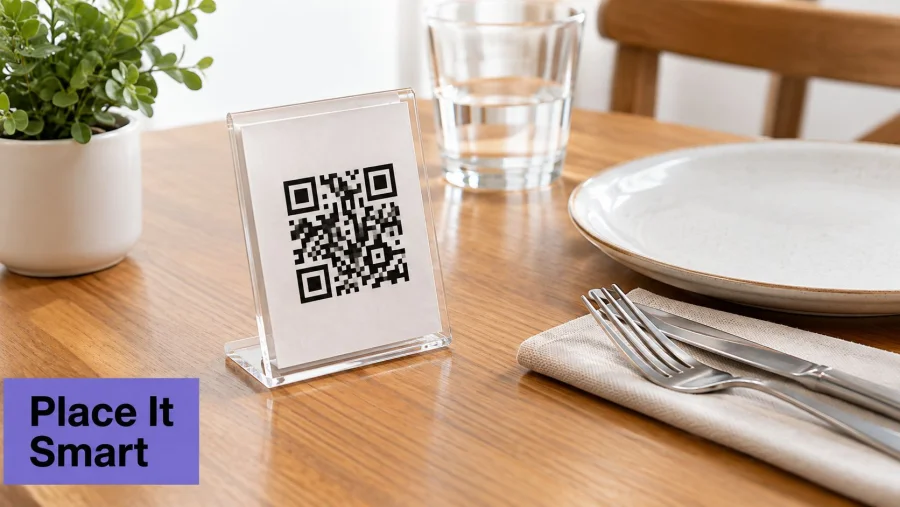
A tabletop stand works well when it sits within natural sight lines, remains visible after plates and drinks arrive, and doesn't force customers to lift condiments. A counter code suits cafés and quick-service venues, especially when the queue needs access before payment. Takeaway packaging and receipts can support later browsing, reorders, feedback, or loyalty, provided the destination is still useful away from the venue.
Make scanning physically easy
Use a dark code on a light, matte background. Acrylic can look polished, but reflections from windows, candles, and overhead fittings can interfere with cameras. Coated or laminated materials should be checked under actual service lighting, including the low-light conditions of an evening booking.
The code needs a clear quiet zone and enough printed area for the intended distance. Keep surrounding copy short:
- State the outcome: “Scan to view the menu.”
- Add the next action: “Scan to view menu and order.”
- Show a typed URL: This gives customers a non-camera route and helps screen-reader users reach the page.
- Keep the destination direct: The scan should open the menu, not a crowded homepage with several competing buttons.
The menu page should use readable HTML for dish names, prices, ingredients, and allergens. Food images need meaningful alternative text where they convey information. Controls should have strong contrast and work with keyboard navigation, screen readers, magnification, reflow, and text-to-speech. UK restaurant accessibility guidance also recommends replacing PDF-only menus and displaying a written address alongside map embeds where maps are used. (Review practical restaurant accessibility guidance)
Train the rescue route
Staff should know what happens when a customer can't scan. The answer is immediate assistance, not a debate about phone settings. A server can provide a paper menu, read out options, enter an assisted order, or direct the customer to the typed URL.
Operators developing related campaigns can use these actionable QR-code marketing ideas for small businesses, while keeping menu access separate from optional promotional journeys.
Measuring Success with Analytics
Scan volume is a starting signal, not proof of success. A stand can receive many scans because customers are curious, then produce few menu loads, item interactions, or orders. Restaurant operators need to measure the points where the guest journey either continues or stops.
Dojo research involving 300 UK hospitality owners and managers and 500 restaurant customers found that 43% of customers had used some form of order-and-pay technology since July 2020. The same research reported that 57% of restaurants offered both physical and digital menus, 83% of surveyed diners preferred using a mobile device to order food and drinks, and 88% of restaurants using online menus expected to continue doing so after the pandemic. (Read the Dojo hospitality research)
The figures support offering QR access at tables, counters, takeaway packaging, and receipts, but they don't prove that every guest wants paperless dining. Measurement should preserve that distinction.
Track the complete funnel
A useful dashboard separates these events:
| Stage | What it reveals |
|---|---|
| Scan | Whether placement and signage attract attention |
| Menu load | Whether the destination works on the customer's connection and device |
| Item click | Whether categories and dishes encourage exploration |
| Order start | Whether the menu makes the next action clear |
| Completed order | Whether ordering and payment work without assistance |
| Assisted order | Where staff intervention remains necessary |
| Exit | The point at which customers abandon the journey |
Break results down by table, service period, menu version, and ordering method. A high scan count with weak menu loads suggests a technical or connectivity problem. Strong menu views with low item interaction may indicate poor hierarchy, unclear prices, or an overly dense page. Frequent assisted orders can reveal a training need, an accessibility barrier, or a confusing modifier flow.
Keep analytics proportionate
The menu shouldn't become a hidden data-collection funnel. Track what the restaurant needs to improve service, explain analytics clearly, and don't require personal data for anonymous menu viewing. Loyalty enrolment, visit history, and promotional consent should remain optional.
A focused customer engagement measurement guide can help operators connect menu activity with repeat visits without treating every scan as a conversion. The most useful comparison is between digital outcomes and the staff-assisted route, not between QR users and an imagined QR-only future.
Review the dashboard after menu changes, service-period changes, and signage changes. If the numbers don't identify a decision, the restaurant is collecting activity rather than insight.
A successful QR menu gives customers a quick digital option without making hospitality conditional on smartphone ownership. Start with a permanent redirect, mobile HTML, accurate allergen records, accessible design, durable signage, and a visible paper fallback. Then use BonusQR as one practical option for combining a digital menu with optional loyalty features such as rewards, visit history, and customer campaigns, while keeping menu access separate from required data capture. Visit BonusQR to review the available setup and launch a restaurant menu and loyalty journey that the team can measure and improve.


