The single most effective way to get more Google reviews is to ask every satisfied customer within 24 hours, using a direct review link or QR code, then automate a polite follow-up and reply to what comes in. Skip incentives, skip star-rating requests, skip gating unhappy customers away from the form. Pace your asks so growth looks steady, not sudden, and Google’s systems will treat your profile the way genuine customers do: with trust.
TL;DR:
- Regularly ask satisfied customers for reviews within 24 hours using a direct link or QR code, avoiding incentives or star-rating requests to maintain trust.
- Verify and optimize your Google Business Profile before sending review requests, placing QR codes in visible customer touchpoints like receipts and signage.
- Time review requests appropriately based on the industry, such as immediately after service for trades and within 24 hours for retail or professional clients.
- Automate review requests triggered by genuine completion events and limit follow-ups to avoid customer irritation or detection as manipulation.
- Respond to all reviews promptly and sincerely, personalizing replies to positive and negative feedback while avoiding any incentivization or review gating practices.
How do you get more Google reviews starting today?
You do not need a new system to start collecting reviews this week. You need five decisions, made in order, and about an hour of setup.
- Verify your Google Business Profile, confirm your name, address, phone number and opening hours are correct, then copy your direct review link and generate a QR code from it.
- Choose your primary channel. SMS tends to convert better for tradespeople and local services because people read texts within minutes; email suits professional and B2B relationships where a longer message feels appropriate.
- Write one short message template and rehearse the verbal version with staff, so the ask sounds the same whether it is typed or spoken.
- Automate a single follow-up for anyone who has not clicked within 48 to 72 hours, and set a recurring weekly slot to check new reviews and reply.
That is the whole loop: ask, automate, reply, repeat. Everything in the rest of this guide is about making each step sharper.
How do you set up your Google Business Profile and review link?
Every review starts with a working Google Business Profile, so get the basics right before you send a single request. Log into Google Business Profile and confirm your listing is verified, then check your name, address, phone number and hours match what customers actually experience. A mismatch here confuses both customers and Google’s ranking systems.
Inside the dashboard, look for the “Get more reviews” panel. Google documents this directly on Business: copy the short review link it generates, and use that same link to build a QR code with any free generator.
Where you place that QR code matters more than most business owners assume.
- Print it on receipts, invoices, or takeaway bags.
- Add it to a small table tent or counter card near the till.
- Include it in the signature of post-service emails.
- Stick it inside vehicles for mobile trades, where customers see it right after the job.
Pro Tip: Run your review link through a link shortener with basic UTM tagging so you can see which placement (receipt, email, van sticker) actually drives clicks, without collecting any personal data on the customer.
When and how should you ask for a review?
Timing decides whether a customer reviews you at all. Ask too late and the moment of satisfaction has faded; ask too often and you look desperate, or worse, manipulative.
- Trades and home services: ask the same day the job finishes, ideally within an hour of the invoice being paid, while the result is still visible.
- Retail and hospitality: ask at the point of sale or within 24 hours via SMS, when the experience is freshest.
- Professional services (accountants, consultants, clinics): ask within 24 to 48 hours of the appointment or delivered work, giving the client a moment to reflect first.
- Send one follow-up only, three to five days later, if there has been no response. A second or third nudge rarely improves conversion and tends to irritate people instead.
Keep the language plain and never mention star ratings. A short SMS might read: “Thanks for choosing us today. If you have a minute, we’d love your honest feedback here: [link].” An email can add one line of warmth before the same link. In person, something as simple as “If you’ve got 30 seconds, a review would really help us out” outperforms anything scripted or stiff.
How do you automate reviews without tripping Google’s filters?
Automation is what turns a good habit into a repeatable system, but the trigger point matters as much as the tool. Tie your review request to a genuine moment of completion: a job marked finished in your CRM, a delivery confirmation, a booking marked “attended” in your calendar or POS system. That single automated touch, paired with one follow-up, is enough to lift response rates meaningfully. Industry data suggests a direct-link request converts roughly 15 to 25% on its own, often doubling once a follow-up is added.
Where automation goes wrong is scale. Do not upload your entire historic customer list and message everyone in one afternoon.
- Send legacy-list requests in small batches over several weeks, not one blast.
- Track four numbers weekly: requests sent, link clicks, published reviews, and average reply time.
- Aim for a steady run rate, something like five to ten new reviews a month for most small operators, rather than a single spike followed by silence.
What should you do once reviews start coming in?
Replies are not an afterthought. They add fresh, relevant text to your profile, and they visibly demonstrate that a real business is listening.
- For positive reviews, thank the customer by name where possible and reference something specific they mentioned, not a generic “thanks for your feedback.”
- For negative reviews, acknowledge the concern, apologise where appropriate, and invite them to resolve it offline through a phone number or email, describing the corrective step you have taken.
- Check any sudden cluster of one-star reviews for signs of a spam attack or a competitor-driven pile-on, and flag suspicious reviews to Google through the profile dashboard rather than deleting or ignoring them.
- Repurpose your best reviews as website widgets or short social posts, which extends their value well beyond the profile itself.
Pro Tip: Keep two or three reply templates for common scenarios, but personalise the first line every time. A visibly copy-pasted reply reads as insincere even when the sentiment is genuine, and can undercut the trust you’re trying to build.
What does Google actually forbid when asking for reviews?
Google’s own contribution policy is unambiguous: incentivising reviews, review-gating (filtering unhappy customers away from the public form while pushing happy ones to it), asking for specific star ratings, and posting fake or employee-written reviews all count as rating manipulation. Google can remove the reviews and, in repeat cases, suspend the listing entirely.
- Never offer a discount, entry into a prize draw, or loyalty points in exchange for a review.
- Never split customers by likely sentiment before asking.
- Never batch-message hundreds of old contacts in one sitting; sudden volume spikes read as manipulation to Google’s detection systems.
- If reviews vanish or your rating drops sharply overnight, check for filtering, document your request pattern, and use Google’s official reporting tools rather than resending mass requests.
Can loyalty tools like Bonusqr support a compliant review workflow?
A loyalty platform will not replace the discipline above, but it can remove the friction that stops busy staff asking consistently. Bonusqr’s QR generation, automated post-visit messaging, and analytics dashboard cover the mechanical side: getting the right link in front of the right customer at the right moment, then tracking whether it worked.
- Use QR codes on receipts or loyalty cards purely to open the review link, never as a reward trigger.
- Automate the “thanks for visiting” message separately from any points or stamp-card activity, so rewards and review requests never look linked.
- Keep loyalty programmes focused on repeat visits and customer retention, and let review requests run as their own, unincentivised message.
Handled this way, a tool built for customer engagement and repeat-visit rewards sits comfortably alongside a clean review programme, rather than blurring the two together.
Why steady review growth beats short-term bursts
Most businesses chasing “review growth hacks” overlook the boring truth: a habit of asking, automating one follow-up, and replying consistently outperforms any clever trick. Build the checklist into your weekly routine, measure it, and the reviews follow.
— Michal
A simpler way to run the whole review loop
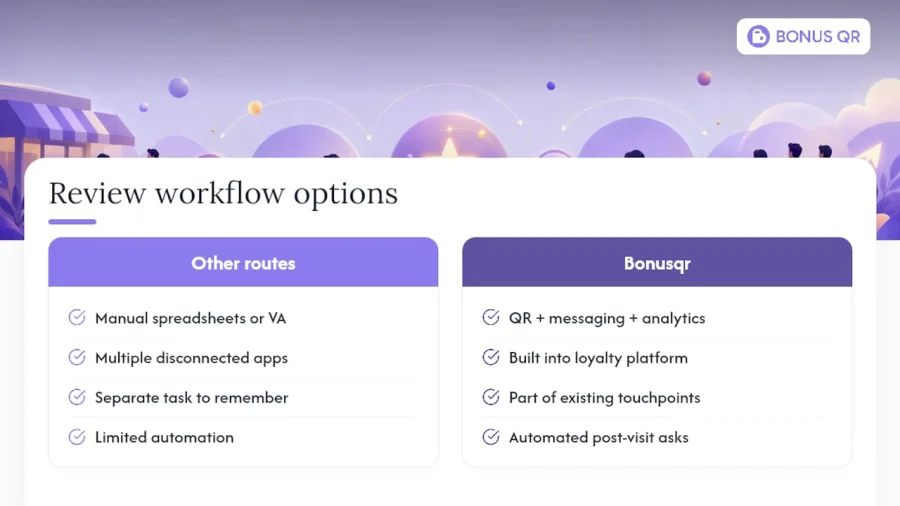
There are other routes to more reviews: manual spreadsheets, a virtual assistant sending texts one by one, or a dozen disconnected apps stitched together. Bonusqr takes a different route by folding the QR generation, automated post-visit messaging, and analytics into one platform you already use for loyalty and rewards, so the review ask happens as a natural extension of a visit rather than a separate task someone has to remember. Pair it with a QR code placed where customers actually look, receipts, table tents, packaging, and the request becomes part of your existing customer touchpoints rather than an extra chore.
The platform offers various subscription plans including a free option for testing, as well as paid tiers for businesses that want to automate messaging and track results. Check the pricing page and set up your first automated review trigger this week.
Sources
- Tips to get more reviews - Google Business Profile Help
- How to Get More Google Reviews: 2026 Guide | Plaudit
- How to Get More Google Reviews for Your Business (Legal, 2026 Guide) | ReplyWithCare
FAQ
Is it legal to buy Google reviews?
No. Buying reviews, or offering any incentive in exchange for one, breaches Google’s contribution policy and counts as rating manipulation. Google can remove the reviews and suspend the associated Business Profile if it detects the pattern.
How do you get 1,000 Google reviews?
There is no shortcut to four figures; it comes from a repeatable weekly system run for months or years, not a single campaign. Businesses that reach that volume typically maintain a steady pace, often five to ten new reviews a month, by asking every satisfied customer and automating one follow-up.
How can you increase Google reviews for free?
Copy your existing Google Business Profile review link, turn it into a free QR code, and place it on receipts, invoices, or a counter card. Combine that with a verbal ask at the point of satisfaction, which costs nothing beyond staff training.
How many five-star reviews does it take to raise your rating?
It depends entirely on your current rating and total review count, since Google averages every review rather than weighting recent ones more heavily. A business with fewer reviews needs far fewer five-star reviews to shift its average than one with many reviews at the same rating.
Can you incentivise Google reviews at all?
No. Any reward, discount, or entry into a draw tied to leaving a review breaches Google’s policy, regardless of whether the incentive is tied to a specific rating. Loyalty rewards must stay separate from review requests, rewarding the visit itself rather than the act of reviewing it.


