Apple Wallet vs Google Wallet: What It Means for Loyalty
Apple Wallet and Google Wallet are the built-in apps that hold cards and passes on iPhones and Android phones. They are close cousins with different homes: Apple Wallet lives on Apple devices, and Google Wallet lives on Android phones. For a shopper they mostly feel the same. For a business owner, the choice shapes how your loyalty cards reach customers, how they update, and how much technical work stands between you and a working program.
Most search results compare these wallets as payment tools. This guide does that briefly, then focuses on what small business owners actually need: how each wallet treats loyalty passes, what you need to issue them, and how to cover both customer groups at once.
Key Takeaways
- Apple Wallet and Google Wallet store cards and passes. Apple Pay and Google Pay are the services that handle payments. Mixing them up is the most common source of confusion.
- Both wallets support loyalty cards with real-time updates and location-aware reminders, so neither is “better” for loyalty in general. The better one is the one your customers already carry.
- Issuing passes directly requires a loyalty backend or a pass provider. A small business rarely builds this itself.
- Most businesses serve both iPhone and Android users, so the practical answer is a single loyalty platform that creates passes for both wallets.
Wallet vs Pay: The Distinction That Clears Up Most Confusion
Before comparing the two ecosystems, separate the app from the payment service. Engadget’s comparison frames it this way: Apple Pay and Google Pay are the services that handle payments, while the Wallet apps store tickets, cards and passes. Wise makes the same point for Apple: Apple Wallet is the one-stop shop for digital cards and passes, whereas Apple Pay is focused on mobile payments.
Why this matters to you as a business owner:
- Payments are handled by your payment terminal and processor. Your customers tap their phone, and the wallet presents a payment card.
- Loyalty is a separate layer. A loyalty pass is not a payment card. It sits next to the cards in the wallet and carries your brand, a balance of points or stamps, and your offers.
You can accept Apple Pay and Google Pay without offering any loyalty pass, and you can offer wallet loyalty passes without changing how you take payments. That separation is exactly why a QR-based loyalty program works without replacing your POS.
Apple Wallet vs Google Wallet at a Glance
The table below compares the two from a business perspective. Details come from Apple and Google’s own documentation, linked in the sections that follow.
| Feature | Apple Wallet | Google Wallet |
|---|---|---|
| Where it runs | Apple devices such as iPhone and Apple Watch | Android phones |
| Payment service | Apple Pay | Google Pay |
| What it stores | Payment cards, loyalty passes, tickets, memberships | Payment cards, loyalty cards, offers, tickets, boarding passes, keys, IDs |
| Loyalty passes | Yes, with points or visits, real-time alerts | Yes, with offers, location-based notifications, real-time updates |
| Pass updates | Push updates; tap to view new details | Real-time updates |
| Availability | Official list of supported countries and regions | Over 50 countries and regions, features vary by country |
| Best fit | Customer base with many iPhone users | Customer base with many Android users |
Notice that the loyalty rows are nearly identical. The real difference is who holds which phone, which is a question about your own customers, not about the technology.
Devices and Availability: Who Can Use What
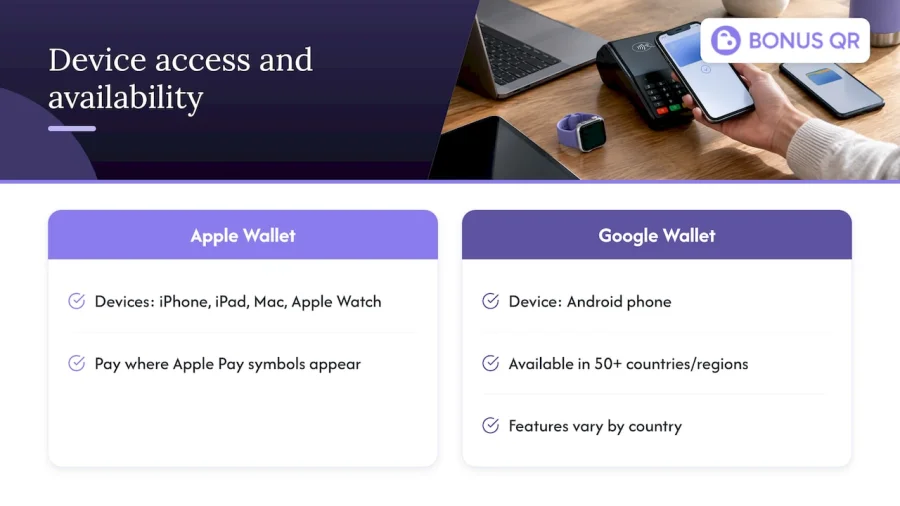
Apple describes Apple Pay as usable on compatible Apple devices, including iPhone, iPad, Mac and Apple Watch, and accepted wherever Apple Pay symbols appear. Apple publishes an official list of countries and regions that support Apple Pay, which is worth checking if you serve tourists or operate outside the US.
Google describes its wallet as the place on an Android phone to store payment cards, tickets, passes, keys and IDs, and says tap-to-pay works wherever Google Pay or contactless logos appear. Google’s help documentation states that Google Wallet is available in over 50 countries and regions, with features varying by country. If you run a hotel, a gas station on a travel route or a shop in a tourist area, that variation matters: a feature your local customers rely on may not work the same way for a visitor from another country.
The practical conclusion is simple. Each wallet reaches only its own device family, so a business that picks one wallet quietly leaves out part of its customers. A restaurant with a young, iPhone-heavy crowd and a gas station with a broad mix of drivers will see very different splits, and neither can know the split without looking at its own customers.
Security: How Each Wallet Protects Card Data
Owners often worry that putting loyalty or payment data on a phone is risky. The two wallets approach payment security differently on paper, and both are built around keeping the real card number away from the merchant.
The European Union’s cybersecurity agency ENISA, in its report Security of Mobile Payments and Digital Wallets, describes Apple Pay’s design: tokenization so the real card number and security code are not used in payments, a tamper-proof Secure Element, encrypted transmission of card data, and localized authorization details for contactless transactions. The same report notes that Google moved from a Secure Element to Host Card Emulation so payment credentials could be stored in the cloud. That report dates from 2016, so treat it as a description of the architecture at the time rather than a current feature list.
For a current consumer-level summary, Which? reports in 2026 that Apple Pay card details are encrypted and stored only on the user’s iPhone, replaced with a device account number, and that Google Wallet uses a similar equivalent.
What this means for loyalty: a loyalty pass does not contain a payment card number. It holds your program data, such as a customer identifier and a points balance. Keeping the loyalty layer separate from the payment layer is a sound design principle, and it is one reason a loyalty platform does not need access to your payment terminal. If you are planning a branded app of your own and want to understand how card data and contactless authorization are protected in app development, mobile app design services are a useful place to see what the process involves.
Loyalty Passes in Apple Wallet
Apple’s Loyalty Passes documentation says businesses can use Apple Wallet passes for points or visits and send real-time alerts, for example updates on points and balances or seasonal campaigns and offers. It also describes contactless loyalty check-in and automatic enrollment after an Apple Pay purchase, which is the smoothest path for businesses with a certified payment setup.
Apple’s Getting Started guide adds two details that matter for retailers and cafes:
- Passes are time- and location-enabled, so they can appear on a customer’s device at the right moment, such as when they are near your shop.
- Passes can be updated with push notifications, so the customer taps to view the new balance or offer.
Apple also describes pass styles. A store card style suits loyalty and balance-type passes, while generic styles cover things like membership or claim tickets. The style determines how the pass looks and which details, such as a time window or location relevance, it can show.
For a deeper look at running this channel, see our Apple Wallet for customer engagement guide.
Loyalty Passes in Google Wallet
Google’s developer documentation says customers can tap to pay wherever Google Pay is accepted and can store loyalty cards, boarding passes, tickets and other everyday essentials on an Android phone. Retailers can let customers add loyalty cards and offers, then engage them with location-based notifications and real-time updates.
In practice, a Google Wallet loyalty card gives a small business three things:
- A permanent place on the phone. The card sits alongside the customer’s payment cards rather than in a separate app they may delete.
- Offers in context. A customer who is close to your location can see a relevant reminder or promotion.
- Live balances. When points or stamps change, the pass reflects it without the customer reinstalling anything.
We have written two guides on this side: the digital loyalty card for Google Wallet guide and the Google Wallet loyalty card retention guide. If your question is specifically about Google’s payment side, our mobile loyalty card for Google Pay reference covers it.
What a Business Needs to Issue Wallet Passes
This is where many owners get stuck. Apple says that a POS provider needs its own loyalty backend or an integration with a certified pass provider, plus support for a certified payment terminal through a certified payment transaction software company or gateway. In plain terms, wallet passes do not appear by themselves. Something has to create the pass, store the customer’s balance, push updates and tell the wallet when a point is earned.
There are three realistic routes:
- Build it yourself. This means developing a loyalty backend, managing pass creation for each wallet, and maintaining it as the wallets change. It is a project for a company with developers, not for a corner cafe.
- Rely on your POS vendor. If your POS includes loyalty, passes may be possible, but you are tied to that vendor’s features and to the hardware you already use.
- Use a loyalty platform. A platform handles the backend, the pass creation and the automation. You configure the program and the platform runs it.
For small businesses, the third route is usually the fastest. It is also why a QR-based approach is attractive: the customer scans a code at the counter, joins, and collects rewards, with no terminal changes. BonusQR is built on that principle. It runs without a POS system and supports Apple Wallet and Google Wallet, so your customers can keep their card in whichever wallet their phone uses.
Which Wallet Should You Prioritize?
The honest answer for most businesses is that you should not have to choose. Still, it helps to know how each situation looks.
Start from your customer base
Look at who walks through your door. A gym or wellness studio in a city center may skew toward iPhone users. A gas station, a grocery store or a hotel serves a broader mix. If you do not know the split, ask staff what phones they see at the counter, or look at the device data in your own website or booking analytics.
Consider the experience you want to offer
- If you want automatic enrollment after a purchase, Apple describes this for Apple Pay purchases, but it relies on a certified payment setup.
- If you want location reminders and live offers, both wallets support them.
- If you run tiered rewards or cashback, the wallet only displays the status. The logic lives in your loyalty platform.
Plan for travelers
Because Google says Wallet features vary by country, businesses serving tourists should not assume a feature works identically for every visitor. A QR code that works from any phone camera is a useful fallback, since it does not depend on which wallet or country the customer uses.
Reduce the work with one platform
The strongest position is to offer both. Customers scan one QR code, add the pass to the wallet their phone supports, and you manage a single program with one set of rewards, notifications and analytics. That is the point of a unified loyalty platform: the wallets are delivery channels, and the program is yours.
Example: A Neighborhood Cafe Serving Both Phones
Consider a cafe with a stamp card: buy nine coffees, get the tenth free. On paper cards, customers lose them and staff cannot see who is coming back.
With a digital stamp card:
- A sign by the register shows a QR code.
- The customer scans it, joins in a few seconds and adds the card to Apple Wallet or Google Wallet.
- At each visit, the barista scans or confirms the visit, and the stamp count updates.
- When the card is nearly full, a notification reminds the customer that one more coffee earns the reward.
- The owner sees visit frequency and reward redemptions in the analytics and can send a promotion on a slow weekday.
Nothing in this flow touches the card reader. The payment still goes through the existing terminal, and the loyalty layer runs beside it. That is the practical meaning of the wallet versus pay distinction from earlier.
Our Perspective
We see the Apple Wallet versus Google Wallet question from small business owners all the time, and we think it is slightly the wrong question. Customers do not choose a wallet because of your loyalty program. They already use the one that came with their phone. Your job is to meet them there.
That is why we built BonusQR around a QR code and not around a terminal. A customer can join in seconds, a business can start without a POS integration, and the program can be managed from one place whether the pass ends up in Apple Wallet or Google Wallet. Points, stamps, cashback, tiered rewards, referral and review modules, and automated notifications all work from the same platform, so the owner is not running two programs.
Repeat customers are the lifeblood of a small business. A loyalty program should protect that, not become another system to babysit. We would rather an owner spend the afternoon with customers than with a wallet developer guide. Choose the platform that takes the technical work off your plate, then let the data tell you what your customers actually respond to.
Michal Palus
Getting Started With BonusQR
If you want loyalty passes in both wallets without building anything, BonusQR is designed for exactly that. The Free plan lets you start without a published price, Basic costs €19 per month and Premium costs €69 per month, so you can match the plan to the size of your program.
For businesses that want their own brand front and center, the white-label option carries a one-off setup fee of €690 and a monthly subscription of €69. If you need something fully tailored, such as an e-shop or booking widget inside your own app, custom app development starts from €1,500 one-off, with monthly maintenance from €69.
FAQ
Is Apple Wallet the same as Apple Pay?
No. Apple Wallet is the app that stores cards, passes and tickets, while Apple Pay is the payment service that lets you pay with a card stored on your device. Google follows the same split with Google Wallet and Google Pay. For a business, that means you can offer loyalty passes without changing how you accept payments.
Which wallet is better for loyalty cards?
Both support loyalty cards with real-time updates and location-based reminders, so neither wins on features alone. The better choice is the wallet your customers already use, which depends on whether they carry iPhones or Android phones. Offering both through one platform avoids the question.
Do I need a POS system to offer wallet loyalty passes?
Not with a QR-based platform. Apple’s documentation notes that POS providers need their own loyalty backend or a certified pass provider, which is why a loyalty platform that creates the passes for you is the simpler route. BonusQR works without a POS system.
Can customers use Google Wallet on an iPhone?
Google describes its wallet as an Android phone feature, and Apple Pay is described for Apple devices. For that reason, we suggest planning for both ecosystems so iPhone and Android customers can all collect rewards. A QR code that opens in any phone camera gives every customer a way in.
Is it safe to store loyalty passes in a digital wallet?
Loyalty passes hold program information such as a balance, not payment card numbers. For payments, Which? reports that Apple Pay card details are encrypted and replaced with a device account number, and that Google Wallet uses a similar approach. Customers can also use the security lock already on their phone.
Sources
- Apple Wallet Vs. Google Wallet: What Are The Differences (Engadget)
- Apple Pay vs. Google Pay: How do they compare (Wise)
- Countries and regions that support Apple Pay (Apple Support)
- Security of Mobile Payments and Digital Wallets (ENISA)
- What is Apple Pay and Google Wallet? (Which?)
- Loyalty Passes (Apple Developer)
- Getting Started with Apple Wallet (Apple Developer)
- Google Pay & Wallet (Google for Developers)


