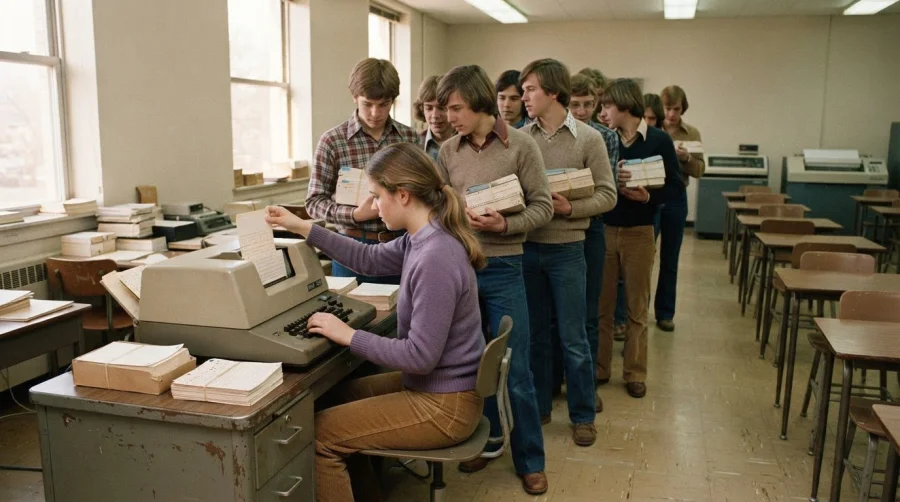
Punch cards made information machine-readable, but limited access to keypunches and slow programming turnaround could turn routine work into a bottleneck. That’s why our old punch card system failed: people had to share equipment, then wait to run and correct their programs. In one high-school Fortran class, 30 students shared a single card punch, and assignments given on Monday were due Friday, with at most four program runs before submission.
It’s easy to see why businesses valued a system that organized data in a format machines could process. But when every change depended on physical equipment and a place in the queue, even a small error could cost time. This article explains how punch cards worked, why access and programming delays made them difficult to rely on, and what those limits reveal about the shift to digital loyalty tools.
Key Takeaways
- See how reliance on specialized equipment and queued processing could slow everyday work.
- Understand the ongoing effort involved in keeping a physical card-based process usable, from handling cards to correcting errors.
- Learn what to consider when moving from a manual punch-card process to a digital loyalty approach.
- Discover how punched cards encoded information and why their format shaped the tasks they could support.
- Explore how BonusQR’s Digital Stamp Card can support a more convenient way to reward returning customers.
Limited access to keypunches, card readers, and printers
A punch-card workflow depended on several machines working in sequence. Staff first entered information with a keypunch, then sent cards to a reader connected to a computer. Processing produced results that often needed printing. If a device was busy, unavailable, or needed attention, the rest of the workflow could stall. Access meant more than owning equipment: the right machine also had to be available when someone needed to enter, run, or review information.
Programming classes show how a shared keypunch could restrict access. At SUNY Stony Brook in 1976, one student recalled that submitting a punch-card program and receiving its output took one hour when the work wasn’t done the day before it was due. That hour included more than computer processing. The user needed to submit the cards, wait for the job, and collect its output. A delay at any point left less time to make corrections.
Computer queues could make deadline pressure worse. At the University of Waterloo in 1979, waits for computer jobs could reach 45 minutes before assignment deadlines. In the final hours, they could reach two hours. Those waits meant a programmer couldn’t treat each run as an immediate test. They had to decide which errors to fix first and whether another submission could return in time. The machine’s capacity and the number of queued jobs shaped the pace of the work.
One small character error could consume hours when each test required another trip through the equipment. At SUNY Stony Brook, a student recalled spending six hours debugging before finding a numeral 1 where a capital I was required. A keypunch translated keystrokes into holes, so the card carried the entered character rather than the programmer’s intention. The reader then processed that card as supplied. Without quick access to a new punch and another run, identifying and correcting a tiny mistake became a drawn-out task.
Access problems could arise at different points in the chain:
- Keypunch availability: A shared machine limited how quickly staff could prepare a new card or replace an incorrect one.
- Reader and computer queues: A completed deck still had to wait for a reader and processing time, as the Waterloo waits illustrate.
- Printed output: Results had to be produced and collected before users could review them, as in the SUNY Stony Brook account.
IBM keypunch machines 026, 029, and 129 could print human-readable text above each of a card’s 80 columns. That text helped people inspect entries, but it didn’t remove the need to punch, read, process, and print the program. Each stage depended on equipment and an orderly handoff. When an error appeared in the output, a correction could send the work back through the same chain.
For a business, the practical issue was the dependence between staff time and machine access. A delayed reader could hold up review; a busy keypunch could postpone corrections; unavailable printing could make results harder to use. The same lesson applies when choosing a modern way to track repeat visits. A digital points system replaces card-punching steps with a digital approach, avoiding dependence on a keypunch-and-reader workflow for loyalty records. It addresses the access bottleneck, not every operational need a business may have.
What are the costs of maintaining a physical punch card system?
A physical punch-card process required more than cards. A business also depended on keypunches, card readers, computers, and printers. Each part created a separate task: preparing supplies, maintaining machines, organizing card batches, and handling output. If one component needed attention, staff still had to coordinate the remaining steps. The cost therefore went beyond buying cards. It included the work of keeping information moving through the entire process.
Card handling created recurring labor. Staff had to enter information onto cards, keep each batch in order, and move it to the next stage. A program card represented one line of code, about 80 bytes in total. If an incorrect character appeared, the affected card needed correction before another run. For a business processing forms or records, the same pattern meant time spent locating the right card, replacing it, and preserving the correct sequence.
Supplies also needed planning. Cards could be damaged, misplaced, or made unusable by an incorrect punch. Replacing them required more than another blank card: someone had to reproduce the information and return it to the right batch. The IBM card measured 7⅜ inches by 3¼ inches, so storage and handling depended on keeping physical batches together. A business needed a reliable way to label and retrieve those batches, especially when different jobs used similar-looking cards.
Equipment upkeep added another cost. A keypunch had to enter information consistently, a reader had to interpret the holes, and a printer had to produce usable output. Each device could need attention, and staff had to identify where the process had stopped. If printed results failed to arrive, for instance, the cause might be a queued job, a reader problem, or an issue at the output stage. Diagnosing it took time before the underlying work could continue.
Maintaining a physical setup also meant planning around capacity. Card formats varied from 40 to 96 columns, so an organization using different formats had to account for compatibility across its records and equipment. An 80-column card could hold only the information its layout allowed. Teams had to decide what to record, how to structure it, and how to keep related cards together. Those choices affected entry time, retrieval, and the effort required to correct a record later.
For a clear assessment, separate the ongoing work into these cost areas:
- Materials: Track blank cards, replacement cards, and any physical supplies needed for sorting or storage.
- Staff time: Include entry, checking, sorting, transport, retrieval, and correction rather than counting only keypunch time.
- Equipment care: Account for machine maintenance and the staff effort needed to diagnose interruptions across the keypunch, reader, and printer.
- Rework: Record how an incorrect character or misplaced card creates another handling and processing cycle.
This breakdown shows why the visible supply cost alone can mislead. A card may be inexpensive to replace, but correcting it still takes staff time and interrupts the record’s journey. Compare the full workflow, from entering one item to retrieving its final output. This makes the recurring burden easier to see and clarifies which delays come from materials, equipment, or manual handling. Those combined demands help explain why our old punch card system failed as business needs grew.
What steps should a company take to replace a punch card system?
Start by defining what the punch-card process does today. A retailer might record customer visits, award a reward after qualifying purchases, and track redeemed offers. These tasks differ from storing general business records. Naming the purpose helps the company choose a replacement that solves the actual problem instead of copying every old step into a new format.
Next, map the workflow from the customer’s action to the final record. For a loyalty program, note how staff issue a card, mark a visit, explain reward progress, and handle redemption. Include exceptions, such as a damaged card or a customer who forgets to bring it. This map reveals where staff spend effort and where customers encounter friction. It also separates essential rules from habits that built up around the old process.
Then identify which information needs to carry over. A physical card might show progress toward a reward, but it may not contain a complete customer history. Decide which records still matter, such as active reward balances, program terms, and redemption status. Keep those details separate from expired promotions or duplicate entries. A clear data inventory makes migration more accurate and prevents paper clutter from being transferred just because it exists.
Choose a replacement based on the customer experience and staff workflow. A digital loyalty program, for example, should make it clear how customers earn progress and what happens when they qualify for a reward. Staff need a straightforward way to explain the process at checkout or during service. Choose a system that fits the actual reward model, whether it tracks visits, purchases, or another defined action. A system that forces a different process can recreate old friction in a new form.
Before changing over fully, test the proposed process with realistic situations. Walk through a new enrollment, a qualifying purchase, earning a reward, and redeeming it. Include an exception, such as a customer returning after a long gap. This practical review can reveal unclear wording or gaps in staff procedures. Refine customer instructions and internal processes before inviting the wider customer base to use the new system.
Plan the transition so customers understand what changes and what remains valid. Explain how active punch-card progress will be handled, where customers can see their new reward status, and how staff will answer questions. Keep the message direct and consistent across the counter, receipts, and customer communications. If the business honors existing progress, define how staff should record it so every customer receives the same treatment.
After launch, review the process rather than assuming the migration is complete. Gather staff feedback about enrollment and redemption, and note recurring customer questions. Check whether reward rules are easy to explain and records are updated consistently. Repeated confusion about qualifying purchases, for example, may signal that the program terms need clearer wording. Use these observations to improve the experience while preserving the core reward customers already understand.
A careful replacement involves a sequence of decisions: define the job, map the workflow, preserve useful records, test the customer journey, and communicate the change. This helps a company leave physical punch cards behind without carrying unnecessary complexity into its next loyalty program.
A Standard Yeast Company punch-card system went live in 1950 and was described in the Powers Samas House magazine in 1952. In 1950, phone and post were the two economically viable communication methods for small companies.
Punched cards
Punched cards turned information into patterns a machine could read. Their history reaches back before electronic computers. In the late 18th and early 19th centuries, punched cards helped control cloth-making machinery and looms. Each hole represented an instruction in a sequence. The machine followed that pattern to produce a repeatable result, connecting physical records with automated work.
Herman Hollerith developed machine-readable punched-card data recording in the late 1880s. His cards were used for the 1890 US Census, where they helped organize information for mechanical processing. Instead of handling every record only as handwritten text, census workers could encode details as holes. Machines could then sort and count those records, showing how card-based data could support large administrative tasks.
Card design shaped what a system could store and process. Hollerith’s early punched card, shown in an 1895 publication, had 12 rows and 24 columns. Around 1900, cards had 22 columns and eight punch positions. Those formats differed from later designs, so equipment and records had to match. A card was not just paper; its layout defined the information a machine could interpret.
IBM introduced its 80-column computer card in 1928. IBM’s 1928 card had 80 columns and 10 rows for coding numbers; IBM unveiled a modified card with 12 rows in 1930. In a common programming layout, columns 1-5 held line numbers or labels, column 6 marked continuation, columns 7-72 held program text, and columns 73-80 held sequence numbers. That structure made placement precise, but left little room for errors or extra information.
For programming, one card represented one line of code, about 80 bytes in total. A program therefore became a deck of cards arranged in order. If a card went missing or entered the reader out of sequence, the program’s meaning could change. Numbered columns helped identify position, while printed characters above the holes made human inspection easier. People and machines both had roles in reading the same physical record.
Formats varied as organizations developed different uses. IBM’s Port-A-Punch format had 40 columns, while punch-card formats ranged from 40 to 96 columns. A 40-column card could hold 40 characters, one in each column. These differences mattered when exchanging records or using a particular machine. A design suited to one task did not automatically fit another system’s cards, readers, or processing needs.
Standards attempted to make card formats more consistent. A punch-card standard was not reached until 1969, when commercial punch-card systems were already being replaced by computers and magnetic-tape input. ISO 6586:1980 defines representations of 7-bit and 8-bit coded character sets on 12-row punched cards and is compatible with existing punched-card files. The timing illustrates a practical challenge: shared conventions can arrive after technology and business needs have begun to change.
Punched cards were a significant bridge between physical instructions and automated processing. Their strengths were tangible: a card could hold a defined record, and machines could act on its pattern. Their limits followed from that same physical design. Capacity depended on columns and rows; revisions meant changing cards; and usable processing depended on compatible equipment. For businesses moving beyond paper-based loyalty tracking, start exploring a digital loyalty setup that records customer rewards without punched-card formats.
BonusQR: Digital Stamp Card
BonusQR offers a Digital Stamp Card for businesses ready to move customer rewards from paper to a digital loyalty experience. Customers can collect stamps without relying on physical punch cards, while the business runs its reward program digitally. The wider loyalty platform and software also help businesses create a more structured approach to customer loyalty.
Consider a digital stamp card if managing paper cards has become awkward for staff or customers, or if you’re planning to replace an existing punch-card program. The right setup depends on the reward process you want customers to understand and use. Explore BonusQR’s Digital Stamp Card to see how it can support your business’s loyalty goals.
Build a Loyalty Experience That Can Move Forward
Understanding why our old punch card system failed can help you make a better choice for the next stage of your customer loyalty program. The goal isn’t to recreate every paper-based step digitally. It’s to shape a reward experience customers can understand and staff can support as the business evolves.
Start with the behavior you want to encourage, then choose a reward structure that fits. BonusQR offers loyalty software, a loyalty platform, and a loyalty application to help businesses build digital loyalty experiences. The right approach depends on your program’s purpose and how you want customers to take part.
If you’re ready to explore a digital alternative, get started with BonusQR. Take the next step at your own pace and build a loyalty experience that works for your business today.
Frequently Asked Questions
What were punch cards and how did they change business?
Punch cards let organizations encode information in a form machines could process, making structured record handling possible without reading every entry manually. For a business, this meant information could be prepared in batches for sorting, counting, or other machine-based tasks. The key was a repeatable workflow: staff recorded data in a consistent format, then equipment processed it. This also made accuracy and compatible card formats important.
What are common causes of punch card system failure?
Common causes included data-entry mistakes, damaged or misplaced cards, equipment interruptions, and delays between processing stages. Why our old punch card system failed often depended on how these problems combined: one incorrect entry could require a replacement card, while a machine delay postponed testing or output. Businesses could spot recurring weaknesses by noting where work stopped and what correction was needed.
How can outdated punch card equipment fail or become unsupported?
Older equipment can become difficult to maintain when parts, technical knowledge, or compatible supplies are hard to obtain. A reader may struggle with cards prepared in a different format, while a keypunch problem can prevent staff from preparing replacements. For example, a business changing its record layout might find that its existing equipment cannot handle the new format consistently. Compatibility issues can disrupt a workflow even when individual machines still operate.
What data should be reviewed to determine why a punch card system failed?
Review records that show where work slowed or needed correction: job submission and completion times, error reports, rejected cards, reprocessing, and missing or mismatched output. Compare records by workflow stage, such as data entry, reading, processing, and printing. Repeated corrections before jobs enter processing, for example, point to a different issue than completed jobs with missing printed results. Staff notes can explain what the logs alone don’t show.


