A café owner sees the same pattern every week. A regular customer reaches the till, smiles, then pats every pocket looking for a paper stamp card that isn't there. The staff member either shrugs and says “next time” or tries to remember whether that customer was close to a free drink.
That's the main problem with add to passbook for small businesses. It isn't about tech for tech's sake. It's about replacing a loyalty system that gets lost, forgotten, bent, washed, and ignored with something customers already keep on their phone.
Most online advice makes this sound harder than it needs to be. It also confuses wallet passes for loyalty with mobile payments. For a coffee shop, salon, gym, takeaway, or local retailer, those are different jobs. A customer doesn't need to tap a phone to pay in order to keep a stamp card, reward coupon, or visit pass in Apple Wallet or Google Wallet.
The End of the Crumpled Punch Card
Paper loyalty cards look cheap and simple. They usually are. But they also create four problems at once.
First, customers lose them. Second, staff have to handle them manually. Third, the business learns almost nothing from them. Fourth, they turn loyalty into a flimsy object instead of a repeatable customer habit.
The weakness of paper is easiest to spot at busy times. Staff are trying to serve quickly, customers are juggling phones, bags, coats, children, takeaway cups, and then someone asks for a stamp card. Even when the system works, it slows the moment down.
A visual summary helps make the trade-offs obvious.
Why paper fails in day-to-day trading
Paper cards don't just create friction for customers. They also create blind spots for the business.
- Lost cards mean lost progress: A customer who can't prove progress often feels they've lost value. That weakens trust.
- Manual handling wastes staff time: Someone has to stamp, check, explain, replace, and occasionally argue about missing visits.
- No usable customer history: Paper doesn't tell the business who came back, who redeemed, or which offer worked.
- Zero presence between visits: Once the card goes into a pocket or drawer, the business disappears with it.
Practical rule: If a loyalty system only works when the customer remembers a fragile object, it isn't a strong retention system.
The UK customer base has already moved toward the phone as the default wallet. Mobile wallet adoption reached 57% of UK adults in 2024, up from 42% in 2023, which was a 15% year-over-year increase and the first time more than half of UK adults regularly used mobile wallets according to FS Tech reporting on UK mobile wallet adoption.
That matters because “add to passbook” is really about meeting customers where they already are. Apple Wallet and Google Wallet are no longer niche utilities for early adopters. They're part of everyday phone behaviour.
Add to Passbook now means loyalty that stays handy
For a small business, the appeal isn't abstract. A wallet pass sits in the same place customers keep travel tickets, boarding passes, event entry, and payment cards. That changes recall.
Instead of asking customers to carry a separate loyalty card, download an app they won't open, or remember a login, the pass is already on the phone. That makes redemption faster and repeat visits more likely.
There's also a mental shift. A digital wallet pass feels more permanent than a paper card and lighter than a full app. For many local businesses, that middle ground is exactly right.
Why this isn't only for big chains
A lot of owners still assume wallet passes are for airlines, major retailers, or payment providers. That's outdated thinking. The actual use case is often strongest for local, repeat-visit businesses where loyalty is simple.
Examples include:
- Coffee shops that want digital stamp cards
- Salons that reward repeat bookings
- Gyms that issue visit-based or perk-based passes
- Quick-service restaurants that push coupons and limited offers
- Independent retailers that want a reusable reward card without a full app build
The old paper model survives because it feels familiar. But familiar doesn't mean effective. For most small businesses, paper loyalty is cheap to print and expensive to rely on.
Why Digital Wallet Passes Are Your Best Loyalty Tool
The best loyalty tool isn't the one with the most features. It's the one customers will use again and again.
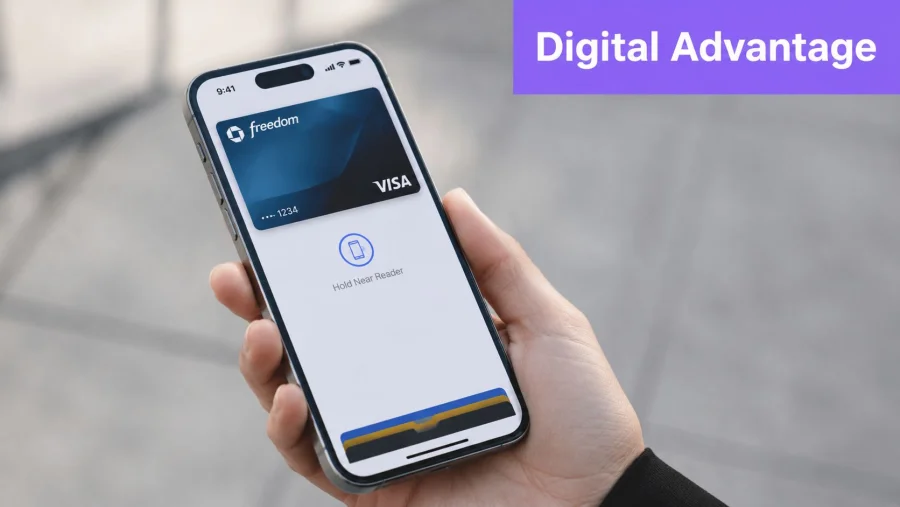
That's why wallet passes work so well for small businesses. They remove the two biggest points of failure in loyalty. App fatigue and physical forgetfulness. Customers don't need another app icon. They don't need a username. They don't need to remember to bring a stamped bit of card.
Simplicity wins more often than variety
Loyalty saturation is a real issue in the UK. While 55% of UK consumers belong to at least four loyalty schemes, 58% have actively used only three or fewer in the past six months, which shows that sign-up doesn't equal engagement, as noted in Mintel's UK customer loyalty analysis.
That gap matters. Small businesses don't need to out-feature national chains. They need to be easier to use.
A wallet pass helps because it is:
- Immediate: The customer can save it in seconds.
- Visible: It sits in the phone wallet instead of disappearing into a downloads folder.
- Low-commitment: There's no heavy install decision.
- Familiar: Apple Wallet and Google Wallet already make sense to customers.
Progress visibility drives return behaviour
A strong loyalty programme shows progress clearly. That's one reason stamp mechanics still work so well when digitised. Visual progress bars are preferred by 81% of consumers because they encourage repeated interaction and show progress toward a reward, according to Open Loyalty's loyalty programme trends resource.
A paper card can show progress, but only when the customer has it in hand. A digital pass can keep that progress accessible every time they open their wallet.
The easier it is for a customer to see “how close am I?”, the easier it is for the next visit to feel worth making.
Better than a standalone app for many SMBs
For local businesses, a dedicated app often sounds attractive and performs poorly. Customers don't want a separate app for every café, barber, bakery, or fitness studio they visit. Download friction is real, and so is app deletion.
Wallet passes solve that by using software customers already trust. That's why the smarter move for many merchants is to start with a pass-first experience rather than an app-first one. For businesses wanting a cleaner route into Apple Wallet loyalty, the BonusQR Apple Wallet feature shows what that efficient setup can look like.
Why non-payment passes matter
A lot of search results about add to passbook are still really about cards used for payment. Loyalty is different. A pass can hold a stamp card, membership, offer, coupon, or reward state without acting as a payment method.
That makes wallet passes especially useful for:
- customers who pay in mixed ways
- businesses without POS integrations
- teams that want a loyalty layer without changing checkout hardware
- owners who need something staff can explain in one sentence
A good loyalty tool should feel light to the customer and practical to the business. Wallet passes do both when they're set up properly.
The Manual Path to Creating a Wallet Pass
This is the part most “add to passbook” tutorials get wrong for small businesses. They describe the manual route as if it's a weekend admin task. It isn't. It's a developer workflow.
At a technical level, the traditional process requires certificate management, pass configuration, file packaging, signing, and delivery. The traditional method for Add to Passbook integration requires creating a PKCS12 bundle with a private key and an X509 certificate chain signed by Apple. The pass identifier's fifth segment must match the unique merchant ID, followed by a secure API call to install the pass, as described in Paytronix developer documentation for passbook integration.
What the manual route actually involves
A non-technical owner usually encounters several layers of complexity before a customer ever sees a pass.
- Developer setup
The business needs the right Apple developer environment and credentials. That's not the same as owning an iPhone or using Apple Business tools.
Pass Type ID configuration
Wallet passes need their own identity. This has to be configured correctly or the pass won't validate.
Certificate handling
Many small teams frequently get stuck. Certificates need to be created, downloaded, exported, and used correctly for signing.
Pass structure
The pass itself is driven by a file structure and metadata that controls appearance, fields, barcodes, colours, labels, and behaviour.
Packaging into a pass file
The assets and configuration need to be bundled into a valid pass package.
Signing and delivery
The final file has to be signed correctly or Apple Wallet won't accept it.
That may sound manageable in a list. In practice, each step has edge cases.
Where businesses usually hit trouble
The problem isn't just coding. It's maintenance.
Once the pass exists, the business still has to think about updates, serial numbers, branding changes, reward states, expired offers, and how customers receive the pass in the first place. A static pass is only useful in narrow cases. Most loyalty passes need to change when the customer earns a new stamp, qualifies for a reward, or receives a fresh offer.
Reality check: Building one pass file is not the same as running a wallet-based loyalty programme.
There's also the issue of platform split. Apple Wallet and Google Wallet aren't interchangeable, even if the customer experience should feel similar. A merchant trying to “do add to passbook” manually often discovers they're really taking on two ecosystems and a distribution problem.
Why manual creation rarely suits local merchants
For a software team, the manual route can be justified. For a salon with three staff, a café with a morning rush, or a gym without an internal developer, it usually can't.
The hidden costs show up in places like:
- Time lost to setup: Someone has to own technical admin that isn't core to the business.
- Risk of brittle implementation: A pass that works once but doesn't update properly creates support headaches.
- Poor onboarding: If distribution isn't smooth, customers won't save the pass.
- No room for iteration: Changing visuals, rules, or campaign logic becomes slower than it should be.
Manual makes sense only in narrow cases
The manual route is usually worth considering only when the business has one or more of these conditions:
| Situation | Manual route fit |
|---|---|
| In-house developers already manage mobile infrastructure | Reasonable |
| The pass is part of a wider custom app ecosystem | Possible |
| The business needs bespoke pass logic unavailable elsewhere | Possible |
| The owner wants a simple digital stamp card without hardware changes | Poor fit |
| Staff need something easy to launch and update | Poor fit |
Small businesses often start by searching “how to add to passbook” and expect a button. What they find is a framework. That difference is exactly why so many manual projects stall before launch.
The Simple Way to Create Wallet Passes with BonusQR
Most small businesses don't need to become pass developers. They need a loyalty system that works at the counter, fits daily operations, and gives customers a pass they can save without friction.
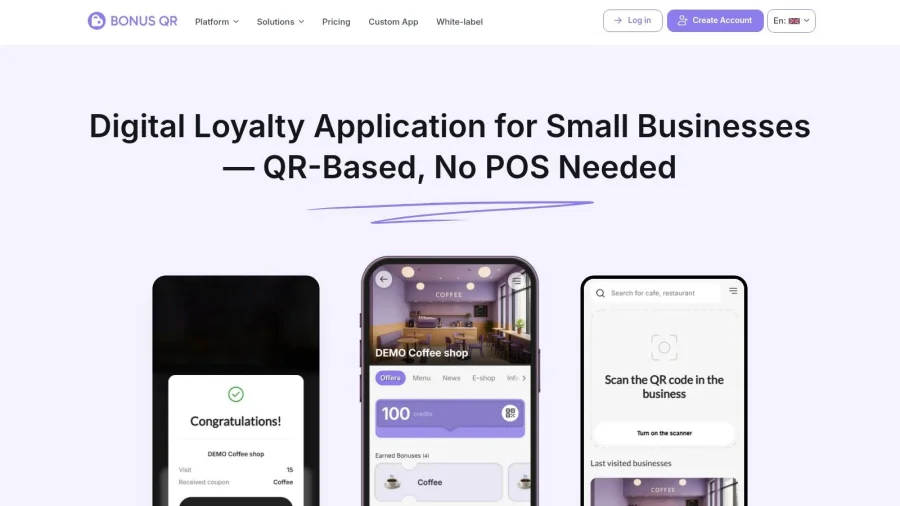
That's where a managed platform changes the decision. Instead of handling certificates, pass packaging, and update logic manually, the business configures the loyalty experience and lets the software handle the wallet layer.
The interface matters because it shortens the distance between idea and launch.
What a simpler setup looks like
A practical wallet loyalty setup usually starts with business rules, not code.
The owner chooses the reward logic first. That could be a stamp card, points, cashback, visit threshold, spend threshold, fixed discount, welcome reward, birthday incentive, or seasonal coupon. Then the design layer follows. Logo, colours, labels, reward wording, and customer-facing fields.
After that, distribution becomes part of the system rather than a separate project.
Why trackable rewards matter
This isn't only about convenience. Loyalty mechanics that are easy to understand and easy to redeem support commercial performance. Members of effective loyalty programmes in the UK generate 12–18% more incremental revenue growth annually than non-members, according to Queue-it's loyalty statistics overview.
That doesn't mean every business will get the same outcome. It does mean the direction is clear. Simpler, visible, trackable rewards tend to support repeat spend better than vague or cumbersome schemes.
Creating Wallet Passes Manual vs. BonusQR
| Requirement | Manual Method | BonusQR Method |
|---|---|---|
| Technical setup | Requires developer-led certificate and pass configuration | Managed inside a guided platform |
| Pass design | Built through file structures and asset preparation | Configured through dashboard settings |
| Reward logic | Custom-built separately | Native loyalty mechanics already available |
| Apple Wallet support | Manual signing and deployment process | Built into the workflow |
| Google Wallet handling | Requires parallel setup approach | Included for compatible customer flows |
| Pass updates | Needs infrastructure for changing reward states | Updates are handled automatically as loyalty status changes |
| Distribution | Must be created from scratch through links, pages, or messaging | Ready to share through QR, web, email, and mobile flows |
| Suitability for SMBs | Poor for non-technical teams | Strong fit for local merchants |
What works better in daily operations
For a small business, the value is operational. Staff don't need to explain a complicated process. The customer signs up, gets a usable pass, and keeps it in the same wallet they already use.
That's especially important for pass updates. A loyalty pass isn't useful if it becomes stale. If a customer earns a stamp, gains a reward, or receives a coupon, the pass should reflect that without someone rebuilding files behind the scenes.
A wallet pass should behave like a living loyalty card, not a static image saved to a phone.
Businesses that want control without the manual overhead can manage branding and reward structure through a customizable rewards platform. This is the primary advantage. The merchant stays focused on offers and customer retention instead of pass engineering.
Where managed tools outperform custom effort
The best use case is straightforward. The business wants to launch quickly, avoid hardware projects, and run loyalty without a developer in the middle of every change.
That makes managed wallet loyalty a strong fit for:
- independent cafés running digital stamps
- salons and wellness centres rewarding booking frequency
- fitness businesses issuing member perks and visit rewards
- restaurants distributing repeat-visit incentives and offers
- retailers who want one simple mobile profile for rewards and coupons
For these businesses, the “easy way” isn't a shortcut. It's the sensible implementation path.
Getting Your Digital Pass into Customers' Hands
A pass that isn't distributed well won't drive loyalty. The setup matters, but promotion matters just as much.
Small businesses usually get the best results from simple prompts in places where customers already pause. The till area. The waiting area. The booking confirmation email. The website. A text message after sign-up. These moments work because they don't ask for a separate trip back later.
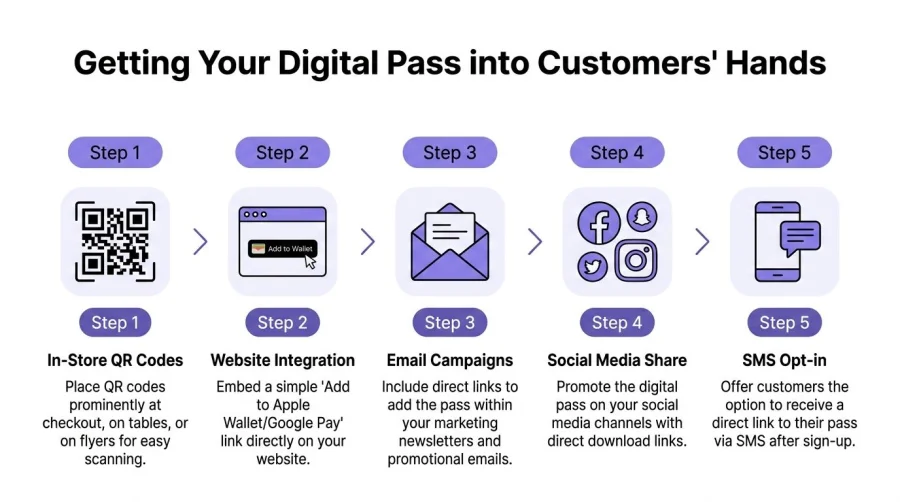
The practical goal is easy to state. A customer should be able to scan, tap, save, and start using the pass with as little friction as possible.
The five distribution channels that usually work best
- In-store QR codes: Put them where the customer naturally waits. Counter mats, table talkers, window signs, mirrors at salon stations, reception desks, takeaway bags, and printed inserts all work.
- Website placement: Add a clear wallet pass prompt on the loyalty page, booking confirmation page, or homepage banner.
- Email campaigns: Include a direct save link in welcome emails, win-back emails, and reward notifications.
- Social channels: Use posts and stories to explain the benefit, then send customers to a landing page with the pass flow.
- SMS delivery: Text works well when the customer has just opted in and is still holding the phone.
QR quality is not a small detail
This is one of the most overlooked issues. Businesses often print whatever barcode or QR image they have at hand, then blame the idea when scanning feels inconsistent.
Google Wallet's photo-scan feature has a 92% barcode recognition success rate for QR-based loyalty programmes, but low-resolution uploads can cause 15% of scan failures at point of sale, according to Google Wallet support information on barcode and pass capture.
That points to a very practical rule. Use system-generated, high-quality QR codes. Don't stretch tiny images into posters. Don't screenshot from a messaging app. Don't send staff to improvise print assets from whatever file happens to be available.
Clean QR generation and clear placement do more for adoption than clever copy.
Match the method to the business type
Different venues should lead with different channels.
| Business type | Best first distribution move |
|---|---|
| Coffee shop | Counter QR code near payment area |
| Salon | Add-to-wallet link in booking confirmation and post-visit message |
| Gym | Reception signage and member onboarding SMS |
| Restaurant | Table inserts and bill receipt prompt |
| Retail shop | Till signage and website loyalty banner |
Don't forget Android users
Many owners still talk about add to passbook as if it only means Apple devices. That's a mistake. Customers use both Apple Wallet and Google Wallet, and the sign-up flow should account for both without making the customer choose from a confusing menu.
A good setup detects the device or presents the right save option clearly. The customer shouldn't need a staff explanation about ecosystem differences. They should just get the correct wallet path.
Keep the hardware conversation realistic
Customers don't need the latest handset to value wallet-based loyalty. For businesses testing digital passes on older shop devices, or for owners checking staff compatibility without buying new stock, this guide on where to buy refurbished iPhones UK can be a useful starting point.
A practical rollout checklist
- Create one clear offer: “Collect stamps, earn rewards” beats a complicated explanation.
- Place QR codes where the queue naturally forms: If customers need to hunt for the sign, adoption drops.
- Train staff with one short script: Keep it to one sentence and one action.
- Use email and SMS after sign-up: Some customers won't save immediately in-store.
- Test on both iPhone and Android: A pass flow that only works on the owner's phone isn't ready.
Distribution is where wallet loyalty becomes visible. If the pass is easy to save, customers will use it. If saving it feels awkward, they won't.
Start Building Real Customer Loyalty Today
Paper cards still feel easy until they fail in front of a customer. Manual wallet pass creation sounds modern until the technical work lands on the business. The practical middle ground is clear. Use digital wallet loyalty in a way that customers can save quickly and staff can run without hassle.
That approach supports repeat visits, clearer reward tracking, and a more organised customer journey. Businesses that want to launch without getting buried in technical setup can start with QR loyalty program pricing and choose a setup that fits the size of the operation.


