The queue is long. The line keeps moving. Customers customise drinks, scan an app, tap a card, grab a pastry, and step aside without the whole counter collapsing into chaos.
That's the moment most independent café owners notice the Starbucks point of sale system for the first time. Not the screen itself. The outcome. Orders move quickly, loyalty feels automatic, and staff don't look like they're fighting the till.
Most articles stop at surface-level observations. They explain what buttons baristas press or how the menu might be laid out. That doesn't help a small UK business owner who needs to answer a harder question. What makes the system work, and which parts are worth copying without taking on enterprise cost, complexity, or compliance headaches?
The useful answer isn't “buy what Starbucks bought”. It's “understand the operating model”. Starbucks succeeds because its checkout experience combines fast order entry, built-in payment flexibility, and loyalty data that moves with the transaction. A small business can borrow those principles. It just needs a smarter, leaner setup.
What Makes the Starbucks Checkout So Fast
A busy owner watching Starbucks usually assumes the secret is training. Training matters, but it isn't the whole story. Staff can only move as fast as the tools in front of them allow.
At Starbucks, speed comes from reducing friction at several points in the same flow. The cashier doesn't need to remember workarounds. The barista doesn't need to decode a messy handwritten note. The customer doesn't need to repeat loyalty details after payment. Each step feeds the next one.
Speed comes from system design
The Starbucks point of sale system works because it turns a complicated order into a manageable sequence. That matters in coffee more than in many other retail categories because drinks aren't standard products. They're combinations of size, milk choice, syrup, espresso shots, temperature, and collection method.
When a system handles those modifiers cleanly, staff spend less attention on navigation and more attention on the person in front of them. That's why the checkout feels smooth even when the order isn't simple.
Practical rule: Fast service rarely comes from telling staff to “be quicker”. It comes from removing extra decisions, extra taps, and extra handoffs.
The queue moves because several jobs happen together
A strong café POS doesn't just take payment. It does several jobs at once:
- Captures the order clearly so the production team gets accurate instructions
- Connects payment methods quickly so customers can tap, scan, or use a stored-value app
- Applies loyalty automatically so no one has to ask awkward follow-up questions
- Pushes the order into the workflow so front counter and prep staff stay aligned
That combination is why the Starbucks checkout looks calmer than many independent counters during a rush.
What small businesses often get wrong
Many smaller operators try to solve slow service with more features. They add screens, add apps, add staff prompts, and end up with a clumsy experience. The result is a till that technically does more but practically slows everyone down.
The better lesson from Starbucks is simpler. Build around flow, not feature count.
A small café doesn't need enterprise infrastructure to move faster. It needs a modern POS, a tighter menu structure, and a loyalty approach that doesn't interrupt checkout. That's where the comparison gets useful, because the advantage isn't the Starbucks brand. It's the way the technology supports staff under pressure.
Inside the Starbucks POS A High-Volume Powerhouse
The Starbucks point of sale system in the UK isn't one isolated till. It's a stack of connected tools designed for scale. The easiest way to understand it is to think of a central brain in the cloud and fast hands in store.
The central brain handles the core transaction logic, data sync, and system-wide consistency. The fast hands are the terminals, payment devices, and store-level interfaces that staff use during service. If either side is weak, checkout slows down.
In the UK, Starbucks formalised that foundation in 2022, when Starbucks (UK) Limited selected Oracle MICROS Simphony Cloud as its primary POS to replace legacy infrastructure across its UK stores, and the payment layer was further modernised in early 2026 with Adyen's platform across 943 UK stores, deploying 2,375 new terminals according to the reported UK Starbucks Oracle and Adyen rollout.
The core platform matters more than the screen
Oracle MICROS Simphony is the operational core. For a high-volume food and beverage business, that matters because the till has to do more than ring up items. It has to support modifiers, order routing, inventory awareness, payment handling, and loyalty-related data in one environment.
A cloud platform helps because store activity doesn't stay trapped inside one terminal. When a business has many locations, that centralisation makes reporting, updates, and consistency much easier to manage. For Starbucks, it supports a national operation. For a smaller business, the same principle means fewer manual fixes and less dependence on one ageing machine under the counter.
The payment layer has its own job
Many owners think of payments as just a card reader attached to the till. At scale, that view is too narrow. The payment layer needs to accept different rails cleanly and keep checkout moving when traffic peaks.
That's where Adyen fits in. A dedicated payment platform helps support in-store transaction handling at volume, while the terminal rollout shows Starbucks didn't treat payments as an afterthought. Payment speed and resilience are part of the customer experience.
A small operator doesn't need the same footprint, but the lesson is clear. Choose a POS with strong payment support. Don't bolt on a weak reader and hope the queue forgives the delay.
Why the cloud model works
Cloud architecture solves several practical issues that independent cafés also face, just at a smaller scale:
| Operational need | Why cloud helps |
|---|---|
| Menu updates | Changes can be managed centrally instead of terminal by terminal |
| Sales visibility | Owners can review activity without being physically in store |
| Reliability across locations | Consistency improves when stores run on the same platform |
| Loyalty and customer data flow | Connected systems can recognise customers and transactions more smoothly |
A lot of SMB operators still treat the till like a standalone box. That approach makes every improvement harder. A modern setup should act more like a connected operating system for the business.
What this means for an independent restaurant or café
The aim isn't to copy Starbucks line by line. It's to recognise the layers that matter:
- Core transaction engine
- Stable payment processing
- Order handling built for modifiers
- Connected customer and operational data
For businesses exploring QR-based restaurant rewards, this distinction matters. The POS should handle selling efficiently. Loyalty should support the customer relationship without turning the whole stack into a custom IT project.
A good POS stack doesn't try to do everything in one messy interface. It keeps the mission-critical tasks reliable and lets the customer experience feel simple.
That's why Starbucks looks polished from the customer side. The complexity sits underneath, not in the customer's way.
The Features That Make Starbucks' System Work
Architecture explains the foundation. Features explain why staff can practically use it during a breakfast rush.
The Starbucks point of sale system works because the interface is built for the specific structure of coffee orders. In cafés, complexity doesn't come from basket size alone. It comes from modifiers. If the till makes modifiers hard to enter, staff either slow down or make mistakes.
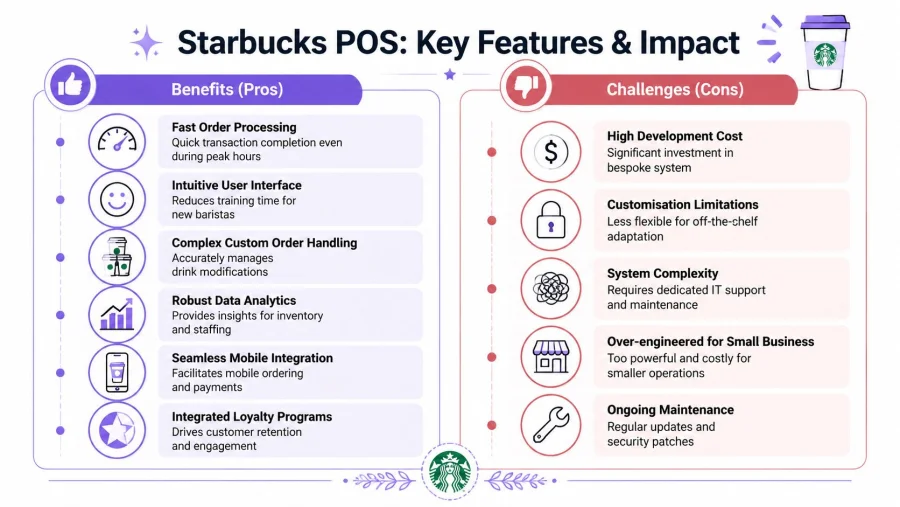
One of the most useful details in Starbucks' design is that its Next Gen POS, built on Oracle's MICROS platform, keeps 80% of drink orders on the main screen without extra navigation, while also showing personalised prompts for loyalty members, according to Nation's Restaurant News coverage of the Next Gen POS.
A better interface cuts two hidden costs
Most owners think a clunky screen costs a few seconds. It usually costs much more than that.
When common options stay on the main screen, two things improve at once:
- Training gets easier because new staff don't have to memorise long navigation paths
- Remakes fall because order entry is clearer under pressure
That's a stronger design principle than “add more buttons”. A fast interface surfaces the right choices at the right moment.
Loyalty works because it's embedded in the transaction
The Starbucks setup also benefits from tight loyalty handling. It doesn't ask staff to run a separate loyalty ritual after the sale. The system recognises the customer, applies benefits, and keeps the order moving.
That matters because loyalty only helps if it feels immediate. If a customer has to explain a membership, wait for a manual lookup, or ask whether points were added, the value of the programme drops. The emotional effect is small but important. Effortless recognition feels rewarding. Manual recovery feels administrative.
Operational insight: The best loyalty moment happens before the customer has time to wonder whether the reward was applied.
Mobile ordering changes the workload, not just the channel
Another reason Starbucks performs well is that mobile activity isn't treated like a side system. It feeds into the same operational flow as in-store ordering. That prevents staff from juggling two disconnected queues.
For small businesses, that principle matters even if they don't have a huge app strategy. Any digital ordering or pre-order process has to end in one clean production workflow. If online orders arrive in a separate inbox or on a separate tablet with no alignment to the counter, the business gains convenience on one side and creates confusion on the other.
What works well and what doesn't
The strongest parts of the Starbucks model are clear:
| Feature | Why it works in practice | Trade-off |
|---|---|---|
| Main-screen order visibility | Staff can enter common drink combinations faster | Requires thoughtful menu design |
| Integrated loyalty prompts | Repeat customers get recognised without friction | Harder to build and maintain |
| Connected order flow | Mobile and counter orders fit one process | Demands disciplined operational setup |
| Data-rich transactions | The business can spot patterns in orders and customer behaviour | Adds system complexity |
The weak spot for smaller businesses isn't the idea. It's the cost of trying to reproduce every integrated feature in the same way.
The lesson worth borrowing
Independent operators should borrow the logic, not the enterprise footprint.
A practical café setup should ask:
- Which modifiers appear most often?
- Which options are slowing staff down?
- Where does loyalty interrupt payment?
- Are digital orders entering the same queue as till orders?
- Does the interface reduce thinking, or does it create it?
Those questions matter more than whether the screen looks like Starbucks.
A lot of POS frustration comes from poor menu engineering, not poor staff effort. When the interface mirrors the actual ordering pattern of the business, speed improves because staff stop fighting the system.
Replicating Starbucks' Success on a Small Business Budget
The mistake many owners make is assuming success comes from deep integration everywhere. It doesn't. For a small business, copying the Starbucks stack too closely can create a very expensive version of the wrong system.
What Starbucks built makes sense for a large chain with complex operational demands. A single-site café, salon, takeaway, or neighbourhood restaurant has different economics. It needs reliability, speed, and customer retention without a multi-layered software project.
The integrated-everything myth
A fully integrated system sounds efficient on paper. In practice, it often creates lock-in, slower implementation, more support dependency, and more points of failure.
That's especially true with loyalty. Owners often hear that loyalty must live inside the POS to work properly. That belief ignores a practical trade-off. POS-integrated loyalty can be powerful, but it also ties customer data capture and redemption logic directly to the checkout infrastructure.
According to ConnectPOS analysis of Starbucks POS practice, the perceived speed of the Starbucks POS can be a myth for complex orders, and UK-specific friction points such as GDPR can complicate loyalty data capture on the POS compared with non-integrated QR solutions that store data separately.
Why separation can be a strength
For small businesses, separating loyalty from the till can be an operational advantage.
A decoupled model can offer:
- Simpler rollout because the loyalty programme doesn't depend on custom POS development
- Less disruption when changing payment terminals or switching till providers
- Cleaner staff training because the sales flow and reward flow are easier to understand
- More flexibility when testing offers, visit rewards, or seasonal campaigns
This doesn't mean the POS and loyalty strategy should ignore each other. It means they don't always need to be welded together.
A small business usually needs fewer dependencies, not more. The more systems depend on one another at checkout, the harder it is to fix a simple issue quickly.
The real budget question
Most owners ask, “How do we get a system like Starbucks?” The better question is, “Which parts create value for our business?”
A useful shortlist looks like this:
| Priority | Worth investing in | Usually overkill |
|---|---|---|
| Checkout speed | A modern cloud POS with strong modifier handling | Heavy custom development |
| Payments | Reliable contactless and wallet support | Enterprise-scale terminal rollout planning |
| Loyalty | A simple reward journey customers understand instantly | Deep POS-side customer data engineering |
| Reporting | Clear sales and visit visibility | Complex analytics that no one uses |
That's where cost discipline matters. Plenty of businesses overspend on system capability they never operationalise.
For owners comparing options, it helps to look at loyalty platform pricing with the same lens used for POS decisions. The question isn't just monthly cost. It's setup effort, staff burden, and how quickly customers use it.
What not to copy from Starbucks
Small operators shouldn't chase Starbucks in three areas:
- Bespoke complexity
- Enterprise-level integration work
- Feature depth without process discipline
A leaner setup often wins because the team can run it well. The strongest independent operators don't mimic the software stack of a multinational. They build a local version of the same customer outcome. Quick checkout. Easy rewards. Fewer dropped details.
An Actionable Checklist for a Smarter POS Setup
A smarter setup starts with a simple rule. Keep the sale fast, keep the menu easy to enter, and keep loyalty visible to the customer without forcing checkout to do all the work.
That's the practical lesson behind the Starbucks point of sale system. Not the exact software stack. The workflow logic.
Here's the checklist that matters for a small business.
Choose a POS that fits service reality
The till should match the shape of the business, not the sales pitch from the vendor.
For a café or quick-service counter, that means the POS should handle modifiers, common combinations, and fast payment acceptance without awkward extra steps. If staff have to jump through too many screens for oat milk, extra shot, decaf, or takeaway, the queue will expose that weakness quickly.
A shortlist should include these checks:
- Modifier handling: Can common add-ons be entered cleanly during rush periods?
- Cloud access: Can the owner review updates and activity without being in the shop?
- Payment flexibility: Does it support contactless, mobile wallets, and simple customer-facing flow?
- Menu control: Can the team change products and availability without a support ticket every time?
Rebuild the menu for the screen, not just the wall menu
Many businesses install a new POS and keep a chaotic product structure from an old till. That wastes the upgrade.
The screen should reflect what people order most often. Put frequent items first. Group modifiers logically. Remove duplicate paths. If the team sells the same drink customisations repeatedly, those options should be easy to find.
This is one of the most overlooked operational wins. A better menu layout often improves speed without changing staff numbers, opening hours, or product mix.
“The interface should match the conversation at the counter. If staff say the same words every day, the screen should follow that pattern.”
Make loyalty immediate, not administrative
Starbucks shows the principle clearly. Its POS loyalty flow uses a 2D barcode scan from the app, automatically applies benefits, reduces payment time by removing manual entry, and queues mobile orders directly into the barista workflow, as described in the archived overview of Starbucks POS screen and loyalty flow.
That principle matters more than the exact hardware. Customers respond to speed and clarity. They want rewards to feel instant. Staff want loyalty to be simple enough that it doesn't create a second checkout inside the first one.
For a small business, a practical loyalty setup should do four things well:
Sign customers up quickly
Long enrolment forms kill momentum. The best moment to capture a customer is when they've already decided to buy.
Let staff recognise and reward visits easily
If the team needs extra hardware or a complicated till integration, consistency usually drops.
Show customers their progress clearly
Loyalty works better when the reward feels visible, not abstract.
Support offers beyond simple stamps
Visit rewards are useful, but businesses also benefit from birthday offers, spend-based thresholds, and timely promos.
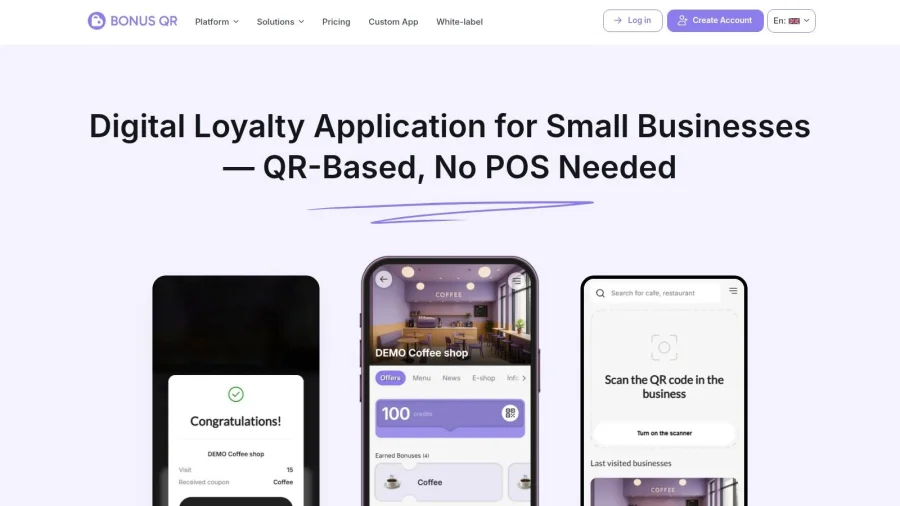
A QR-led model works well here because it can preserve that instant-reward feeling without requiring deep POS integration.
Here is the kind of simple customer-facing loyalty experience many small businesses now prefer:
Train around edge cases, not just basics
Basic payment and order entry training isn't enough. Staff need to know what happens when:
- A customer changes the order mid-transaction
- A reward is redeemed during a busy period
- An item goes out of stock
- A mobile or QR loyalty scan doesn't happen at the ideal moment
Teams that rehearse these edge cases usually perform better than teams that only learn the perfect-path transaction.
Review the setup every month
A POS isn't finished when it goes live. The owner should check whether staff are using shortcuts, whether certain modifiers still create confusion, and whether loyalty redemption is being skipped at busy times.
A short monthly review can focus on:
| Monthly review area | What to look for |
|---|---|
| Order entry friction | Repeated mistakes or slow modifier paths |
| Staff behaviour | Workarounds that signal the layout is weak |
| Reward usage | Whether customers understand and use the programme |
| Customer questions | Repeated confusion around offers or redemptions |
That cadence matters. The best setups stay organised because someone keeps tuning them.
Bringing the Starbucks Experience to Your Counter
The lesson from Starbucks isn't that every business needs Oracle, Adyen, bespoke workflows, and enterprise-grade development. The lesson is that modern retail and hospitality systems work best when checkout, customer recognition, and operational visibility support one another.
That's why the Starbucks point of sale system gets so much attention. It doesn't just process sales. It reduces friction in places that usually slow a business down. Order entry. Payment. reward recognition. Workflow handoff.
Most public content still misses the question smaller UK operators care about. It explains how the Starbucks till works for staff, but it doesn't show how an independent business can handle real-time loyalty and mobile-order style expectations without enterprise complexity. That gap is exactly what Swyft POS noted in its discussion of Starbucks POS content gaps.
Competing with Starbucks doesn't mean copying Starbucks
Independent businesses win when they choose the right level of system design.
That usually means:
- A modern POS for fast core transactions
- A clean menu structure that mirrors real customer behaviour
- A loyalty layer that customers can understand instantly
- A data approach that stays useful instead of becoming a technical burden
For many local operators, that last point is where strategy matters most. They don't need a giant integrated stack. They need a loyalty model that keeps repeat visits visible, simple, and operationally realistic.
The smarter interpretation of the Starbucks model
The principle is easy to state and harder to execute well. Keep the till focused on selling. Keep rewards easy to access. Keep customer recognition present in the flow instead of bolted on at the end.
That's why a decoupled loyalty approach can be the better fit for a smaller business. It keeps the customer experience fast while avoiding much of the complexity that comes from tying every loyalty action directly into the till.
Small businesses rarely lose to big chains because they care less. They lose when their systems create more friction than the customer will tolerate.
The good news is that the gap is more manageable than it looks. A local café doesn't need Starbucks' scale to create a smoother checkout or a more memorable reward experience. It needs a setup that people will use consistently.
What a strong next step looks like
A practical owner can move forward with three decisions:
| Decision | Good outcome |
|---|---|
| Upgrade the core till if it's slowing staff down | Faster service and fewer order-entry mistakes |
| Rework the menu and modifier flow | Cleaner transactions during busy periods |
| Add a lightweight loyalty layer | More repeat visits without overcomplicating checkout |
The strongest version of this for many bricks-and-mortar businesses is a QR-based loyalty system that works alongside the POS rather than inside it. That delivers the customer-facing benefit people care about most. Recognition, rewards, and a reason to return.
For businesses that want that outcome without a heavy integration project, the BonusQR loyalty feature is a practical place to start. It gives customers an accessible reward experience, keeps offers handy through wallet-based convenience, and avoids turning loyalty into a complicated POS rebuild.
Starbucks proves that fast checkout isn't one trick. It's the result of organised order entry, low-friction payment, and loyalty that feels immediate. A small business can absolutely bring those same principles to the counter.
The key is discipline. Don't copy enterprise complexity. Copy the customer outcome.
If the goal is more repeat visits, smoother redemption, and a loyalty setup that doesn't demand a bespoke tech stack, BonusQR is the simplest next move. It gives brick-and-mortar businesses a fast, QR-based loyalty experience that's affordable, easy to launch, and realistic for everyday operations.


