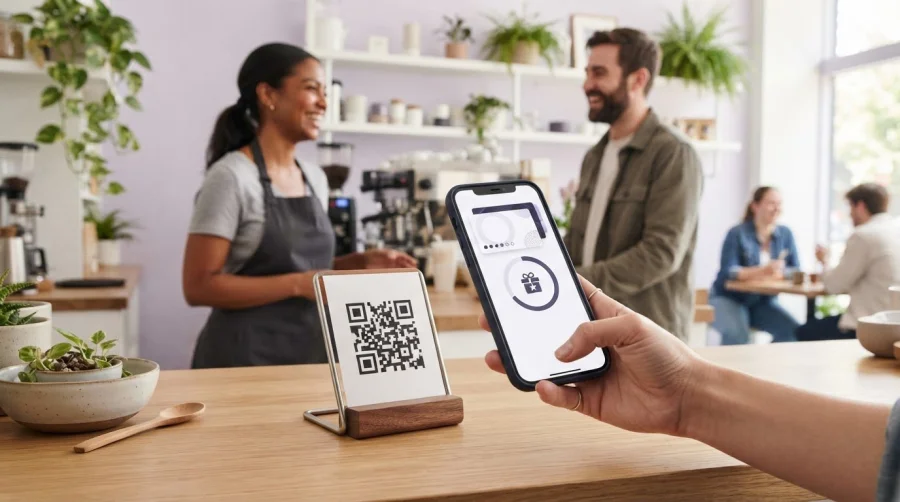
A loyalty reward can begin with one scan, not a paper card or a long sign-up. A QR code loyalty card system links customers to a digital card where they can join a program, collect stamps or points, and access rewards. The QR code can lead to a mobile-friendly page, with the option to connect loyalty cards to a digital wallet.
A scan is only the starting point. The reward structure needs to match how customers buy, and the redemption process should be clear for customers and staff. A smooth experience helps you see what a QR program can do and where friction may arise.
This guide explains how QR code loyalty programs work, how to choose between stamps, points, tiers, and referrals, and how mobile pages can support redemption. It also covers QR codes for different campaigns or locations and how Wallet integration makes rewards easier to access. You’ll get a practical overview of what turns a scan into a repeat visit.
Key Takeaways
- Use scan, redemption, and engagement data to understand how customers move through your rewards program.
- Connect digital rewards with Apple Wallet and Google Wallet to make loyalty cards easier for customers to access.
- Choose stamps, points, tiers, or referrals based on the behavior you want to encourage and the rewards you can sustain.
- Make the mobile landing page clear, and map the path from first scan to reward redemption.
- Create QR codes that fit each campaign or location, then test the full customer journey before expanding.
What Is a QR Code Loyalty Program?
A QR code loyalty card system uses scannable codes to connect customers with digital rewards. Customers can join, collect points or stamps, and redeem perks through a mobile experience without carrying a physical loyalty card.
Scan and Redemption Tracking
Tracking QR scans alongside reward activity and business results helps show how a program is performing. A useful dashboard can report scans, sign-ups, redemptions, and engagement by channel or location. Compare these measures with sales or loyalty activity over time to understand whether members return or spend differently. Review the measures together rather than treating scan volume alone as success.
For example, a receipt code may attract scans but few sign-ups. A reward that members earn but rarely redeem may need clearer terms or a better fit. Add a feedback prompt to the receipt or mobile page to learn what customers value. Scan data, redemption patterns, sales comparisons, retention activity, and direct feedback can show where the experience needs attention.
Business-Scanned and Customer-Scanned Codes
The two approaches differ in who scans the code and records the visit. In a business-scanned setup, customers scan a code displayed at the business to open their loyalty card and record a visit without staff assistance. The static code can be printed and laminated. Place it where customers can see it at checkout or while waiting.
In a customer-scanned setup, each customer presents a unique QR code, which staff scan using an admin app. This lets staff control when stamps are added. The choice affects checkout: a displayed code gives customers more independence, while staff scanning puts visit recording in employees’ hands. Match the method to how your team serves customers.
Customer Enrollment and Code Delivery
Enrollment connects a new member to a digital loyalty card and its rewards. A customer can scan a code on a counter display, receipt, bill folder, or promotion to reach a sign-up page. A simple email sign-up can give customers access to a browser-based card across devices. QR enrollment can take less than 30 seconds, keeping the first step brief.
After joining, customers need a convenient way to return to their card. A mobile page can display a unique code for staff to scan or explain how to scan the business’s code. Email can also provide card access or member promotions. Make the sign-up prompt clear: explain the reward, what information is needed, and what happens after the scan.
Loyalty Benefits of QR Codes
QR codes make it easier to join and use a loyalty program during a visit. Customers can access digital loyalty cards without downloading an app or carrying a card. For example, a café can display a code by the counter and invite customers to earn a stamp on each qualifying visit. Clear reward terms help customers understand the value of joining.
Codes also give businesses flexible ways to present promotions and learn which touchpoints attract engagement. A receipt code can invite enrollment, collect customer feedback, or open a points check. Separate codes for campaigns or locations make comparisons easier. For a visit-based reward, a digital stamp card can show progress toward the next reward, giving customers a visible reason to return.
Apple Wallet and Google Wallet integration
Yes, loyalty cards can connect with Apple Wallet and Google Wallet. POS integration depends on how the loyalty and sales systems exchange data. A QR code can open a wallet pass, loyalty page, or sign-up form, but each destination serves a different purpose.
With Wallet integration, members can keep a digital loyalty card alongside other passes on their phone. The QR code can guide them to add the card, which they then present or scan during a visit, depending on the program setup. Before launch, map the steps: scan, save, show the card, record the purchase, and apply the reward. This helps identify where staff need clear instructions.
Each channel can use the same campaign code or a distinct one. Add a code to your business website, social profile, email promotion, or in-store display. Separate codes help compare scans by channel or location. For example, a café can distinguish scans from its counter sign and email offer, then see which brought more sign-ups or redemptions.
Small-business POS integration needs a clear division of tasks. The POS records sales, while the loyalty system tracks member activity and rewards. If the systems connect, eligible transaction details can support points or redemption records. Without an established connection, staff may need to scan a member’s card separately or record activity through the loyalty system. The key decision is how purchases and rewards will be matched accurately.
Google Forms can offer a simple sign-up route for businesses collecting member details. A QR code can open a form that asks for the information needed to register. The form does not automatically create a wallet pass or update a loyalty account. Plan how form entries will reach the system, and explain to customers what happens after they submit them.
CRM and POS connections can bring customer and transaction activity into a more useful view. A CRM may hold member details and communications, while a POS captures purchases. When connected appropriately, the business can compare engagement with sales and redemptions. A dashboard is most useful when it distinguishes scans, new members, repeat visits, and redeemed rewards instead of grouping every interaction together.
Before choosing an integration, sketch the customer journey across channels and systems. Identify where the member scans, where the card is stored, and where staff record a purchase or reward. Then test a complete example, from an email link to a wallet card and an in-store redemption. If you’re ready to plan a digital loyalty setup, explore the loyalty program setup as a next step.
Loyalty program structures, including points, tiers, punch cards, and referrals
A QR loyalty program can support points, tiers, stamp cards, or referral rewards. The right structure depends on what you want to encourage, such as frequent visits, higher spending, or recommendations.
QR code loyalty cards can be easier to access than paper punch cards, connecting customers with digital rewards without requiring a dedicated app. They do require a working phone and scannable code, while paper cards work without a device. Apps can provide a dedicated branded experience, but customers need to download them.
Choose the reward rules before designing the QR experience. A café might use a visit-based stamp card, while a salon could reward spending or referrals. A simple buy-nine-get-the-tenth-free offer makes progress easy to understand. A spending-based plan might award one point for every dollar spent, but the business must define each point’s value and how members can redeem it.
Tiers add milestones to a loyalty program. For example, customers could unlock a new perk after reaching a defined scan or purchase milestone. Referral rewards add another route: award points after a referred customer completes a qualifying action. You can also reward birthdays or social activity. Keep each earning rule visible so customers know which actions count.
Account needs depend on how progress is stored. A browser-based card can keep stamps on a customer’s device without an account, but progress may not transfer between devices. Email sign-up can support access to a browser-based card across devices. Choose based on whether customers need that access and whether the program relies on member records.
Industry matters. A coffee shop may focus on repeat visits, while a retailer can connect points to transaction value. A service business might reward referrals or repeat appointments. In each case, match the earning action to the behavior that creates value, then make the reward attainable and clear. A points-based loyalty structure suits businesses that want rewards tied to customer activity or spending.
QR programs can make enrollment and reward access simpler, while digital records help businesses review engagement. Legacy cards can be misplaced, and manual stamping makes activity harder to review across locations. Digital systems still need clear rules and a reliable redemption process. More than 54% of loyalty memberships eventually become inactive, so relevant rewards and timely communication matter.
In the United States, loyalty program requirements depend on the program and applicable state rules. Publish clear terms for earning, redemption, expiration, and eligibility, and explain how member information is used.
At a minimum, include a mobile-friendly member experience, clear reward rules, a way to record earning and redemption, and reporting that shows engagement. Test the full journey, from sign-up to reward use, before promoting the program widely.
Mobile-friendly loyalty landing pages and reward redemption
Customers earn rewards when a scan records an eligible visit or transaction, then redeem them under the program’s stated rules. A mobile-friendly page should make the balance, progress, and next available reward easy to find.
Checkout Scans and Reward Updates
A checkout scan records qualifying customer activity and updates the digital card or points balance. Customers and staff can then see whether a reward is ready to use. For a customer-presented code, staff scan it in the admin system. For a business-displayed code, customers scan the display to record a visit.
At redemption, staff confirm the reward in the admin panel, then the card can reset for another earning cycle. A stamp card may show progress toward a reward, while a points program displays the available balance. Test both earning and redemption before launch, including the staff view and customer experience on a phone.
Points, Thresholds, and Expiry
Points and thresholds define what customers earn and when they can redeem a reward. For example, a campaign might give a customer a $5 discount after they earn 50 points. State which purchases qualify, how points convert into rewards, and whether unused points expire.
Expiry rules determine how long members have to use their balance, so display them alongside the reward terms. A landing page should show current points, the redemption threshold, and any expiry details before checkout. Clear information helps customers decide whether to redeem or keep earning.
A useful landing page makes the next action obvious. Show members their progress, eligible rewards, and redemption instructions without burying key terms in lengthy copy. If customers earn points from purchases, explain how a transaction changes their balance. If they earn stamps from visits, show how many remain before the reward unlocks.
Personalized offers can reflect a customer’s activity, while rotating promotions give the business a way to feature different rewards. For example, a member who has not engaged for over 60 days could receive a double-points offer. Time-sensitive promotions can also apply during selected hours or days. Keep each offer’s eligibility and end conditions visible.
Location-based rewards can use separate QR codes for individual branches, so each location can display relevant promotions. Geofencing is different: it uses a device’s location to trigger an experience. It is a separate technical approach, not an automatic feature of scanning a QR code. For a multi-location business, branch-specific codes can connect customers with the offer shown at that site.
Before expanding a campaign, test the entire journey on a phone: scan the code, view the landing page, earn progress, reach the threshold, and redeem. Include a real example, such as a customer earning points on a visit and using an unlocked discount at checkout. This can reveal confusing instructions or gaps between the displayed balance and redemption process.
QR-code loyalty card generation
Generating loyalty QR codes starts with deciding what each scan should do. A code might open sign-up, display a member card, or connect customers with a specific campaign. Choose the destination first, then create and label codes so each has a clear purpose. This makes later performance comparisons more useful.
Use separate codes for different offers, campaigns, or store locations. For example, a café can create one code for its counter display and another for an email promotion. If each branch has its own code, scan data can show which locations attract engagement. Keep a record of each code’s destination, placement, and campaign so staff can identify it easily.
Decide whether customers or staff will scan the QR code. A business-displayed code can direct customers to a loyalty page or sign-up flow. A customer’s unique code can instead be scanned by staff to record activity. These codes serve different purposes, so label them clearly when you generate them and don’t use one in place of the other.
Design the code for its physical or digital setting. A printed counter sign needs strong contrast, clear space around the code, and a size customers can scan nearby. A code on a website, social post, or email should be easy to find and open on a smartphone. Add a direct instruction, such as “Scan to join,” so customers know what to expect.
Before printing or sharing a campaign, test the scan from start to finish. Try different phones and lighting conditions, then confirm that the code opens the intended page. Check the sign-up or reward action, not just whether a camera recognizes the pattern. If a static business code will stay in place, print and laminate it after testing.
Design campaigns around customer behavior and preferences. A visit-based offer may suit a café, while a points promotion may fit purchases with different values. Use separate codes to compare campaigns, then review scans alongside sign-ups or redemptions. Avoid changing several elements at once, which makes results harder to interpret.
Keep the code’s destination current for the campaign period. If an offer ends, update the linked page or replace the displayed code, and remove old versions from receipts, social posts, and signs. A brief code inventory helps prevent customers from reaching expired promotions. For a streamlined way to build and manage digital loyalty campaigns, create your loyalty program.
BonusQR: Loyalty application
BonusQR can help businesses run digital rewards through a loyalty application. Its loyalty platform and software support programs such as digital stamp cards, bringing the reward structure in this guide into a digital format. Choose this approach when you want customers to track progress without carrying a paper card, or when your business is ready to manage a consistent loyalty experience.
Start with the reward mechanic that fits your customers, then shape the program around how they earn and redeem. A digital stamp card can suit a visit-based offer, while other program structures may fit different business goals. Visit bonusqr.com to explore the loyalty application, or contact BonusQR to discuss your next step.
Make Your Next Loyalty Move Count
Set a clear goal for your loyalty initiative before choosing its format. You might want to encourage repeat visits, make rewards easier to access, or create a consistent experience across customer touchpoints. A QR code loyalty card system can support that goal when its reward rules, customer journey, and daily workflow work together.
BonusQR offers a loyalty application, platform, and software for businesses building digital rewards. Use it to turn your chosen approach into a program customers can understand and staff can manage. Start by matching your business goals with a practical loyalty setup.
Contact BonusQR to discuss your loyalty program. A focused plan can help you move from idea to a loyalty experience that fits your business.
Frequently Asked Questions
Do customers need an account?
Not always. Some browser-based cards store progress on the customer’s device without an account. This can make joining simple, but progress may not carry over to another phone. Email sign-up supports access across devices and can help link a member’s activity. Choose based on whether cross-device access matters and what information your program needs to manage rewards.
Is it secure?
A QR code alone doesn’t secure a loyalty program. Security depends on how the platform handles member information and account access. BonusQR states that it stores personal data provided by users and is GDPR-compliant. Its staff access control supports limited permissions for employees who scan codes. Collect only the information your program needs, explain how it is used, and limit staff access according to their responsibilities.
What if a customer's phone has no signal or a dead battery?
Without a signal, a previously loaded card may still display on systems that cache it, but the visit must sync before the stamp is recorded. A dead battery prevents customers from opening their card. If it won’t load, staff can use a name or phone-number lookup in the admin panel as a manual fallback. Set a clear process for recording and reconciling the visit.
How does a QR code loyalty card system work?
A QR code loyalty card system connects a scan with a member’s digital rewards activity. For example, a customer scans a business’s code, joins the program, and opens a digital card. On a later visit, a scan records eligible activity and updates their progress toward a reward. The exact flow depends on whether customers scan a business code or staff scan each customer’s unique code.
What are the best QR code loyalty card platforms for small businesses?
The right fit depends on your reward model, Wallet needs, staff workflow, and reporting requirements. BonusQR offers a loyalty platform with digital stamp cards, points, and Google Wallet and Apple Wallet integration. It requires no POS integration, which can suit a small business that wants to run digital rewards separately from its sales hardware. Compare platforms based on how well the customer journey fits your daily operations.
How do businesses set up a QR code loyalty card system?
Start by defining the reward and the action that earns it, such as a visit or purchase. Then create the program, choose the customer journey, and prepare its sign-up page and QR code. BonusQR’s setup flow starts with creating a profile, configuring the program, and sharing the code through flyers, stickers, social media, or a website link. Test sign-up and redemption before promoting it.
How do QR code loyalty programs protect customer data and prevent fraud?
Protect information by collecting only what the program needs, explaining how it is used, and limiting staff access. Set clear rules for qualifying purchases and reward redemption, then review program records for unusual activity. BonusQR states that its app is GDPR-compliant and offers staff access control with limited permissions. These practices support responsible data handling and employee access, while clear program rules help deter improper reward claims.
How can businesses measure the effectiveness of a QR code loyalty program?
Compare scan activity with sign-ups, repeat participation, reward redemptions, and sales trends. Use separate campaign or location codes to see which placements attract members, then review whether those members return and redeem rewards. Customer feedback can explain why a promotion gets scans but few redemptions. Review the measures together: a high scan count alone doesn’t show whether the program supports your business goal.


