Customer retention in CRM is the systematic process of keeping existing customers active and spending, using a single platform to track their behaviour, automate follow-ups and flag risk before someone leaves. Rather than treating retention as a vague goal, a CRM turns it into a set of trackable numbers, mainly retention rate and customer lifetime value (CLV), that you can act on daily.
TL;DR:
- A retention rate above 90% indicates a healthy customer base, but it must be tracked against your historical trends to accurately assess your performance.
- Automating lifecycle moments, such as onboarding and renewal reminders, and establishing clear ownership for follow-ups are crucial for effective retention strategies.
- Building a habit of weekly review of customer health scores and risk signals can significantly improve retention outcomes without additional software investment.
- Focusing retention efforts on high-CLV customers yields a larger revenue impact than repeatedly targeting low-value segments.
- Adding loyalty programs like points and rewards on top of your CRM can strengthen customer engagement and provide valuable behavioral data for improving retention.
What is customer retention, and why does it matter?
Customer retention is your business’s ability to keep existing customers buying from you rather than switching to a competitor, and to grow the value of that relationship over time. It covers everything from a second purchase to a five-year renewal. IBM defines it as the capability to convert first-time buyers into repeat customers while preventing churn to rivals, which is a useful frame because it puts the emphasis on an ongoing capability, not a one-off campaign.
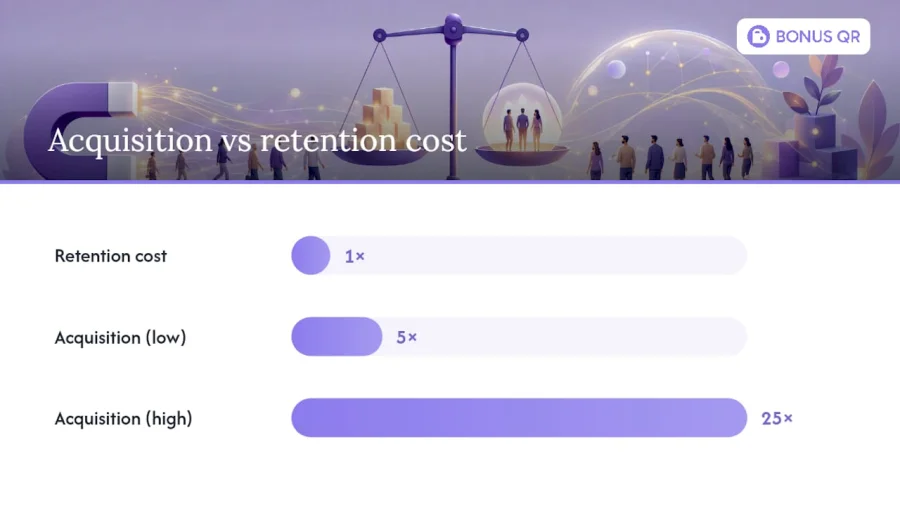
The economics behind this are stark. Winning a new customer typically costs far more than keeping one you already have, and industry research commonly cited in CRM circles puts acquisition costs at 5 to 25 times higher than retention. Even a modest lift in retention tends to produce an outsized effect on revenue, because loyal customers buy more often, spend more per visit, and refer others without you paying for the introduction.
That doesn’t mean acquisition stops mattering. Growing businesses still need new customers in the pipeline. But once your acquisition channels are working, the highest-return activity usually shifts to your existing base. A few distinctions worth keeping in mind:
- Acquisition costs are visible and immediate (ad spend, sales commissions); retention costs are lower but easy to under-invest in because they’re less visible.
- CLV compounds. A customer worth £40 per month for three years is worth far more than their first purchase suggests.
- Retention rewards consistency; acquisition rewards volume. You need both, but they’re managed differently inside a CRM.
- New customers are expensive to educate; existing customers already know your product, which makes every retention touchpoint cheaper to run than an acquisition campaign.
What role does CRM play in customer retention?
A CRM’s job in retention is to remove the guesswork. It gives every team, sales, support, and success, the same customer record, so nobody is working from a stale spreadsheet or a memory of a call from three months ago. ServiceNow’s guidance on CRM and retention makes the point plainly: a unified, real-time view of the customer lets teams spot problems early, resolve them faster, and personalise engagement instead of sending generic blasts.
Three mechanics make this work in practice:
- A single customer view that logs every purchase, support ticket, and conversation, so anyone touching the account sees the full history instantly.
- Automated triggers for lifecycle moments, welcome sequences, renewal reminders, check-ins after a lull in activity, that fire without a person having to remember to send them.
- Shared accountability across departments, so a customer who complains to support doesn’t get an unrelated upsell email from sales the same afternoon.
The most common failure point isn’t the software. It’s structural: sales, support, and success often operate in silos, each holding a partial picture of the customer. A CRM only solves that if the teams actually feed it and read from it consistently. When they do, retention stops depending on any one person’s memory or goodwill and becomes a process the business can rely on, month after month, regardless of who’s on shift.
Which CRM features actually drive customer loyalty?
Not every CRM feature moves the retention needle equally. The ones that consistently do share a common trait: they turn customer data into a specific action, rather than just storing it.
- Segmentation and personalised messaging. Grouping customers by behaviour, spend, or lifecycle stage lets you send messages that are actually relevant, instead of one newsletter for everyone. A customer who hasn’t ordered in 60 days needs a different message than one who just made their fifth purchase this month.
- Automated workflows and reminders. Zoho’s guidance on workflow automation points out that consistent follow-ups and clean hand-offs between teams are what separate a good retention idea from a repeatable practice. Automation is what makes that consistency possible at scale.
- Behavioural analytics and health scores. Usage patterns, support ticket volume, and engagement trends can flag an at-risk account before the customer ever says they’re unhappy.
- Feedback management and case tracking. A CRM that logs how quickly issues get resolved, and whether they recur, tells you where retention is quietly leaking away.
- Loyalty programmes layered on top. Points, stamp cards, or tiered rewards give customers a reason to keep choosing you, and when that loyalty data flows back into the CRM, it sharpens your segmentation even further.
Pro Tip: Don’t build ten automated workflows on day one. Start with the two or three lifecycle moments where customers most commonly disengage, usually the first 30 days and the renewal window, and get those right before adding more.
ServiceNow’s feature breakdown lists unified customer views, AI-powered workflow automation, omnichannel engagement, and real-time analytics as the core retention-focused capabilities worth prioritising when you’re evaluating or configuring a CRM.
How do you calculate retention rate, churn and CLV?
You can’t manage what you don’t measure, and retention has a small set of formulas that do most of the heavy lifting.
Customer Retention Rate (CRR) is the clearest starting point:
CRR = ((Customers at end of period − New customers acquired during period) ÷ Customers at start of period) × 100
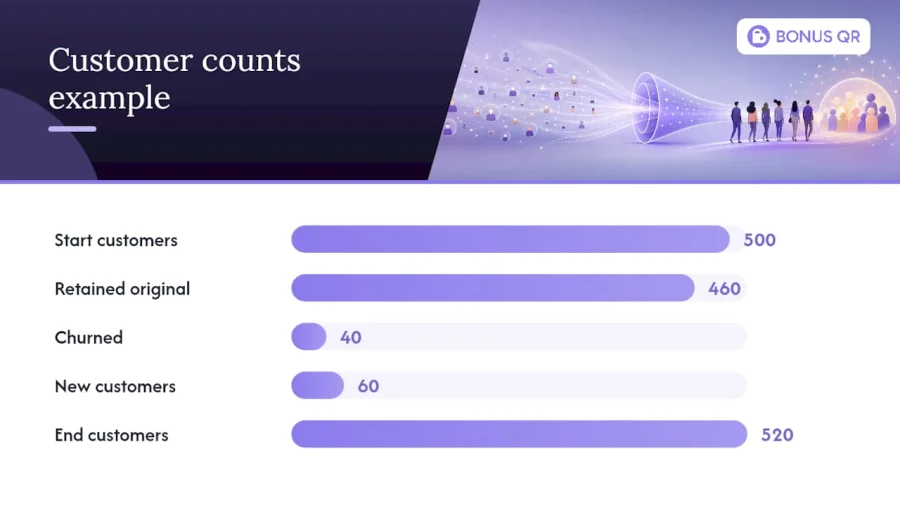
Say you start the quarter with 500 customers, gain 60 new ones, and end with 520 total. That means you kept 460 of your original 500, giving you a CRR of 92%. A retention rate in that range is generally considered strong for most subscription and service businesses, though what counts as healthy varies by sector.
Churn rate is retention’s mirror image: the percentage of customers who leave in a given period. Revenue churn, tracked separately, tells you the value lost, which matters more than headcount churn if you lose a handful of high-spend accounts.
Customer Lifetime Value (CLV) estimates the total revenue a customer generates over the relationship, and it’s the number that should drive prioritisation. Tracking retention rate, churn, CLV and usage trends together is how you spot which accounts are worth defending hardest, and which upsell opportunities are hiding in plain sight.
Supporting metrics worth watching alongside these:
- Net Promoter Score (NPS), a proxy for how likely customers are to refer others.
- Product or service usage frequency, an early indicator of disengagement.
- Time to value, how quickly a new customer reaches their first meaningful win with you.
A retention rate sitting comfortably above 90% for many service and subscription businesses signals a healthy base, but the number only means something when you track it against your own historical trend, not a generic benchmark.
How do you build a CRM playbook to cut churn?
A retention playbook works best as a sequence, not a scattered list of tactics. Here’s the order that holds up in practice:
- Clean your data first. Duplicate records, outdated contact details, and inconsistent tagging will sabotage every automation you build afterwards. Start with a single, accurate customer view before anything else.
- Define your risk signals. Decide what “at risk” actually looks like for your business, a drop in login frequency, a support ticket left unresolved, a renewal date within 30 days with no engagement, and build a health score around it.
- Map staged lifecycle campaigns. Onboarding, adoption, and renewal each need their own message sequence, triggered automatically rather than sent manually by whoever remembers.
- Set cross-team workflows with SLAs. If a health score drops, someone specific needs to own the follow-up within a defined window, not “someone from support, eventually.”
- Layer in predictive alerts where available. AI-powered CRMs can surface at-risk flags from behavioural signals like usage decline or rising support volume, often weeks or months before a customer actually cancels.
- Measure whether interventions actually work. Track whether accounts flagged and contacted convert to renewals at a higher rate than those left alone. If they don’t, the intervention needs changing, not abandoning.
Pro Tip: Treat your first health score model as a draft, not a finished product. Review which flagged accounts actually churned after 90 days, and adjust your thresholds based on what you find rather than what seemed logical at the start.
This sequence matters because skipping steps compounds. A predictive alert built on messy data will misfire constantly, and a health score with no owner attached is just a number nobody acts on.
What does CRM-driven retention look like in practice?
Retention tactics vary by sector, but the CRM mechanics behind them are remarkably similar.
- Retail: A CRM flags customers who bought a specific product 45 days ago and are due to reorder, triggering a targeted discount or bundle offer based on their basket history rather than a blanket sale email.
- SaaS: New sign-ups get a staged onboarding sequence tied to feature adoption. If a user hasn’t touched a core feature by day 14, an automated nudge (or a human check-in for high-value accounts) goes out before the trial or renewal window closes.
- Services: A CRM schedules automatic maintenance reminders or annual check-ins, so a customer never has to remember to book you again. The business initiates the relationship instead of waiting.
Each of these works because the CRM removes the dependency on someone remembering to act, replacing it with a rule that fires on schedule.
How do you measure retention ROI and prioritise efforts?
Retention work only earns its budget if you can show the return, and that means testing before scaling.
- Run A/B tests on lifecycle messages, one version of a renewal reminder against another, and measure the actual lift in renewal or repurchase rate, not just open rates.
- Translate that lift into revenue by multiplying the retained customers by their average CLV, giving you a concrete incremental revenue figure to weigh against the campaign’s cost.
- Prioritise high-CLV segments first. A 5% improvement in retention among your highest-spending customers usually outweighs the same improvement across your lowest-value segment.
- Treat high-risk, high-CLV accounts as your top priority list. These are the customers where a missed intervention costs the most.
This is where the earlier calculations pay off. Once you know your CLV by segment, deciding where to spend retention effort stops being a guess and becomes straightforward arithmetic.
The operational gap nobody talks about
Most retention failures I’ve seen traced back to a CRM sitting idle, not a CRM missing features. Teams buy the platform, build a few automations, and then quietly stop checking the dashboards after the first month. The health scores are there. Nobody’s looking at them.
The fix isn’t more software, it’s a habit. A weekly fifteen-minute review of flagged accounts, one named person owning outreach for each risk tier, and a simple rule that a follow-up gets logged within 48 hours of a red flag. None of that requires a bigger budget.
A CRM is an enabler, not a substitute for someone deciding to act on what it shows you. The businesses that retain well aren’t necessarily using more sophisticated tools than everyone else. They’ve just built the discipline to use the ones they have.
— Michal
Where a loyalty layer fits alongside your CRM
A CRM tells you who’s at risk and who’s valuable. Bonusqr gives those customers a concrete reason to keep coming back, without the technical lift of a POS integration or months of setup. It layers points, stamp cards, tiered cashback, and coupon campaigns on top of the customer relationships your CRM already tracks, and every redemption feeds fresh behavioural data straight back into your retention picture.
For a small business, the Free, Basic (£19 per month), or Premium (£69 per month) plans let you test loyalty triggers against your existing retention campaigns without a long commitment. Larger operations wanting a fully branded experience can look at the white-label setup at £690 one-off, or explore custom app development from £1,500 for something built entirely around your workflow. If your renewal and repurchase campaigns are already live in your CRM, adding a loyalty trigger is often the fastest way to lift the numbers further. Check the pricing page to see which tier fits your customer base today.
Sources
- CRM customer retention: A guide to building lasting customer relationships
- Monday
- How to use automated workflows to improve customer loyalty and retention | Zoho CRM
- What Is Customer Retention? - IBM
FAQ
What is the role of CRM in customer retention?
A CRM centralises every customer interaction into one record, so teams can spot warning signs early, automate follow-ups, and personalise outreach instead of relying on memory or scattered spreadsheets. Platforms like Bonusqr extend that role by layering loyalty triggers, points, cashback, and rewards, directly onto the customer data your CRM already holds.
What does an 80% retention rate mean?
An 80% retention rate means that out of every 100 customers you had at the start of a period, 80 were still customers at the end, excluding new sign-ups from that count. Whether that’s strong or weak depends on your industry, but many subscription and service businesses aim for figures closer to 90% or higher.
What are the three R’s of customer retention?
Definitions vary across sources, but a commonly used version refers to Retention, Related sales (cross-selling and upselling), and Referrals, the three ways an existing customer continues generating value beyond their first purchase.
How do you calculate customer lifetime value?
CLV is typically calculated by multiplying average purchase value, purchase frequency, and average customer lifespan, giving you a total expected revenue figure per customer. Tracking CLV alongside retention rate and churn helps identify which segments deserve the most retention investment.
Does Bonusqr replace a CRM?
No, Bonusqr complements a CRM rather than replacing it. It adds loyalty modules, stamp cards, points, and rewards, that feed repeat-purchase data back into your existing retention and segmentation efforts.


