Customer Feedback Request Email Template for UK Businesses
The Saturday rush is over, the chairs are empty, and you still don't know whether the flat white was too bitter or the colour appointment ran late. Review sites stay quiet. The regular who would have told you the truth has already left. A short customer feedback request email template closes that gap when it names the visit, asks one question, and stays a service request rather than a discount blast.
The copy below is ready to adapt for a café, restaurant, salon, gym or shop. Timing changes with the visit. The line between feedback and marketing is stricter than most templates admit.
Copy-Ready Customer Feedback Request Email Template
A feedback email that names the visit, asks one question and takes under a minute gets far more replies than a generic survey invite. People answer a person. They ignore a brand chasing a score. Writing the body by speaking professionally in short thought groups keeps the note warm without turning it into a speech.
Subject lines that name the visit
Pick one subject and stop there. Three options cover most local visits:
- The visit line: How was your visit to [Business Name]?
- The service line: Two minutes on your [Service] at [Business Name]?
- The day line: Your opinion on Saturday at [Business Name]
The body, with nothing extra
Hi [First name],
Your view helps the team fix what didn't work and keep what did.
You came in for [service or item] on [visit date].
Share your feedback (the form takes about 60 seconds).
The owner reads every comment and uses it to change service on the next shift.
[Staff first name]
[Business name]
[Business phone number]
That is the whole message. One reason, one visit, one button, one human sign-off. Don't add a second link, a menu, or a paragraph about the business story. The button should sit where a phone screen shows it without scrolling.
A neutral version with no offer
The same email works without a discount code, voucher, or any line suggesting that a reply grants access to anything. Here it is filled for Hollow Oak Coffee, written to Priya after a Saturday morning visit.
Subject: How was your visit to Hollow Oak Coffee?
Hi Priya,
Your view helps the team fix what didn't work and keep what did.
You came in for a flat white on Saturday morning.
Share your feedback. The form takes about 60 seconds.
Maya reads every comment and uses it to adjust drinks and service on the next shift.
Maya
Hollow Oak Coffee
0161 496 0123
Practical rule: Swap every placeholder, send the test to yourself, and check that each field shows a real name rather than a raw code. Keep the subject line under 45 characters so a phone doesn't cut the business name.
Fill In the Details for Each Type of Visit
| Business type | Send after | Feedback question | Link leads to |
|---|---|---|---|
| Café or coffee shop | Within 2 hours of the visit | How were your drink and service today? | Short form with an optional comment |
| Restaurant | Next morning | How were your meal and the wait for your table? | Form with food and service ratings |
| Beauty salon | 24 hours after the appointment | How did your treatment and the booking go? | Form with a treatment question |
| Gym or fitness studio | Within 48 hours of a class or induction | How useful was the class and the instructor? | Form with a class rating |
| Retail or grocery store | Within 24 hours of a purchase | How easy was it to find what you needed? | Form with a store and checkout question |
Fields worth filling, in the order you type them
Staff member. Name the person who served them. A salon email should name the stylist or therapist. A gym email should name the instructor on a class or induction. A shop email should name the department when you know it. A blank "our team" line reads like a mail merge.
Service or item. Match the question to what they did. A café asks about the drink and the service. A shop asks whether products were easy to find. A restaurant that asks "how was your experience" gets a shrug. A restaurant that asks about the meal and the wait gets a sentence you can act on.
Visit date and the name customers use. "Saturday morning" beats "your recent transaction". Use the name on the door, not the limited company name on the invoice.
Don't ask for a name, postcode or previous visits. You already hold those. Asking again makes the email feel careless, and people close it.
Read the finished email as the customer would. Delete any sentence that could belong to any business on the high street.
Stay Within UK Marketing Rules
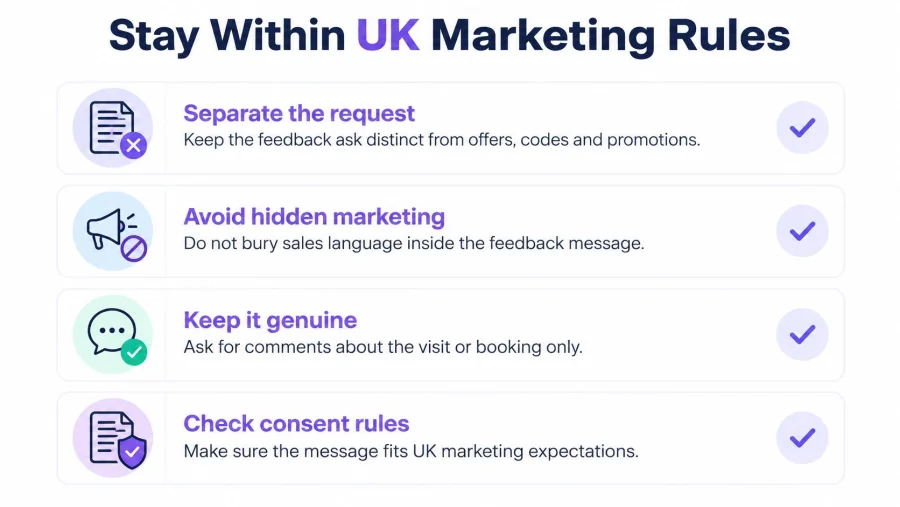
A genuine service question is not the same message as a promotion. Keep the feedback invitation separate from offers, codes and future deals. If the email promotes rewards, discounts or later offers, it is direct marketing.
The Information Commissioner's Office guide to electronic mail marketing states that marketing emails to individuals require specific consent or the limited soft opt-in exception, and that UK GDPR and the Data Protection Act 2018 also apply when personal data is used.
What the soft opt-in actually allows
An existing customer who bought, or negotiated to buy, a similar product or service can receive marketing email without a fresh opt-in. That only holds if you gave a simple opt-out when you collected their details, and again in every message after. A first-time newsletter signup with no purchase doesn't meet that test.
If you still want to mention future deals, put them on a separate, unticked box. Never write that a reply is required to keep a service or a reward. Don't bundle survey participation with marketing consent.
What the answers count as
Comments tied to a name, email, purchase, booking or loyalty record are not anonymous. The ICO's note on survey data explains that survey answers you can link back to a person are pseudonymous personal data, and data protection law still applies. Say who reads the comments. Collect one rating, one visit question and an optional comment. Promise anonymity only when the form cannot be tied back to that customer.
This is general information, not legal advice. Check the ICO guidance for the detail that fits your list.
Before each send, run this check:
- Business name visible: The customer can see who wrote.
- Reason stated: The email says why you're writing about that visit.
- No code in the feedback email: Offers live in a separate, consented message.
- Unsubscribe works: Any message that contains marketing has a working opt-out.
- Permission recorded: You can show why this person was on the list, and you act on opt-outs promptly.
How to Send the Request in Five Steps
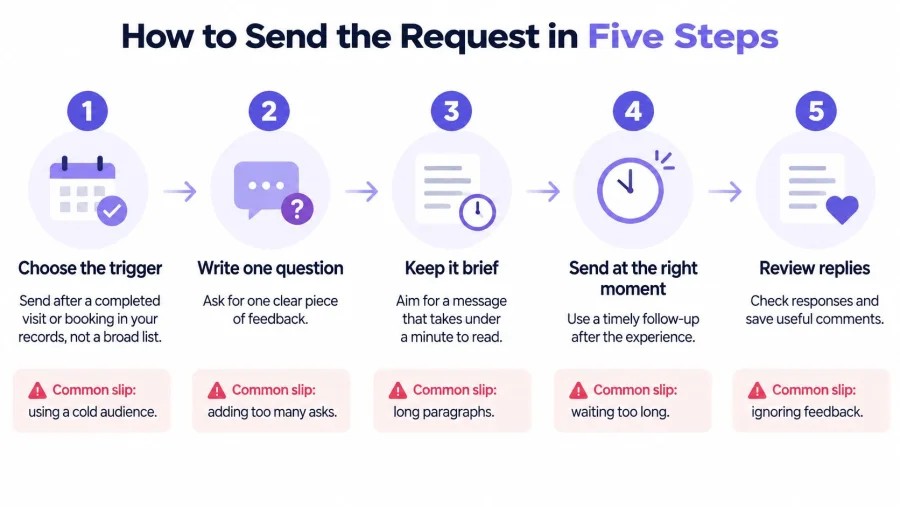
Choose the trigger. Send after a completed visit or booking in your records, not to everyone who has ever spent money. The slip is a broad list of old contacts who don't remember you. A till export from this week is enough.
Check permission. Confirm each contact can receive this request before it goes out, using the consent or soft opt-in test above. The slip is assuming a receipt email address is permission for a later promotion. A BonusQR feedback and rewards setup can sit beside the request so a later, separate reward doesn't get pasted into the survey itself.
Fill the personal fields. Drop in the first name, the visit and a real sign-off. The slip that ruins an otherwise good note is a merge field that lands as
{first_name}. Open three records at random before you approve the batch.Test the send. Email yourself, open it on a phone, and tap the button. The slip is sending from an address that looks like spam. Use your own business domain, and check the subject still makes sense when the screen cuts it short.
Send and log. Record the send date, delivery, clicks and replies in a simple spreadsheet so the next round has something to beat. The slip is sending and then forgetting. After the first week you should see whether the button gets taps and whether the comments are specific enough to change a shift.
Route Happy and Unhappy Customers Differently
A 2-star comment about a cold table needs a faster response than a 5-star note. It should not get a different review rule. Give every customer the same optional invitation to leave a public review, then use the score only to set the speed and tone of your follow-up.
The public ask still matters. In 2024, 68% of UK consumers said online reviews were their primary source for purchasing decisions, according to Reputation's survey of 530 UK consumers. Keep that invitation separate from the feedback form: the survey is for service recovery, and a discount does not belong inside it. A tool such as BonusQR automatic Google review requests should only carry that same optional review prompt.
Low scores go to the front of the queue. Reply in private within one working day, thank them, name the issue they raised, and offer a fix or a short call. If they also post a negative public review, answer it courteously in public and keep the detailed fix in private. High scores get a warm thank you and the same choice to review, with no pressure.
Say a restaurant gets a 2 for a long wait. The manager writes the same day: "Thanks for telling us. The wait on Saturday was too long, and that sits with us. If you'd like to come back, we'll hold a table so you aren't standing at the door." If a public review appears too, the public reply stays short: "Sorry for the wait. We've messaged you directly and are fixing the Saturday handover."
If a comment names a person, pass it to the manager that day. If it names a problem that could happen again, add it to the list for the next team meeting.
Staff don't need a long policy. They need that one rule on the wall by the pass.
Lift Response Rates and Measure What Works
A finished form is the only result that counts as a reply, so track three numbers: sends that land, clicks on the form link and completed forms. An open is only a rough sign the subject was seen. The DMA Email Benchmarking Report 2025 publishes annual delivery, open and click benchmarks for UK email, and it works best as a reference for what ordinary campaign performance looks like rather than a pass mark.
Your own trend across batches is the number that matters.
Delivery tells you the address was real. A click tells you the reader acted. A completed form tells you they cared enough to answer. Log finished forms separately from clicks, because a click with no form usually means the form is too long or the link landed on the wrong page.
Because the request carries no voucher and no review link, the replies measure the visit itself. Add a discount to the same email and the count mixes two signals: how the service went, and how much the customer wanted the deal. A clean ask keeps the data readable.
| Symptom | Likely cause | Fix |
|---|---|---|
| Low open rate | Vague subject line or a poor send time | Name the business and the visit in the subject and send within 2 to 48 hours of the visit |
| Opens but few clicks | Button is hidden or several links compete | Use one clear button high in the email and remove other links |
| Clicks but no completed form | Form is too long | Keep to one rating and one optional comment |
| Only extreme scores come back | Only very happy or very unhappy customers respond | Rotate the customers you ask and avoid asking after every visit |
| Comments are vague | The open question is too broad | Ask one specific question that matches the visit type |
Work in batches of similar size so the comparisons stay fair. When one fix moves a number, watch the others for a batch or two before judging it: a stronger subject can lift opens while the same weak form still loses the click. A simple sheet with the date, the subject used, clicks and finished forms covers the basics of how to track customer satisfaction without another dashboard on day one.
Send Your First Feedback Request This Week
Pick the row closest to your business, paste the template, and send it to 20 customers from the past week who have already given permission. In seven days, count sends, clicks and completed forms. Then change one thing for the next batch: the subject, the timing or the button text.
BonusQR offers a free consultation with its team to help you choose a loyalty setup, so the feedback ask and any later reward don't get mashed into one email. Ready-to-print promo materials are available in the business dashboard, which means you can also prompt a comment at the till or the table. The analytics show which offers perform best and help you spot the customers who come back.
That is a repeatable loop. Regulars stay in the conversation, and a problem surfaces while you can still fix it on the next shift.
Book the free consultation, print the till card, and send those 20 emails before the week is out.


