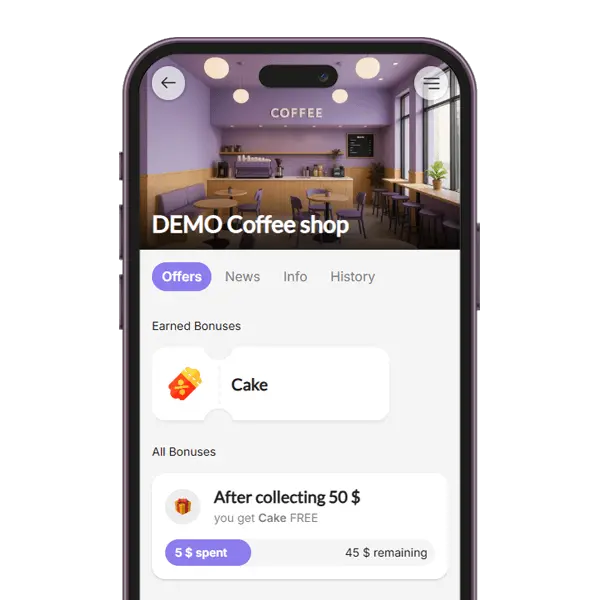
Reward for Spend
Reward customers for regular payments.
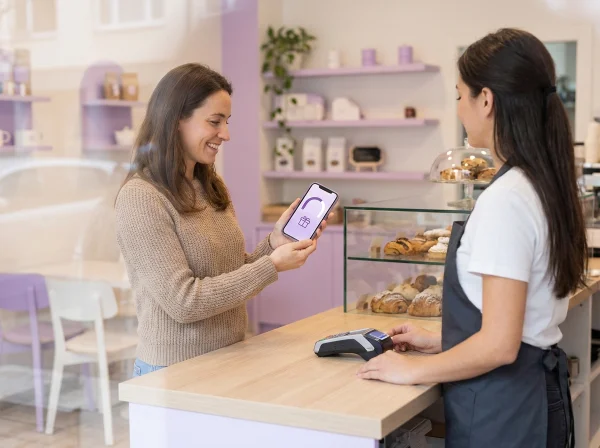
Reward your customers for their regular purchases with instant coupons once they reach a set spending threshold. Simply scan the customer’s loyalty QR code, enter the total purchase amount, and if they reach the target spend, they’ll earn a reward. Simple, motivating, and perfect for increasing loyalty!
Coupons as rewards
Collecting is fun
Every payment counts
What is a spend-based loyalty program?
A spend-based loyalty program rewards customers for how much they spend, not just how often they come. You set a target amount, and once a customer’s purchases add up to it, they automatically receive a reward coupon.
In BonusQR this program is called Reward for Spend. Staff scan the customer’s loyalty QR code and type in the bill amount – that’s all. The amount is added to the customer’s total, the loyalty card shows how much is left to the next reward, and the coupon appears in the customer’s account as soon as the target is reached.
- Spending adds up across visits – small and large purchases both count
- Anything spent over the target carries over toward the next reward
- Part of the Free plan and works with any cash register
What can be set up in the loyalty program Reward for Spend?
Set the Reward Threshold
Define the total amount a customer must spend to earn a reward.
Choose the Reward
Create a motivating coupon your customer will love – whether it’s a free item, discount, or special offer.
Customize the Coupon
Add an expiry date, write a short message, or explain the reward details.
Why reward customers for what they spend
A spending target gives every purchase a purpose and gives customers a reason to choose you next time.
Every purchase counts
Customers see their total grow with each bill, so even a quick purchase brings them closer to the reward.
A reason to come back
When the next reward is within reach, customers have a good reason to make their next purchase with you rather than elsewhere.
Fair to every customer
The reward follows the money spent, so customers who spend more reach it sooner – without levels or rules to manage.
Nothing to explain at the till
Staff scan the QR code and enter the amount. BonusQR keeps the total and issues the coupon automatically.
A reward you choose
Set the target amount, the reward, how long the coupon stays valid and a short note for your customers.
Clear progress for customers
The loyalty card shows how much has been spent and how much is left, and every new coupon also arrives by e-mail.
Related loyalty programs and features

Customer’s perspective of
Reward for Spend - loyalty module
- The customer clearly sees how much more they need to spend to get their reward.
- Once the set amount is reached, a coupon for the reward shows up in the app.
- The customer can easily redeem the reward coupon and keep collecting toward the next one – any amount over the target carries over.

How will your employees see the
loyalty program: reward for spend
- Add the Payment Amount: Staff scan the loyalty QR code and enter the bill; the amount is added to the customer’s total automatically.
- Redeem the Coupon: When the customer wants to use a reward coupon, staff scans the coupon and instantly sees if it’s valid and ready to use.
- Clear and Guided Actions: The loyalty system clearly shows the staff what to do – whether it’s adding points or redeeming a coupon. Easy and intuitive!

Manager’s view of
Reward for Spend
- Customer Stats: See how much each customer spent and how many rewards they earned or used.
- Program Overview: Track total spend, number of customers, and all issued or redeemed coupons.
- Growth Tracking: Filter data by time to see how your loyalty program is helping your business grow.
Reward for Spend compared with points and cashback
All three reward spending. They differ in what the customer collects and how the reward is received.
Points system
Customers earn points from the bill at a rate you set and choose a reward from your catalogue.
- ✓Up to 20 rewards for customers to choose from
- ✓Optional expiry of points
- −Available from the Basic plan
Reward for Spend
Customers collect the amount they spend and receive a reward coupon when they reach the target you set.
- ✓One simple goal that everyone understands
- ✓Coupon issued automatically, extra spending carries over
- ✓Staff only enter the bill amount
Cashback
A percentage of every bill is credited to the customer as credit they can use to pay a later bill.
- ✓Customers see the value in money
- ✓Credit brings them back to spend it
- −The reward is credit, not a product you choose
| Comparison | Points system | Reward for Spend | Cashback |
|---|---|---|---|
| What customers collect | Points from the bill amount | The amount spent | Credit (a % of the bill) |
| What staff enter | Bill amount | Bill amount | Bill amount |
| How the reward is received | The customer picks it from your catalogue | A coupon issued automatically at the target | Credit used to pay a later bill |
| Plan | Basic | Free | Free |
Where Reward for Spend works well
Wherever bills vary in size and customers come back regularly.
Loyalty program Reward for Spend - suitable for industries











Why Do You Need a Loyalty App?
- Increase Repeat Visits
- Enhance Sales & Customer Spend
- Gain access to powerful features
Loyalty Programs
Choose the loyalty program that fits your business. Points collection, Stamps, Cashback, Rewards for regular visits, Discounts, Coupons ...
– it’s all up to you!
Analytics & Insights
Get to know your customers better. Track visit history, see which offers perform best, and identify your most loyal customers. Build your database and watch your business grow!
Push & Email Notifications
Stay on your customers’ minds. Send them regular updates and news, special discount coupons, or request feedback after repeat visits.
Coupons & Surprises
Automate promo coupon distribution for special occasions – Birthdays, Valentine’s Day, Children’s Day... Or boost sales with pre-sale coupon offers.
Important features of the loyalty application




Frequently asked questions about Reward for Spend
What business owners most often ask before they start.


