
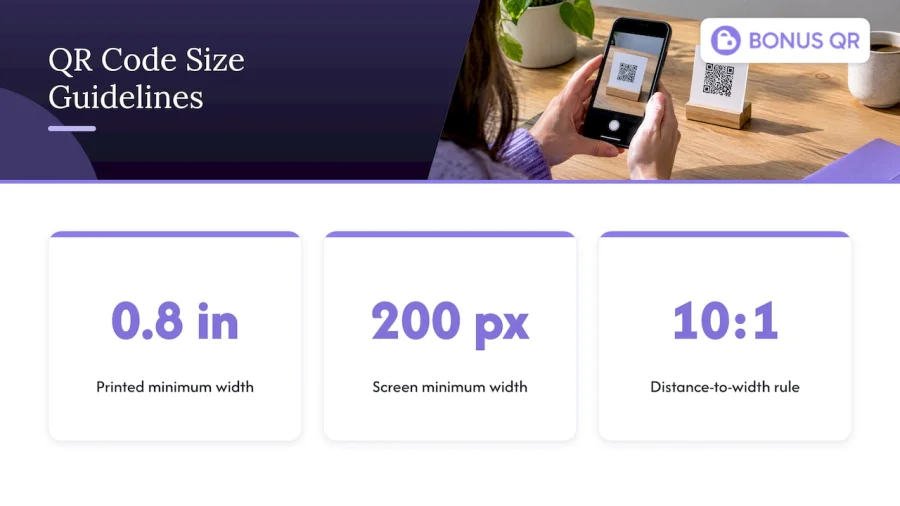
A printed QR code should be at least 2 × 2 cm (about 0.8 × 0.8 inches) for close-range handheld items, and on screens at least 200 × 200 pixels. Beyond that floor, size depends on how far away the customer stands: the width of the code should be about one-tenth of the scanning distance. A counter card scanned at arm’s length can be small. A window decal scanned from the sidewalk cannot.
This guide shows how to size, place and test QR codes for a real business, with loyalty enrollment signage as the running example. If you run a cafe, a gym, a salon or a retail shop, you will leave with a size for each surface you print on and a checklist to run before the print order goes out.
Key Takeaways
- The practical minimum for a printed QR code is 2 × 2 cm (about 0.8 × 0.8 in); on a digital display, plan for at least 200 × 200 pixels.
- Use the 10:1 rule: the code’s width should be at least one-tenth of the distance from which people scan it.
- Keep a clear margin of four modules on all four sides. Text, borders and artwork inside that margin are a leading cause of failed scans.
- A dynamic code holds a short redirect URL, so it can stay smaller and denser-free, and you can change its destination without reprinting. That matters for loyalty signage you will keep for years.
- Always test the final printed piece on several phones, at the real distance and in the real lighting, before ordering a full run.
What size should a QR code be?
There is no single correct size, but there is a reliable floor and a reliable method.
The floor: for most scanners to read a printed code, about 2 cm × 2 cm (0.8 in × 0.8 in) is the commonly cited minimum. That figure assumes the code is scanned from a short distance, such as a receipt, a business card, a product label or a loyalty card held in the hand. In the US, where most print specs are in inches, think of it as a bit under an inch, and treat it as the smallest you should ever go, not a target.
The method: start from the distance, then size up. Once you know how far the customer will be from the code, the 10:1 rule gives you the width. The sections below walk through it.
On screens, the numbers are in pixels. A code shown on a website, a tablet at the register or a digital menu board should be at least 200 × 200 pixels at the size it is actually displayed. Export it at a higher resolution and scale it down rather than the other way around, because enlarging a small image blurs the edges of the modules, the small squares that make up the code.
Why very small codes fail
A QR code is a grid of modules. The smallest standard version has 21 × 21 modules, and the largest has 177 × 177. Your phone camera has to resolve each of those squares. If the printed module is too small, or the camera is too far away, neighboring modules blur into one another and the scan fails.
That is why size is not just about the outer dimensions. It is about how many modules the code contains and how large each one is when it reaches the customer’s phone.
The 10:1 rule for scanning distance
The most useful planning guideline is the 10:1 ratio: a code’s width should be at least one-tenth of the scanning distance. The same source gives a metric example: a 10 cm wide code for a scanning distance of 1 meter. Another guide states it from the other side: scanning distance should be no more than 10 times the code’s width.
It is a planning shortcut, not a law of physics. Phone cameras, lighting and the amount of data in the code all change the real result, which is why the testing section below matters. But it gets you to a sensible first draft quickly.
Here is what it works out to in inches for typical small-business surfaces. These are our own calculations from the 10:1 ratio, rounded up, so treat them as starting points:
| Where the code lives | Typical scanning distance | Minimum width by 10:1 | Suggested size |
|---|---|---|---|
| Loyalty card, receipt, business card | 4 to 8 in | under 1 in | 1 in (2.5 cm) or larger |
| Table tent, menu, countertop stand | 1 to 2 ft | 1.2 to 2.4 in | 2 to 3 in |
| Register or checkout sign | 2 to 3 ft | 2.4 to 3.6 in | 3 to 4 in |
| Wall poster or shelf talker | 3 to 5 ft | 3.6 to 6 in | 5 to 6 in |
| Door or window decal | 5 to 8 ft | 6 to 9.6 in | 8 to 10 in |
| Storefront banner or large sign | 10 ft | 12 in | 12 in or larger |
Two habits keep this table honest. First, measure the real distance: stand where a customer would stand, not where you would stand behind the counter. Second, round up. A code that is slightly too large costs a little extra ink. A code that is slightly too small costs you every scan.
Sizing for screens and digital signage
For displays, the same ratio applies, but the numbers are set by screen size and viewing distance. A code on a TV-style menu board that customers read from across the room needs to be far larger than the same code on a tablet at the register. Guidance for digital signs also points out that the type of code affects size, since dynamic codes hold a short URL and can stay simpler. Keep the code on a solid light panel, away from video content that moves or changes brightness.
What else changes the size you need
Data density
The more you encode, the more modules the code needs, and the larger it must be printed to keep each module readable. Research presented to the printing industry notes that encoding more data increases the module count and calls for larger physical dimensions to maintain scannability.
The practical lesson is simple: keep the payload short. A code that points to a short link has far fewer modules than one that encodes a long URL with tracking parameters. Fewer modules means each one can be larger at the same printed width, and larger modules scan faster and from farther away.
Quiet zone
The quiet zone is the blank margin around the code. The QR standard calls for a margin at least four modules wide on all four sides, and the same source identifies violations, such as text, borders or design elements sitting too close, as a leading cause of scanning failure. You can also see this rule in other design guidance: measure one module in your final artwork, multiply by four, and keep that distance clear on every side.
This catches people out on branded signage. A designer places the code inside a colorful frame or a rounded badge, and the frame eats the margin. The code looks fine to a person and fails on half of the phones that try it.
Contrast and color
Dark modules on a light background are the safest choice. Guidance on print and digital use warns that multi-color gradients or split-pattern schemes often lead to scanning failures. Brand colors are fine when the code stays two-tone and the contrast is strong. Light modules on a dark background, glossy surfaces that reflect store lighting and busy photo backgrounds all reduce your margin for error.
Print method and material
The material changes how small a module can safely be. One print guide reports that uncoated stock and 203 dpi thermal printing need 0.5 mm modules, compared with 0.4 mm for coated offset, because ink spread and paper texture can make small codes unreadable. If you print receipts on a thermal printer, or use uncoated kraft cards, add size to the code rather than squeezing it.
A quick way to turn that into a number: a version 1 code is 21 modules wide, and adding the four-module margin on each side brings the total to 29. At 0.5 mm per module, that is roughly 14.5 mm including the margin. Real codes for web addresses are usually bigger than version 1, so the actual footprint grows. This is our own arithmetic, so use it only to see why a tiny thermal-printed code is risky.
Error correction
Higher error correction levels make a code more tolerant of scuffs, folds and partial damage, which suits items that get handled all day, like punch cards and counter stands. The trade-off is more modules for the same data. If your code sits on a laminated table sign that rarely gets touched, a lower level with fewer modules can be the better choice. For stickers on shared surfaces such as gym equipment or a gas station pump, choose higher correction and a larger print.
Static vs. dynamic QR codes
This is the other question readers ask most, and it affects size as well as flexibility.
A static code encodes the destination directly. Whatever is inside is permanent, and it cannot be updated without reprinting. A dynamic code encodes a short redirect URL instead. The destination lives on a server, so you can change it later and see scan counts.
| Static | Dynamic | |
|---|---|---|
| What is encoded | The destination itself | A short redirect link |
| Changing the destination | Reprint required | Edit anytime |
| Scan analytics | None built in | Scan counts and trends |
| Typical code density | Grows with the data | Stays low, so it can scan from farther away |
| Best for | Wi-Fi details, a fixed homepage | Campaigns, menus, loyalty enrollment |
The rule of thumb from one practical guide is to use dynamic when the destination may change or you want scan counts, and static for permanent targets such as Wi-Fi credentials.
Which one fits loyalty signage?
For loyalty enrollment, dynamic is the sensible default. You will print the sign once, but your program will change: a new reward tier, a seasonal promotion, a different sign-up page. If the code is static and encodes the old link, every printed sign becomes obsolete. A dynamic code lets the same sign keep working, and scan counts tell you whether the sign is earning its spot on the wall.
There is one more benefit for small businesses. Because a dynamic code carries a short link, it has fewer modules, so it tolerates a smaller print size or a longer scanning distance than a static code carrying the same long address.
Where to place QR codes so customers actually scan them
Size gets the code readable. Placement gets it noticed. The core placement guidance is to put the code in the natural reading flow, away from fold lines, edges and areas subject to handling damage, with the quiet zone kept clear.
Placement rules that hold in most shops
- Put it where people wait. Checkout counters, queue lines, table surfaces, waiting rooms and reception desks give customers a few idle seconds and a phone already in hand.
- Match height to behavior. Countertop codes should sit flat or tilted toward the customer. Wall codes belong roughly at chest to eye level, not above the head and not at knee height.
- Avoid glare. Glass, laminated gloss and spotlights create reflections. Test the spot at different times of day, and choose a matte finish for signs under bright lights.
- Do not wrap or curve it. A code on a bottle, a cup sleeve with a tight curve or a seam gets distorted. If you need a curved surface, enlarge the code and test it.
- Keep it off folds and edges. Menus, brochures and tri-fold cards crease right through the data.
- Leave space. Do not crowd the code with other logos, prices or QR codes for other purposes.
Tell people what they get
A bare code is a puzzle. A short line beside it turns it into an invitation. Placing a clear call to action next to the code significantly improves conversion. Instead of nothing, write what happens and what the customer gains: “Scan to join and get your first stamp.” If you want help with the wording, this walkthrough on writing compelling CTAs covers the principles. And when the code leads to a conversation or a booking rather than a sign-up, a short explanatory line also helps, as in this example of QR code appointment setup.
A good loyalty sign has four parts: a headline with the benefit, the code at the right size, a one-line instruction and, ideally, a visible reward such as a free coffee or a discount on the next visit.
Placement by business type
- Cafes and restaurants: a table tent or a card by the register, plus a small code printed on the receipt so customers can join after paying.
- Retail and grocery: a counter sign at the register and a larger poster at the entrance. Shelf talkers work for specific product rewards.
- Gyms and wellness centers: reception desk, locker-room doors and near the check-in kiosk, where members wait or pass by regularly.
- Hotels: the front desk, the key-card sleeve and the in-room information folder.
- Gas stations: at the register and on the pump, where people stand still. Use a larger code and a robust, weather-resistant finish for outdoor use.
- Service providers: the invoice, the appointment confirmation and the waiting area.
A worked example: a coffee shop loyalty sign
Say a cafe wants three surfaces: a counter stand, a window decal and a loyalty card.
The counter stand is read at about two feet. By the 10:1 rule that needs a code roughly 2.4 inches wide, so the owner prints at 3 inches to leave room for variation in phone cameras, with a clear margin around it. The window decal is read from about six feet outside, which calls for roughly 7 inches, and the owner picks 8 inches on a matte vinyl. The card is held in the hand and is scanned from a few inches, so 1 inch is the minimum; the owner uses 1.25 inches and checks that the thermal printer produces crisp modules.
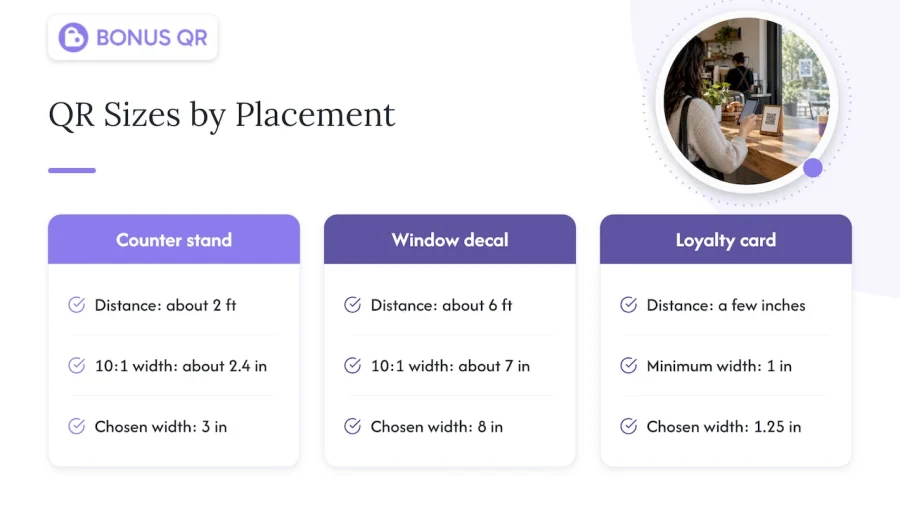
All three use one dynamic code that points to the same enrollment page. When the cafe adds a summer reward, nothing gets reprinted. The scan counts also show which surface performs best, so next quarter’s budget goes to the right place.
What to test before you print
A code that scans on your own phone on your own monitor proves very little. Before approving a print run, work through this checklist. Our own hands-on list matches the testing steps common in print-prep guidance, which advises going beyond a single scan on your own phone and checking several devices and methods.
- Print a proof at actual size on the actual material. Do not judge from the screen.
- Scan it with several phones: an iPhone, an Android phone and an older model if you can find one. Use the default camera app, not only a dedicated scanner.
- Scan at the real distance, standing where customers stand, and at the real angle.
- Test in the real lighting: morning sun, evening bulbs, the glare from a window.
- Check the destination, not just the scan. Does the page load quickly on mobile data, and does it show the enrollment screen right away?
- Check the margin: nothing from the frame, text or background pattern should intrude on the quiet zone.
- Stress-test the surface: a card that sits in a wallet gets scuffed, and a counter sign gets wiped. Rub, bend and wipe the proof, then scan again.
- Ask someone who has never seen it to try it without instructions. If they hesitate, improve the call to action.
File format matters too. For print, send a vector file (SVG or PDF) or a high-resolution PNG so the edges stay sharp at any size. Avoid heavily compressed JPGs for codes, since compression artifacts blur the modules.
Common QR code sizing mistakes
- Designing on the screen only. Codes look larger on a monitor than on a business card.
- Shrinking a code to fit the layout. Change the layout, not the code.
- Encoding long URLs in a static code. The module count rises, and the code gets harder to read at small sizes.
- Using stretched or non-square codes. Always scale proportionally.
- Inverting colors for style. Light-on-dark codes confuse some scanners.
- Ignoring the print method. Thermal receipts and uncoated paper need more size.
- No call to action. A perfectly sized code on a blank sign still goes unscanned.
Our perspective: loyalty signage should be simple to scan and easy to change
Most small business owners we talk to treat the QR code as a design detail. We see it as the front door of the loyalty program. If the code is too small, hidden behind a frame or tied to a link you cannot update, the customer never gets in, and every sign you printed is wasted.
That is why we built BonusQR around a QR-based approach that needs no extra POS system. Customers scan, join and start collecting points, stamps or cashback on their own phones, while the platform handles reward distribution, notifications and customer insights. Because the sign is only the entry point, you can adjust rewards and promotions in the platform rather than reprinting your materials.
Our advice is to size every code for the farthest customer who will realistically scan it, keep the margin clear, put a one-line benefit next to it and test it on real phones before you print. A properly sized, well-placed code is the cheapest customer-retention tool in a small business, because repeat customers are the lifeblood of any small enterprise.
Michal Palus
Turn the scan into a loyalty program
A well-sized code only matters if the scan leads somewhere useful. With BonusQR, the code on your counter opens a digital stamp card, points program or cashback scheme that customers keep on their phones, with no POS integration required. You can start on the Free plan, move to Basic at €19 per month or Premium at €69 per month as you add features, and compare what each includes on the BonusQR pricing page. If you want a branded app for a larger operation, see the white-label option, or read more loyalty ideas on the BonusQR blog.
FAQ
What size are most QR codes?
Most printed QR codes on handheld items such as cards, packaging and flyers fall between about 1 and 2 inches wide, with 0.8 inches (2 cm) as the practical floor. Signs read from farther away are much larger, scaled by the 10:1 distance rule. The code itself ranges from 21 × 21 to 177 × 177 modules depending on how much data it holds.
What is a good size for a QR code sticker?
For a sticker people scan from arm’s length, such as on a table or a shared piece of equipment, aim for 2 to 3 inches wide. Go larger if it will be scanned standing up or from the other side of a counter. Keep a clear margin, use a matte finish and test it on the actual surface.
Should a QR code be a PNG or JPG?
For print, a vector file (SVG or PDF) is best because it stays sharp at any size. If you need a raster image, use a high-resolution PNG, which keeps crisp edges. Avoid JPG for QR codes, since compression can blur the modules and make scanning less reliable.
Should I use a dynamic or static QR code for my loyalty program?
Use dynamic. It encodes a short redirect link, so you can change the destination without reprinting and see how many people scan. Static codes suit permanent targets like Wi-Fi details, but they lock in whatever link you printed.
Does a QR code need a white background?
Not necessarily white, but it needs strong contrast and a clear margin. Dark modules on a plain light background work best. Test any brand color on the real material before printing.
Sources
- QR code size guide, FreeQR
- What’s the Minimum Size for a QR Code?, Bitly
- Information capacity and versions of QR Code, QRcode.com
- How Small Can a QR Code Be?, Wave
- QR Code Size on Digital Signs by Scanning Distance
- The Relationship of 2D Barcode Size and its Ability to Scan, TAGA Proceedings 2025
- QR Code Best Practices 2026, Cutt.ly
- QR Code Quiet Zone: 4-Module Margin and Design Rules
- QR Code Best Practices for Print and Digital, EZQR
- The minimum size a QR code can be, UseQR
- QR Code Print Size: Distance, Modules, and Proof Testing
- How to Create Compelling CTAs for Higher Conversion Rates
- How to Set Up WhatsApp QR Code Appointments


