A faded board, a half-updated price card, and a customer asking whether the soup is still that price. That's the daily reality for a lot of cafés, restaurants, salons, and small shops. A menu price list template is not just a design file, it's a working sales tool that has to stay current on paper, on phones, and at the counter.
The wrong template slows staff down. The right one makes weekly updates easy, keeps allergen and VAT information visible, and stops old prices from lingering in printouts or QR menus. The options below range from free gallery tools to paid editors and print services, with clear notes on who updates them, what they're good at, and where they fall short. The last step is simple, host the finished menu in a BonusQR profile so prices, rewards, and visit history live in one place.
1. Canva
Canva is the easy starting point for teams that want speed without hiring a designer. The platform has a huge template library, and its drag-and-drop editor works well for a menu price list template that needs GBP formatting, clear item names, and space for VAT notes or allergen markers. It suits cafés, small restaurants, salons, gyms, and retail price lists because staff can open it, change text, and export quickly.
The practical advantage is handoff. A manager can update prices, a shift lead can swap seasonal items, and a designer isn't needed for every change. High-resolution export also makes it usable for both print and digital menus, which matters when a venue needs one master file and several customer-facing versions.
Practical rule: keep the price field separate from the description field. If item names and prices are mixed into one text block, weekly edits become messy fast.
Canva does have trade-offs. Some of the better templates and assets sit behind paid plans, and the exact UK pricing is shown at checkout. Still, for a small venue that changes items often, the low friction is the true value.
A useful next step is to pair the finished menu with loyalty and visit tracking. The workflow fits well with mobile loyalty program setup for restaurants made easy, especially when the same menu needs to appear on phones and in print.
For a design reference, the template gallery is at Canva's menu templates. The extra inspiration route, if needed, is designing custom event shirts, though that's more about layout thinking than hospitality use.
2. Adobe Express
Adobe Express works better for operators that care about brand control and consistency across locations. It offers free and premium menu templates, along with brand kits, template locking, and collaboration features that help multi-site businesses stop staff from drifting off-brand. For a menu price list template, that matters when one person updates drinks, another updates food, and every version still has to look like the same business.
The Adobe Firefly features are useful when a venue wants to turn a rough layout into something cleaner without starting over. Print-ready export is another advantage, especially for businesses that still rely on wall menus, folded menus, or counter cards. It also sits naturally inside the Adobe ecosystem, which helps if the business already uses other Adobe tools.
Where It Fits Best
Adobe Express suits groups that need governance more than novelty. Franchise sites, fast-growing independents, and operators with strict brand rules will get more value from locked templates than from endless design freedom. That kind of control keeps weekly price changes from breaking layout consistency.
The downside is simple. The stronger governance and advanced features sit behind Premium or Business plans, and new users may face a learning curve if they've never used Adobe tools before. For a single-site café, that can be more tool than needed. For a multi-location brand, it's often worth it.
The website is Adobe Express menu templates. Use it when the menu has to look polished everywhere, not just on one printed sheet.
3. Venngage
Venngage is a good fit when the job is less about flair and more about structure. Its food and beverage price-list templates are built for clear layouts, which makes them useful for cafés, salons, gyms, and retail price cards. A menu price list template here tends to read cleanly, with less fuss and fewer design distractions.
That's the main appeal. Non-designers can build a price-led list without fighting the editor. For businesses that care more about item hierarchy than decorative backgrounds, that saves time and reduces mistakes. Paid plans add PDF and PowerPoint export, plus brand kit support, which matters if the same list needs to go to print, email, or internal review.
Trade-offs That Matter
Venngage is strongest when the team wants a simple, structured format and fast learning. It is weaker when the business expects a large amount of collaboration without paying for it. Free-plan limits also mean that the polished export path usually lives in the paid tiers.
That makes Venngage useful for operators who already know what they sell and just need a tidy way to present it. It is less useful for venues that want highly custom layouts or heavy visual experimentation. In practice, that's fine for many small businesses. A clean price list beats a clever one if staff can update it properly.
The template page is Venngage food and beverage price lists. For teams that want a quick scan-friendly list rather than a design project, this is one of the cleaner options.
4. VistaCreate
VistaCreate is worth a look for small teams that need more than one person to touch the menu. Its Pro plan includes up to 10 team seats, which makes it easier for managers, supervisors, or front-of-house leads to help update a menu price list template without passing files around manually. That matters in venues where price changes, seasonal specials, and offer updates happen often.
The library is large, with 200K+ premium templates and 170M+ stock assets on Pro, plus Unlimited Brand Kits and AI tools. That gives a small operator enough range to refresh menus for holidays, seasonal drinks, and short-lived promotions without rebuilding everything from scratch. The asset depth is particularly useful when the business wants a different look for breakfast, lunch, and specials boards.
A menu tool only helps if the people on shift can use it. Multi-seat access often matters more than fancy effects.
The trade-off is that the feature set can feel crowded. New users may spend too much time browsing options instead of updating prices. Some advanced exports and features also sit behind Pro, so the free plan is more of a trial than a full working system.
For a small venue with a few editors, the value is solid. For a solo owner who only changes prices occasionally, it may be more than needed. The website is VistaCreate.
5. PosterMyWall
PosterMyWall is fast. That's the main reason it belongs on this list. It has thousands of menu templates, a menu maker workflow, and enough category filters to get a takeaway menu, salon price sheet, or board graphic out quickly. For venues that need a menu price list template for both print and social posts, that speed matters.
The workflow is built for quick production, not endless refinement. That suits busy owners who need a lunch special, takeaway flyer, or promo board live the same day. Animated templates can also be useful for digital signage, which gives the same menu a second life beyond paper.
What to Watch
The main drawback is that features and watermark removal vary by plan. Pricing also depends on billing setup, so the checkout screen is the place to confirm the actual cost. That makes it less predictable than some of the simpler fixed-editor tools.
Still, if the priority is to produce something readable, usable, and quick, PosterMyWall does the job well. It is especially strong for marketing-driven menu updates and short-run campaign assets.
The restaurant-focused landing page is PosterMyWall menu templates. For operators tying menus to repeat visits, the restaurant use case connects neatly with BonusQR for restaurants, especially when menus and offers need to sit side by side.
6. Marq
Marq is built for consistency. It fits franchises, chains, and multi-site groups that need the same menu price list template structure across several locations. The editor feels more like desktop publishing than a casual drag-and-drop app, which is exactly why some operators prefer it.
Brand governance is the big strength. Locked templates help prevent local edits from breaking the master layout, and the precise layout tools make it easier to prepare print-friendly files. That matters when the menu must hold up on a wall, on a counter, and in a controlled brand environment.
Best Use Case
Marq works best when someone in head office owns the master layout and local managers only make limited changes. That model reduces inconsistency, especially when multiple branches are updating prices at different times. It is also helpful when typography and spacing need to stay tight for production-ready print.
The trade-off is cost and scale. It is usually more expensive than lightweight editors, and the public template library is smaller than the biggest consumer tools. That makes it a better fit for businesses that genuinely need governance, not for a one-off café menu.
The website is Marq menu templates. If the team values control over speed, this is one of the stronger structured options.
7. Visme
Visme is useful when a list needs to stay structured and readable across multiple pages. It includes price-list and menu makers, which makes it a practical choice for salons, gyms, retail price sheets, and restaurants. A menu price list template in Visme can be built to expand or condense item lists without losing the overall layout.
The strength here is organisation. Brand kits, collaboration, and export options on paid plans give teams a workable path from draft to print or internal sharing. That is handy when one person writes the copy, another checks pricing, and a third prepares the final file.
Why It Works for Longer Menus
Visme handles multi-page lists better than many basic tools. That matters for operators with breakfast, lunch, drinks, add-ons, and specials all living in one system. The export support for PDF and PPTX is also useful when menus need to be shared internally before printing.
The downside is familiar. Free exports are limited, and most of the genuinely useful production features sit behind paid plans. For a business that only needs a simple one-page list, it may feel like overkill. For a venue with a lot of SKUs or menu sections, it becomes more attractive.
The menu maker page is Visme menu maker. It suits businesses that need clear structure more than visual theatre.
8. Envato Elements
Envato Elements makes sense when a business produces menus all year round. The subscription gives access to a very large library of creative assets, including restaurant and salon menu price list template files that work across Adobe, Canva, Figma, Illustrator, and other tools. For seasonal menus, rotating offers, and frequent refreshes, that breadth can save time.
The strongest point is value for repeat use. A venue that changes designs often can pull from different styles without buying each file separately. Stock media is bundled in as well, which helps when a menu needs images, icons, or supporting artwork.
Practical rule: subscription libraries only pay off if the team keeps publishing. If a business updates one menu twice a year, a one-off purchase may be simpler.
The downside is editing friction. Many files need desktop software such as InDesign or Illustrator, so the tool is less friendly for owners who want browser-only editing. Pricing and available items also vary by plan, so the subscription should be checked carefully before committing.
The website is Envato Elements. It suits businesses that treat menus as ongoing assets, not one-time projects.
9. Creative Market
Creative Market is the best fit when a business wants a distinct design without subscribing to a library. It's a marketplace, so buyers pay per item and choose from thousands of vendor-made menu and price-list files across formats like InDesign, Illustrator, and Canva. That makes it a strong option for a menu price list template that needs to feel more boutique than generic.
The appeal is simple. There's no recurring subscription, and the range of styles is wide enough to support very specific brand looks. That helps cafés, salons, and small restaurants that want something polished but not mass-market.
The Catch
Quality varies by seller. Buyers need to check ratings, reviews, compatibility notes, and the included readme before purchase. Support and updates are also not uniform across shops, so the file should be treated as a purchased asset, not a guaranteed long-term system.
That makes Creative Market a good one-off solution, especially for a launch menu, a rebrand, or a seasonal refresh. It is less attractive when the business wants weekly editing simplicity. In that case, a live editor is easier to maintain.
The marketplace is Creative Market templates and themes. It works best when design uniqueness matters more than ongoing workflow.
10. Vistaprint UK
Vistaprint UK is the strongest option for businesses that want design and printing in one place. It offers editable templates for flat, bi-fold, tri-fold, and Z-fold formats, along with water-resistant stock options and UK delivery. For a printed menu price list template, that makes the final step straightforward.
The built-in editor is practical, not flashy. It's aimed at businesses that want to configure a menu, choose stock, and order printed copies without moving between several suppliers. That is helpful for venues that need physical menus in hand quickly and don't want to handle print file prep themselves.
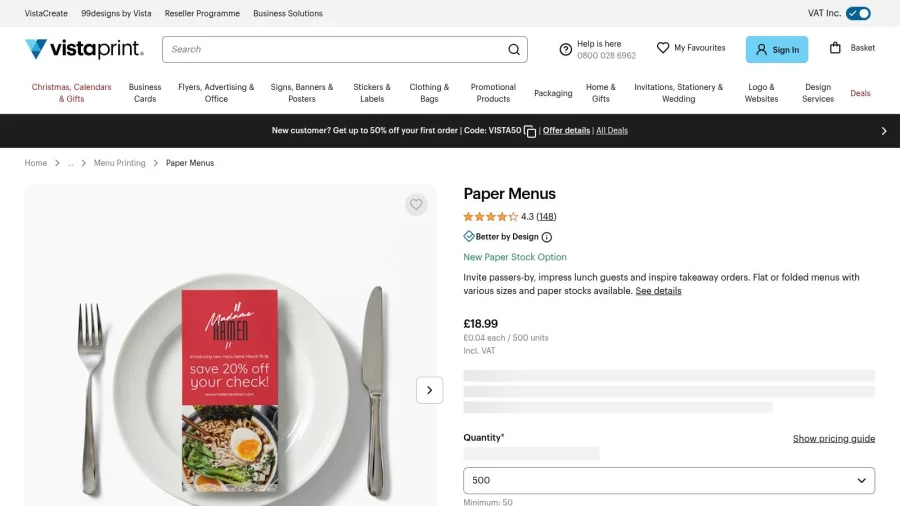
The trade-off is control. Compared with a proper desktop publishing app, Vistaprint gives less freedom for highly bespoke layouts. Pricing also depends on size, stock, and quantity, so the final figure is only clear during configuration.
For businesses that want a printed menu with less technical effort, that's fine. The workflow is direct, and UK support is part of the appeal. The site is Vistaprint UK menus. For a menu hosted inside a customer-facing loyalty setup, the pairing with BonusQR's menu price list feature keeps the print version and the digital version aligned.
Top 10 Menu Price List Template Tools Comparison
| Product | Core features | UX & Quality ★ | Value / Pricing 💰 | Best for 👥 / Unique ✨🏆 |
|---|---|---|---|---|
| Canva | 16,000+ templates, drag‑and‑drop, Brand Kit, high‑res export | ★★★★★ easy for non‑designers | 💰 Free + Pro for premium assets | 👥 Cafés, restaurants, small venues, huge template variety ✨ |
| Adobe Express | Template locking, Brand kits, Adobe Firefly, print‑ready exports | ★★★★ good, some learning curve | 💰 Free + Premium/Business | 👥 Multi‑location brands, governance & Adobe ecosystem 🏆✨ |
| Venngage | Structured price‑list templates, Brand Kit on Business, exports | ★★★★ clear & fast for non‑designers | 💰 Free limited; Business for PDF/PPTX exports | 👥 Price‑driven menus, salons & gyms, structured layouts ✨ |
| VistaCreate | 200K+ templates, 170M+ assets, AI tools, multi‑seat Pro | ★★★★ user‑friendly with large library | 💰 Pro (cost‑effective multi‑seat) | 👥 Small teams with multiple managers, multi‑seat value ✨ |
| PosterMyWall | 5,900+ menu templates, menu maker, animated boards | ★★★★ very fast workflow | 💰 Free + paid plans; watermark/removal varies | 👥 Takeaway & social menus, quick print/animated options ✨ |
| Marq (Lucidpress) | DTP‑style editor, locked templates, precise layout controls | ★★★★ professional, more technical | 💰 Paid tiers for governance | 👥 Franchises/multi‑site, brand consistency & control 🏆 |
| Visme | Price‑list/menu maker, multi‑page support, Brand Kit | ★★★★ good for structured, multi‑page menus | 💰 Free limited; paid for full exports | 👥 Salons/retail/gyms needing multi‑page menus ✨ |
| Envato Elements | Unlimited downloads, cross‑app templates, stock media | ★★★★ vast library; some files need desktop apps | 💰 Subscription, high value for frequent use 🏆 | 👥 Designers/teams producing seasonal or many menus ✨ |
| Creative Market | Pay‑per‑item templates (InDesign/AI/Canva), vendor marketplace | ★★★★ quality varies by seller | 💰 One‑time purchase per item | 👥 One‑off distinctive designs & boutique styles ✨ |
| Vistaprint UK | Built‑in editor + print, water‑resistant stocks, UK delivery & VAT | ★★★★ streamlined print workflow | 💰 Pay per print job; pricing by config | 👥 UK venues needing printed menus + delivery & local support 🏆 |
Choose the Template Your Team Will Actually Update
Pick the tool that matches who edits the menu each week, not the one with the biggest gallery. A beautiful file that no one can update is a liability. A plain file that staff can change in two minutes is usually the better business choice.
For small UK venues, the test is simple. Can the menu move from print to phone without breaking? Can prices change without rebuilding the whole layout? Can allergen notes, VAT treatment, and service charges stay visible when the list changes? Those questions matter because UK food rules require accurate allergen communication, prepacked-for-direct-sale products need full ingredient and allergen details, and displayed prices must stay clear before purchase Natasha's Law guidance, FSA catering guidance. UK pricing pressure also means menus need regular revision, not occasional cosmetic updates ONS restaurant meal inflation data.
That is why the best menu price list template is the one with the fewest handoffs. Canva and VistaCreate suit fast, frequent edits. Adobe Express and Marq suit brands that need tighter control. PosterMyWall and Vistaprint UK work well when the goal is quick output or print delivery. Creative Market and Envato Elements suit businesses that care more about design sourcing than live editing. Venngage and Visme are strong when structure and readability matter more than decoration.
The smart move is to build one clean master, export a print version, then keep the digital version live. Host that digital menu in a BonusQR profile next to rewards, visit history, and customer offers, so people don't have to hunt for the latest prices. Start with a free BonusQR account, upload the finished menu, and keep the same list current across the counter, the phone, and repeat-visit campaigns. For a broader pricing view, WebinOne pricing is a useful reference point, but the operational win comes from a menu that staff can keep current.


