How to Ask Customers for Reviews: A Step-by-Step Guide
A salon regular leaves the chair pleased with a fresh cut. The owner takes payment, answers the phone and welcomes the next appointment. Only later does anyone remember the review request, when the customer has already moved on with the day.
Knowing how to ask customers for reviews means fixing that missed moment, not finding a more persuasive sales pitch. A useful routine connects a completed visit to a short, neutral message, makes responding easy and gives staff a clear way to handle whatever comes back.
Best Time and Channel for Each Business Type
The best starting point is a completed experience, not a customer's apparent mood. A café customer can judge the order and service shortly after collection. A salon customer may give more useful treatment feedback after getting home.
The following timings are suggested starting settings for a test, not measured response-rate benchmarks. The wait applies to an outbound message; a printed QR code remains available whenever the customer chooses to scan it.
Best moment and channel to ask, by business type
| Business type | Best moment to ask | Preferred channel | Wait before sending |
|---|---|---|---|
| Coffee shop or café | Same day, once the order is collected | QR code at the till or text | 1-2 hours |
| Restaurant | Evening, after the bill is paid | Text or email | 2-4 hours |
| Beauty salon | Next morning after the appointment | Text message | About 24 hours |
| Gym or fitness studio | After the class, or after a membership visit | App push notification | About 1 hour |
| Retail or grocery store | After delivery or collection | Email or receipt link | 2-3 days |
Match the channel to the customer's existing habits
A receipt QR code suits a walk-in customer because it doesn't require staff to collect contact details. Text suits appointment-based businesses where customers already receive permitted messages. App notifications make sense for members who actively use a loyalty or booking app.
Owners can collect Google feedback with BonusQR through an accessible QR-code route rather than asking customers to search for the right listing. The code should sit somewhere customers can pause, such as an appointment card or receipt, rather than somewhere they block a queue.
Timing should reflect what the customer can assess. A retail collection message can ask about collection service, but a product review needs enough time for the buyer to use the item. Sending everything immediately after payment confuses those different experiences.
Test a moment, not an entire marketing strategy
Consider a hypothetical gym sending a push notification an hour after a class, instead of including the request in a general Monday email. The member can still recall whether the instructor explained movements clearly, whether equipment was available and how the room felt.
A request arriving a week later leaves more room for forgotten details. But a message sent during the journey home may also be inconvenient, so the first setting shouldn't become permanent without checking results.
Practical test: Run one timing for two weeks, then try another for two weeks. Keep the wording, channel and eligibility rules unchanged.
Record requests delivered and responses received for each test. Compare the proportion responding, not just the total, and note whether the feedback contains useful details. Small samples provide a direction for the next test, not proof of a universal best time.
A Step-by-Step Routine for Requesting Reviews
A written routine prevents review collection from depending on whichever employee remembers to ask. Give the process a named owner, save the message template and define when a visit counts as complete.
The CMA's reviews guidance for businesses and agencies warns against positive-review incentives and fake or concealed incentivised reviews. A transaction-linked workflow gives staff a practical way to keep requests connected to genuine experiences rather than chasing ratings.
Give staff a repeatable sending process
Log the visit, appointment or purchase. Record completion in the appointment book, transaction system or loyalty visit history so the invitation has a genuine trigger. A booking alone isn't enough, because the customer may cancel or never attend.
Wait until the experience is finished. Use the suggested timing for the venue and deal with immediate service needs before sending. Don't request a restaurant review while the customer is still waiting for a missing dish, or keep postponing a dissatisfied customer's invitation until a favourable answer seems likely.
Send one message through the customer's opted-in channel. Use the channel permitted for that communication and respect opt-outs. Having a phone number for appointment administration shouldn't automatically become permission for every promotional message.
Link directly to the review destination. Use the correct Google Business Profile review form or another chosen platform, rather than the business homepage. Test the destination after any listing change, particularly where neighbouring branches have similar names.
Include a private complaint route alongside the public option. A reply address or business phone number lets customers discuss order details without publishing them. Both routes should remain available to everyone, not appear only after a satisfaction question.
Apply a cooling-off period before another invitation. For example, a venue could start with a 30-day pause for the same customer. That's an operational choice, not a legal interval, and it prevents frequent visitors receiving a request after every coffee or workout.
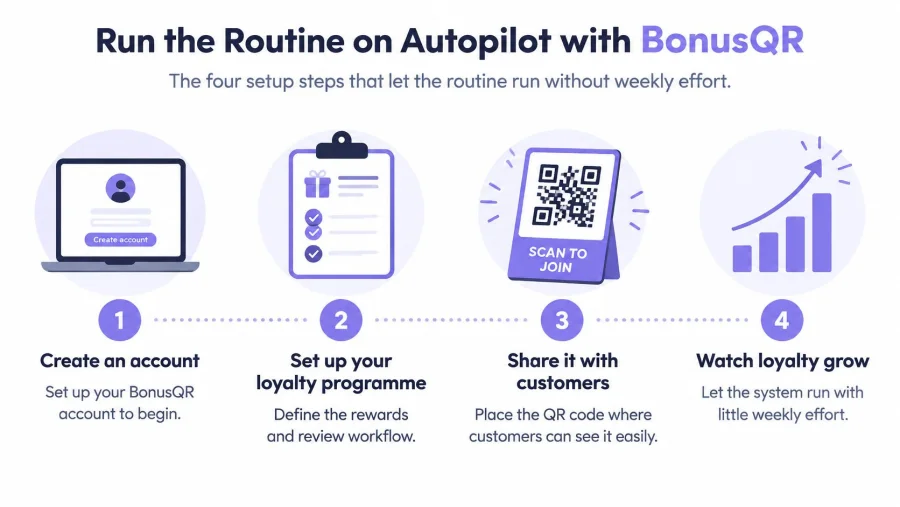
The setup can remain modest. A BonusQR programme has four setup steps: create an account, set up the programme, share it with customers and watch loyalty grow. The review routine needs its own assigned responsibilities within that broader loyalty process.
Work through a restaurant example
Consider a hypothetical restaurant sending 30 requests a week. The manager checks completed meals against channel permissions and recent invitations, then sends the saved message after the dining experience.
A customer who reports a missing takeaway item receives a service response from the duty manager. That complaint doesn't disappear from the log merely because it arrived privately, and the public review option doesn't depend on accepting a replacement.
For businesses that also deliver services at customers' premises, Recepta.ai's resource on review management for home service businesses offers a useful adjacent workflow to consider. The operational question remains the same: which completed customer interaction should trigger the invitation?
Audit the process, not just the stars
A practical monthly audit can examine 100 recent requests, or all available requests where the business has fewer. Check the underlying visit, permission record, message destination and repeat-request history.
- Trace complaints: Confirm each complaint reached someone responsible for resolving it.
- Measure responses: Divide responses by delivered requests, keeping private replies separate from identifiable public reviews.
- Inspect the review mix: Look for detailed comments, recurring complaints and unexpected gaps between locations or channels.
Public reviews won't always be attributable to a particular invitation. Record that uncertainty rather than treating every new review as a confirmed campaign response.
Request Wording That Stays Neutral and Honest
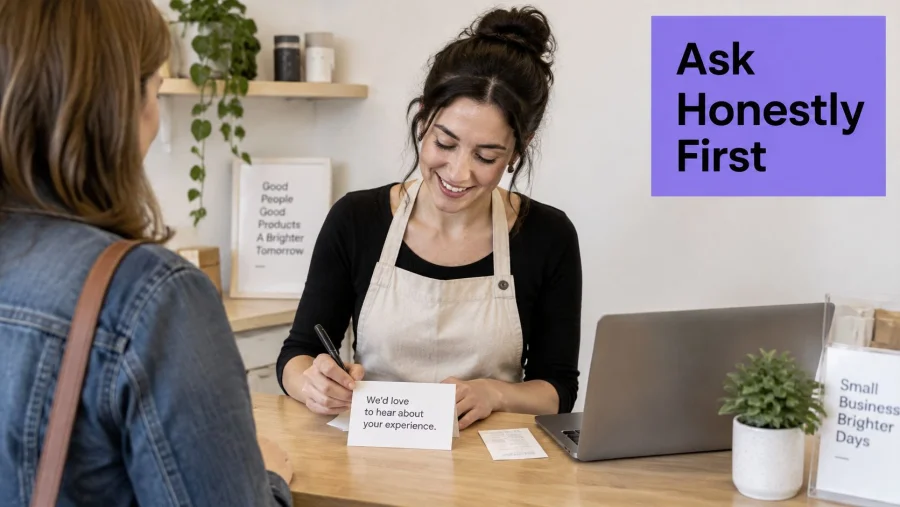
A customer leaving a café after a good coffee and quick service can still have a different view of the value or atmosphere. Ask for an honest account of the whole experience, not a particular rating. Neutral wording gives customers room to praise, criticise or describe a mixed visit.
Online reviews are a major part of how people research products and services. Credible requests are more useful than messages designed merely to collect praise.
Copy-ready scripts for everyday visits
“Please tell us how your experience went” is a clear starting point. Add a specific topic if it helps the customer give useful detail, without suggesting what they should say.
- Café: Thanks for visiting [venue name]. Please share an honest Google review about your order and the service: [review link]. For help with an order, contact [private contact].
- Gym: Thanks for attending [class name]. If you'd like, share an honest Google review about the instruction, equipment or cleanliness: [review link]. You can also contact the team at [private contact].
- Salon: Thanks for choosing [venue name]. Please share an honest Google review about your treatment and appointment: [review link]. If you have a concern, contact [private contact].
Avoid five-star requests, invitations sent only to customers who appear happy, and wording that implies a reward for favourable feedback. Staff incentives based only on ratings can make requests feel pushy. Assess whether staff follow the routine, not whether they secure praise.
Make the destination obvious
Name Google if the link opens a Google review form. Get the direct link from the Google Business Profile dashboard, open it on a phone to check it, then use its QR code on a till sign or appointment card.
Keep a text request short and clear:
Thanks for visiting [venue name]. Please share an honest Google review about your experience: [review link]. If you need help with anything from your visit, contact [private contact]. Your feedback helps the team improve.
For an in-person request, staff can say:
Thanks for coming in today. If you have a minute, we'd value your honest view of how it went. You can leave it here.
Point out the QR code, then give the customer space to decide. Don't watch them fill in the review or ask to approve the wording.
If a customer has already shared private feedback, thank them and respond to the issue. Don't chase them for a public review. Their feedback is useful even when it stays private.
Rewards and Incentives Without Breaking the Rules
A discount for feedback can look like an easy solution to a quiet review profile. The problem is that UK consumer law and platform policies are separate tests, and a campaign must satisfy both.
From 6 April 2025, fake reviews and concealed incentivised reviews became banned practices under the Digital Markets, Competition and Consumers Act 2024, as explained in the CMA's reviews and endorsements guidance collection. An incentive isn't automatically prohibited under that framework, but it must be disclosed clearly and must never depend on a favourable rating.
Separate visit rewards from review rewards
Google Business Profile reviews need particular care. J Tandy's Google reviews guide explains that Google prohibits incentives for Business Profile reviews, so describing a reward as payment for an honest review doesn't solve the platform-policy problem.
Which review practices are allowed in the UK
| Practice | Allowed? | Reason |
|---|---|---|
| Reward for scanning a loyalty QR code on each visit | Yes | The reward is for visiting, not for the review |
| Reward for leaving any Google review | No | Google prohibits incentives for Business Profile reviews |
| Discount for a five-star rating | No | Reward depends on sentiment, which the rules ban |
| Incentive for any review, clearly disclosed, on a platform that allows it | Yes, if disclosed | Disclosure must be visible wherever the review appears |
| Asking only customers known to be happy | No | Selective sampling gives a misleading picture |
| Asking every eligible customer for honest feedback | Yes | Balanced, and in line with CMA guidance |
| Removing or delaying negative reviews | No | Suppressing genuine feedback is a prohibited practice |
The final row concerns genuine, relevant feedback. Reporting suspected spam, abuse or fabricated content through a platform's moderation process is different from suppressing an authentic complaint because it harms the average rating.
With Reward for Visit, customers receive a coupon after scanning their QR code a specified number of times. That structure rewards attendance, provided earning and redeeming the coupon never requires a review.
A neutral loyalty-stamp card can make the distinction explicit:
This stamp is for visiting, not for leaving a review.
The customer should receive that stamp whether they post praise, publish criticism or leave no review at all. Staff shouldn't ask to see a submitted review before issuing an independently earned reward.
Don't confuse Google's different review products
Google's rules for merchant product-rating feeds aren't permission to reward local-business reviews. The Google Merchant Center product-rating policy requires the is_incentivized_review attribute for applicable incentivised reviews and prohibits incentives depending on sentiment.
That policy also allows Google to remove non-compliant reviews or block a review feed. A café collecting Business Profile feedback shouldn't borrow a disclosure mechanism intended for merchant product feeds and assume the campaign is acceptable.
Private feedback rewards need equally clear separation. A survey reward shouldn't become a reward for public posting, and a dissatisfied respondent shouldn't lose access to the public review destination.
Before launching any incentive campaign, the owner should answer:
- Does the reward depend on the rating? Any positive-sentiment condition needs removing.
- Is it disclosed? Where incentivised reviews are permitted, disclosure must travel with the review.
- Is every eligible customer asked? Eligibility should follow an objective customer interaction, not predicted satisfaction.
The simplest operating choice for Google reviews is an unrewarded invitation alongside a separate visit-based loyalty programme.
Answering Negative Reviews Without Losing Trust
A thoughtful response can improve how prospective customers interpret a complaint. Trustpilot's 2025 UK research, involving more than 600 businesses and 2,000 consumers, found that 83% of consumers were more likely to trust a business when it engaged with dissatisfied customers and offered a solution on a review platform.
That doesn't make a negative review more valuable than positive feedback in every case. It means the owner still has an opportunity to demonstrate accountability, especially when the reply addresses what went wrong.
Build a reply around the specific problem
A useful response has three parts:
- Thank the reviewer for raising the issue, without adding a defensive qualification.
- Acknowledge the specific problem in plain language, avoiding speculation or a public argument.
- Explain a genuine action or offer private contact where resolving the issue requires personal details.
Consider a hypothetical café review describing a 25-minute lunch wait. If the café has sincerely changed its queue process, a response could read:
Thank you for explaining what happened. Waiting 25 minutes for lunch wasn't the service the café aimed to provide. The team has introduced a separate collection queue and clearer wait-time updates. Please contact [manager contact] so the team can discuss the visit directly.
The operational change must be real. If staff are still investigating, the response should say so rather than claiming a fix that hasn't happened.
For owners who need more examples before drafting, Silva Marketing's review response guide is a useful resource for considering tone and structure.
Keep the response connected to an operational fix
Set a working target to reply within 48 hours, while allowing time to check the facts. That's a practical service standard, not a statutory deadline, and someone must be responsible for monitoring it.
- Never delete genuine criticism: Use moderation routes for policy breaches, not embarrassment.
- Never blame the customer: Explain relevant facts without sarcasm, accusation or disclosure of private information.
- Never request a changed rating: Resolve the service issue without attaching a reputation-management condition.
Keep a monthly list of recurring problems, including slow service, booking friction and stock gaps. Give each fix an owner and record whether it has been completed.
Use customer feedback collection tools to support that listening process, while keeping the public review option independent of any private satisfaction score. The useful outcome is a better-run visit, not merely a tidier review page.
Run the Routine on Autopilot with BonusQR
The four setup steps are straightforward: create an account, set up the loyalty programme, share it with customers and watch loyalty grow. The operational work sits inside those steps, including deciding which recorded visits qualify, when requests should arrive and who handles replies.
Start small and choose the right plan
Staff scans create a visit history that can support a transaction-linked routine. The chosen timing becomes the sending schedule, while the saved invitation supplies consistent wording and a complaint route.
Owners looking to reward members at your fitness studio can keep visit rewards and review invitations within the same broader customer journey without making one conditional on the other. Before enabling automation, confirm that every eligible customer can access the public review route regardless of satisfaction.
- Free entry: The Free plan costs nothing, and signing up requires no credit card.
- Premium distinction: Automatic collection of Google Maps reviews is only included in the Premium plan.
- Measurement: Keep the two-timing test running and examine response quality alongside response rate.
The first 30 days should be treated as a learning period, not a promised uplift. Low visit volumes may require a longer test before choosing a permanent schedule.
Start free with BonusQR, set up the visit-based programme and send the first neutral review request this week using the timing table. Check the response rate after 30 days, keep the timing that produces useful feedback and turn recurring complaints into specific service improvements.


