Loyalty program Points System

A Points-Based Loyalty Program for Your Business

Let Customers Choose Their Reward

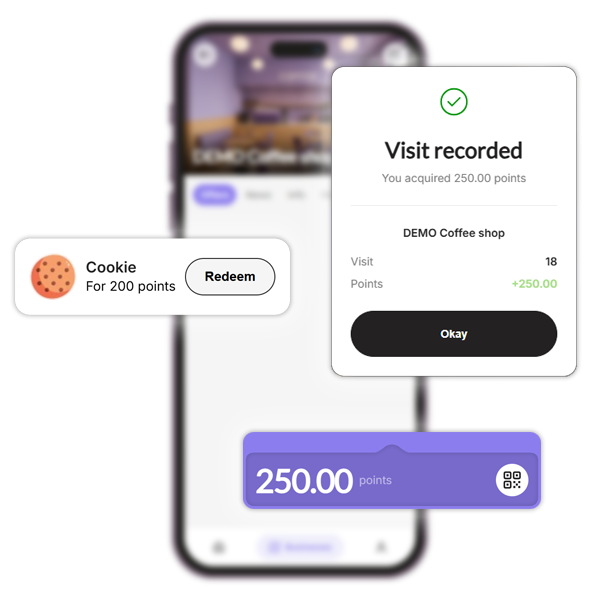
Reward customers for what they spend and let them choose a reward. Your team scans a customer’s QR code and enters the bill amount; BonusQR calculates the points using the rules you set.

Well-known and trusted

Rewarding for everyone

Fits any business
How a points-based loyalty program works

An illustrative setup: award 1 point for every €1 spent and offer a reward worth €5 at 100 points. A €20 purchase earns 20 points; after €100 of qualifying spending, the customer can redeem the reward. These are example rules, not a required BonusQR setting.

Choose a reward your margin can support

In this example, the retail value of the reward is 5% of qualifying spend. Your actual cost depends on the reward and redemption rate. Decide which purchases qualify and explain earning and redemption rules before launch.

Points or a stamp card?

Points suit businesses where basket sizes vary and spending should determine the reward. Stamps are simpler when each visit or qualifying item counts equally, such as a coffee or haircut.

What can be set up in loyalty program points System?

01
Customize Your Currency

Set the currency in which customers pay.

02
Define the Ratio

Choose how many points customers earn per unit of currency. Example: 1 euro = 5 points.

03
Set Rewards

Set rewards and decide how many points each one costs. Small ones can be 10 points, bigger ones 50.

💡 Pro tip: Learn how to design a points program that boosts repeat visits and revenue in our blog: Read BLOG.
Customer’s perspective of Points System loyalty module

Customer’s perspective of
Points System - loyalty module


  • See the points equation directly in the app (e.g., 1 euro = 10 points).
  • Check the current point balance anytime.
  • Browse available rewards and exchange points for selected items.
How will your employees see Points System loyalty program

How will your employees see
loyalty program: points system

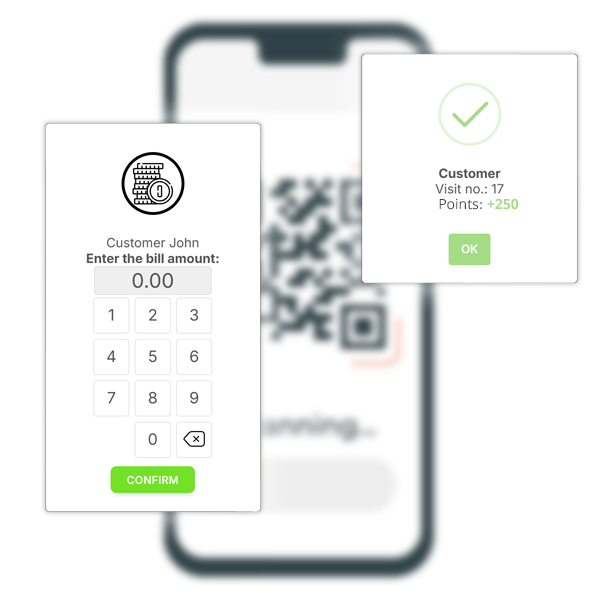
  • QR Code Scanning: Staff members scan customer QR codes effortlessly.
  • Adding Points: If the customer shows a QR code to collect points, the staff enters the bill amount, and points are automatically calculated.
  • Redeeming Rewards: When the customer shows a QR code for a redeemed reward, the staff instantly sees the type of coupon, with no further action needed.
Manager’s view of Points System

Manager’s view of
Points System

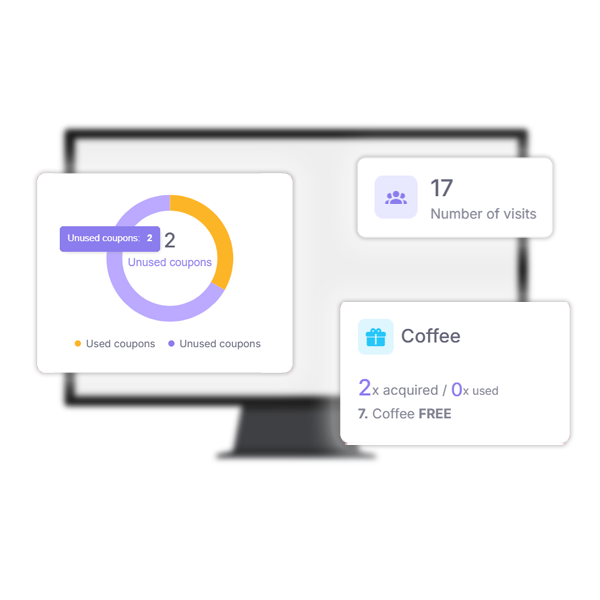
  • Detailed Scan History: Track which staff member awarded points, the bill amount, points added, and redeemed coupons.
  • Points Balance: Monitor the current points for each customer.
  • Reward Tracking: See the total number of issued and redeemed coupons.

Want to launch a loyalty program for your business?
Set it up in just a few minutes!

Loyalty program Points System - suitable for industries

Why You Need a Loyalty APP?

  • Increase Repeat Visits
  • Enhance Sales & Customer Spend
  • Gain access to powerful features
See all features

Loyalty Programs

Choose the loyalty program that fits your business. Points collection, Stamps, Cashback, Rewards for regular visits, Discounts, Coupons ...

– it’s all up to you!

Analytics & Insights

Get to know your customers better. Track visit history, see which offers perform best, and identify your most loyal customers. Build your database and watch your business grow!

Push & Email Notifications

Stay on your customer’s minds. Send them regular updates and news, special discount coupons, or request feedback after repeat visits.

Coupons & Surprises

Automate promo coupon distribution for special occasions – Birthdays, Valentine’s Day, Childrens Day... Or boost sales with pre-sale coupon offers.

Important features of the loyalty application

Questions before you launch

View plans and pricing

How does my team award points?

Staff scan the customer’s QR code in the BonusQR business app and enter the bill amount. BonusQR calculates the points from your earning rules. Set up rewards in the manager dashboard and brief staff on when customers can redeem them.

Do I need to connect my cash register?

No. The program works without a POS integration: staff enter the purchase amount in the BonusQR app. Add this step to your checkout routine and test it during a busy shift. A POS integration is optional and quoted separately as a custom project.

Which plan includes points?

Points are included in the Basic and Premium plans, not in Free. Check current pricing and plan conditions before you choose a plan.

Want to launch a loyalty program for your business?
Set it up in just a few minutes!