Customer database software isn't just a fancy digital address book. For a small business, it’s the secret weapon that turns casual visitors into die-hard fans. Think of it as the modern-day version of the neighborhood shopkeeper who knew everyone’s name and had their favorite order ready before they even asked.
This software is your command center for building real, lasting relationships that drive repeat sales.
Why Your Customer List Is Your Most Valuable Asset
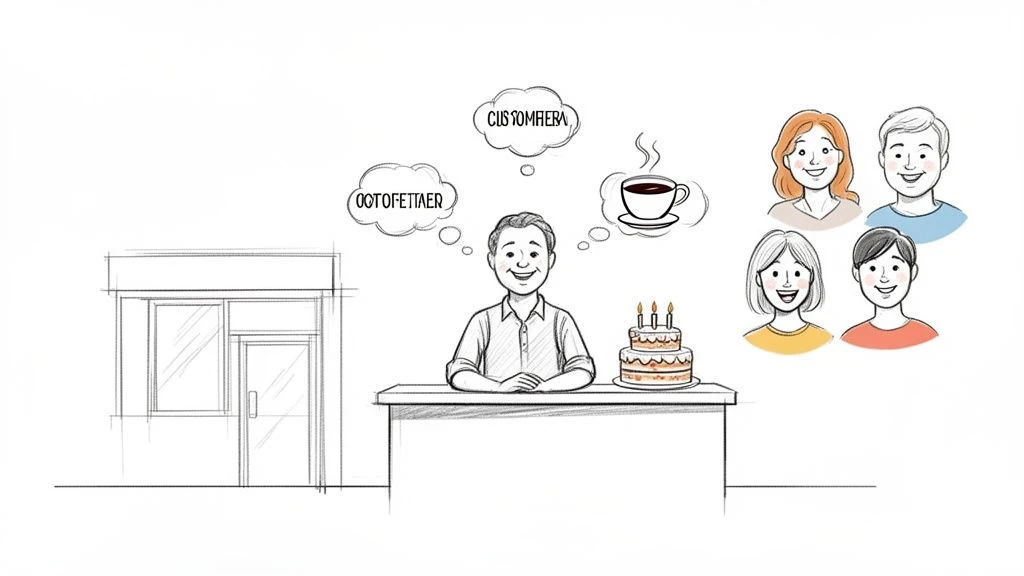
Imagine knowing every regular by name, remembering their go-to coffee order, or surprising them with a birthday discount. That personal connection is what makes a local business thrive and stand out from the big, impersonal chains. Your customer list isn't just a bunch of names and emails; it’s your direct line to the very people who keep your doors open.
Without a smart way to organize this information, you're flying blind.
- Who are your most loyal patrons?
- What do they love to buy?
- When did they last stop by?
Missed answers mean missed chances for repeat business and a marketing budget that feels more like guesswork than strategy.
From Simple Spreadsheet to Smart Database
Lots of small businesses start with a spreadsheet. And that's a great first step! But as you grow, that spreadsheet quickly becomes a liability. It’s static, clunky, and tells you absolutely nothing about customer behavior. This is where customer database software for small businesses comes in, creating a living, breathing profile for every person who walks through your door.
This kind of tool automatically pulls in key information that helps you:
- Understand customer behavior: See purchase history, visit frequency, and total spending at a glance.
- Personalize their experience: Use what you know to create offers that actually matter to them, making them feel seen and valued.
- Turn one-time visitors into regulars: Spot new customers and give them a compelling reason to come back.
Think of it this way: a spreadsheet is a single photograph of your customers. A customer database is a live video, constantly updating and showing you the whole story.
The Power of Knowing Your Customers
This leap from just collecting names to actively managing relationships is a game-changer. The data doesn't lie: an impressive 71% of small businesses already use these systems, which shows they're no longer just for corporate giants. If you're looking for more details on CRM adoption, salesmate.io has some great insights.
Ultimately, this software gives you the power to make smarter, data-driven decisions. Instead of sending out generic marketing blasts, you can create targeted campaigns that connect. For example, send a special discount to coffee lovers who haven't visited in a month or reward your top 10 most frequent visitors with a well-deserved perk.
Simple, cost-effective solutions like BonusQR build this database right into a loyalty program, making it ridiculously easy to collect information and reward customers all at once. It’s all about working smarter, not harder, to drive repeat sales.
So, What Exactly Is Customer Database Software?
Let’s cut through the tech talk. At its heart, customer database software is a single, central place for everything you know about your customers. It's way more than a digital address book; think of it as a smart, living file on every person who interacts with your business.
This kind of software goes beyond just storing a name and email. It’s built to create a rich profile that tracks what people buy, how often they visit, and even what they like best. For a small business, that kind of information is pure gold.
Moving from Static Spreadsheets to Dynamic Insights
A lot of small businesses start out tracking customers in a spreadsheet. And that's a fine first step! But a spreadsheet is static-it only shows you what you've manually typed in. It can’t update itself, spot trends, or give you real, actionable insights.
A customer database, on the other hand, is dynamic. It grows and learns with every single customer interaction. It automatically connects the dots for you, helping you understand not just who your customers are, but how they behave and what they truly want.
A spreadsheet tells you that you have a customer named Jane Smith. A customer database tells you Jane Smith visits every Friday morning, always buys a large latte, but hasn't stopped by in three weeks. Maybe it's time to send her a friendly "we miss you" offer?
This leap from passively collecting data to actively managing relationships is what separates the businesses that thrive from those that just get by.
A Tale of Two Businesses
To really see the power of customer database software for a small business, let's look at two different scenarios. It makes the difference crystal clear.
Scenario 1: The Local Café with a Spreadsheet
A café owner has a basic spreadsheet of email subscribers. Every week, they blast out a generic newsletter with the same special to everyone. They have no idea who the daily regulars are versus the occasional visitors, or who prefers tea over coffee. Their marketing is a shot in the dark, and they might even be annoying their best customers.
Scenario 2: The Retail Store with a Database
A small boutique uses a simple customer database linked to its sales system. The owner can easily see that a specific group of customers buys the same brand of jeans. With a few clicks, they can create a targeted email campaign announcing a new shipment from that exact brand-and send it only to the people who will be excited to hear about it. The result? More sales and shoppers who feel like the store just "gets" them.
Turning Information Into Action
The real magic of customer database software is that it empowers you to make smarter, more personal decisions. When you understand your customers on a deeper level, you can suddenly do things that were impossible before.
- Offer More Relevant Promotions: Stop sending steak coupons to your vegetarian customers. Segment your audience to make sure every offer is timely and valuable.
- Provide Personalized Service: A quick look at a customer's profile can remind you of their last purchase or a special request, delivering a personal touch big-box stores can't dream of.
- Boost Customer Loyalty: Easily identify your best customers and reward them for sticking with you. Exclusive perks and special recognition make them feel appreciated.
Modern tools like BonusQR make this incredibly easy by building a customer database right into a loyalty program. As customers scan a QR code to earn rewards, their profiles are automatically updated. This gives you powerful insights without adding a single extra task to your plate.
Must-Have Features for Your Small Business
When you start shopping for customer database software, the sheer number of options can feel overwhelming. Many are packed with features you’ll never touch but will definitely pay for. The trick is to cut through the noise and find a tool that solves real problems for a business like yours.
Think of it like buying a chef's knife. You don't need a massive, complicated set. You just need one high-quality, versatile knife that handles 90% of your kitchen tasks perfectly. Your software should be the same-powerful, reliable, and focused on what actually matters.
This checklist will help you zero in on the non-negotiable features that deliver real value from day one.
Simple Contact Management and Segmentation
First things first: managing customer information must be effortless. You need a clean, at-a-glance view of each customer, showing their contact details, purchase history, and visit frequency.
But just storing information isn't enough; the tool needs to help you make sense of it. That’s where segmentation comes in. A good platform will let you implement powerful customer segmentation strategies. This allows you to group customers based on their behavior, like:
- 'Lunch Regulars': Customers who visit most weekdays between 11 AM and 2 PM.
- 'Weekend Brunch Crowd': Folks who primarily visit on Saturdays and Sundays.
- 'High Spenders': Your top 10% of customers based on their total spend.
Grouping customers this way lets you send relevant offers that resonate instead of generic blasts that get ignored.
Easy-to-Read Analytics and Reporting
Data is useless if you can't understand it. Enterprise-level software often comes with complicated dashboards that are more confusing than helpful. For a small business, clarity is everything. Your software should present key information in simple, visual reports you can digest in minutes.
You should be able to instantly answer critical questions like:
- Who are my most loyal customers?
- How often do new customers return after their first visit?
- What's the average amount a customer spends per visit?
This diagram shows exactly how a customer database should function-as a central hub connecting contact details and purchase history to generate real, actionable insights.
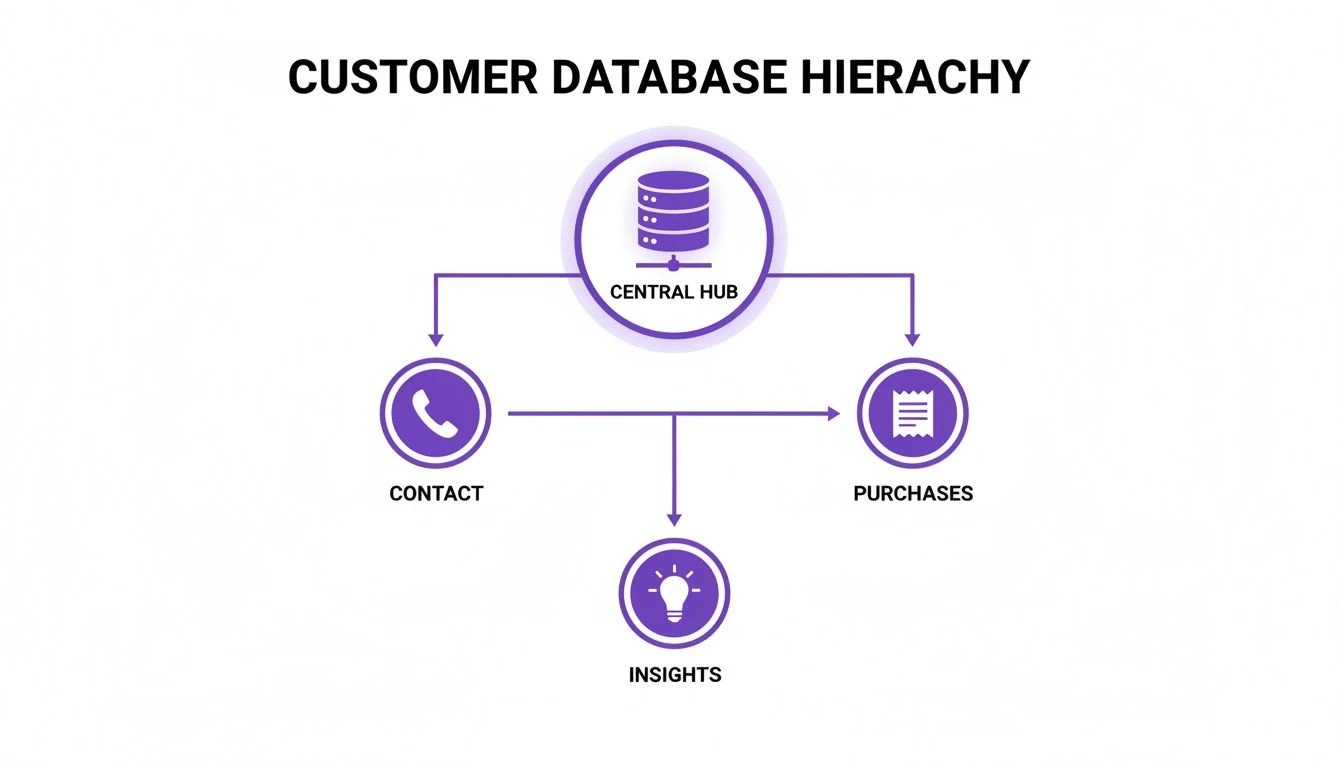
The takeaway here is simple: raw data from contacts and purchases only becomes valuable when the software translates it into clear insights you can actually act on.
Seamless and Automatic Integrations
Your time is your most valuable asset. A standalone database that requires constant manual data entry is a recipe for frustration. This is why seamless integration isn't just a nice-to-have; it's non-negotiable.
The right software should act as a silent partner, working in the background to keep your customer information accurate and up-to-date without you lifting a finger.
Your chosen solution must connect effortlessly with the tools you already use, especially your Point of Sale (POS) system. That connection ensures every transaction automatically updates the customer's profile.
Even better are tools that integrate the database directly into a loyalty program, like BonusQR. When a customer scans their QR code, their purchase data is captured instantly. This builds detailed customer profiles automatically, turning a simple transaction into a powerful data point.
The market for these tools is growing fast. The SMB segment is expected to expand at a CAGR of 16.2%, mostly because affordable, cloud-based solutions are finally within reach for small business budgets. Choosing software that automates and integrates is how you tap into this power without breaking the bank.
How to Choose the Right Software on a Budget
Finding the right customer database software for your small business shouldn't feel like a second job. It's easy to get buried under endless options, confusing features, and price tags that make your head spin. But here’s the secret: the key is to have a clear plan. Focus on what you actually need to grow.
This simple guide will walk you through making a smart, cost-effective choice. We'll cut through the pricing jargon and help you find the perfect fit.
First Things First: What’s Your Main Goal?
Before you even glance at a piece of software, stop and ask yourself one simple question: What is the number one problem I’m trying to solve? Getting crystal clear on this is the most important step you'll take.
Are you trying to:
- Boost repeat visits? Your focus should be on tools that help you spot and reward loyal customers.
- Launch a loyalty program? Then you need something that ties data collection directly to a rewards system.
- Just get organized? A clean, simple contact manager with basic analytics might be all you need.
Being honest about your main objective keeps you from paying for advanced features you won’t touch. For most small businesses, the goal is simple: turn first-timers into regulars.
Choosing software without a clear goal is like going grocery shopping without a recipe. You’ll end up spending money on things you don’t need and come home with a confusing mess.
Making Sense of Software Pricing
Software pricing can feel intentionally confusing, but most models fall into a few common buckets. Knowing the difference helps you spot hidden fees.
- Affordable Subscriptions (SaaS): This is the go-to model for most small business software. You pay a predictable monthly or annual fee, which typically covers updates and support.
- One-Time Fees: While less common, some software is still sold with a single license fee. Watch out for extra charges for future updates or support.
- Freemium or Free Tiers: Lots of platforms offer a free version with basic features. This is a fantastic way to test the waters, but always check that the paid plans are affordable for when you grow.
When you're comparing prices, always read the fine print. Look for hidden costs like setup fees or per-user fees. What looks cheap at first can get expensive fast.
Simplicity and Ease of Use Are Non-Negotiable
The most feature-packed software on the planet is worthless if your team can’t figure it out. A complicated tool with a steep learning curve will create more headaches than it solves.
The best customer database software for a small business should feel intuitive and require almost no training. After all, a recent Verizon survey showed that 57% of small businesses are adopting multi-factor authentication, proving a shift toward technology that's secure but still easy to manage.
A tool your team can't use isn't just an expense-it's a roadblock. The best software should fade into the background and make everyone’s job easier, not harder.
Always take advantage of free trials. This is your chance to get your hands dirty and see how the software feels in your day-to-day operations. Get your team involved. Can they add a new customer in seconds? Can they pull up a purchase history without a manual? Their feedback is pure gold.
How to Find the Perfect Match
With your goal defined and your budget set, it's time to find the right software. Look for simple, all-in-one solutions built for the real-world challenges small businesses face.
Platforms like BonusQR are designed specifically for this. They combine a powerful customer database directly with a simple loyalty program. This two-in-one approach cuts out the complexity and delivers immediate value by helping you understand-and reward-your best customers automatically.
If you're ready to dive deeper, you can learn more about choosing your first customer loyalty software to make sure you get it right from the start.
Connecting Your Database to a Loyalty Program
A customer database on its own is a powerful asset. But it really starts making you money when you pair it with a modern loyalty program. This combo creates a powerful cycle of engagement and growth, turning raw data into delighted, repeat customers.
Think of it this way: your database is the fuel, and the loyalty program is the engine. One without the other won’t get you very far. But put them together, and you build real momentum.
Automating Your Data Collection
Let’s be honest, one of the biggest headaches for small business owners is finding time for manual data entry. Between managing sales, inventory, and staff, updating spreadsheets is the last thing on your mind. This is where an integrated system changes the game.
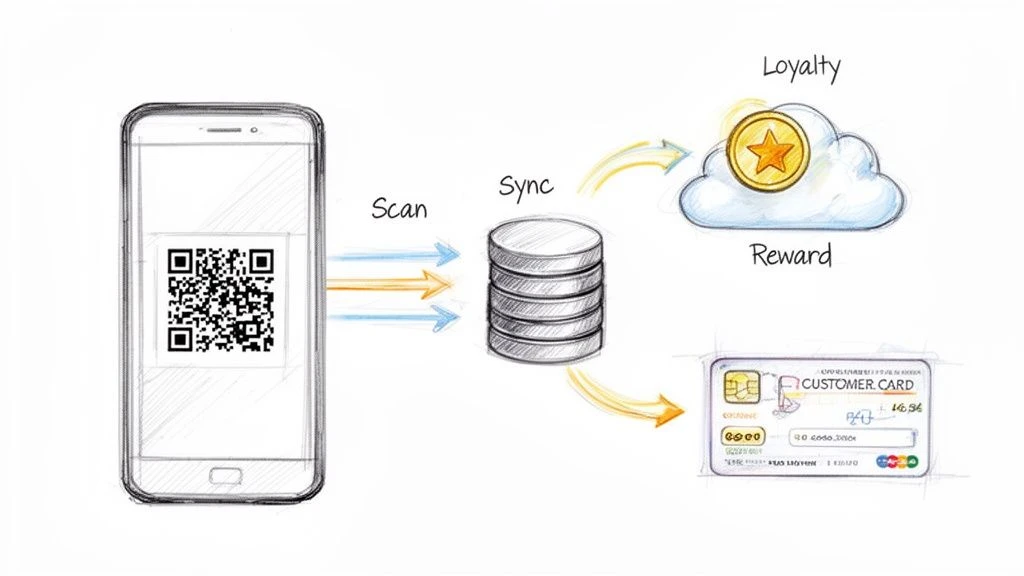
When your customer database software for a small business is directly connected to a loyalty program, the whole data collection process happens on its own.
- A customer buys something and scans a QR code to get their points.
- Instantly, the system creates or updates their profile in your database.
- Their purchase amount, what they bought, and when they visited are all logged automatically.
This seamless flow means your data is always accurate and current, without you lifting a finger. Every transaction becomes a valuable piece of the puzzle.
Turning Real-Time Data Into Action
With a database that’s always up-to-date, you can stop blasting generic marketing messages and start creating targeted rewards that feel personal. This is where the data becomes your secret weapon.
An integrated loyalty and database system doesn't just tell you who your customers are. It tells you how to talk to them, what they value, and when they need a gentle nudge to come back.
For example, you could easily set up automated campaigns that:
- Re-engage lapsed customers: Send a "we miss you" offer to anyone who hasn't stopped by in 30 days.
- Reward your biggest fans: Automatically find your top 10% of customers and surprise them with an exclusive perk.
- Celebrate milestones: Acknowledge a customer's 10th visit or their one-year anniversary with a little bonus.
Why BonusQR Is the Smartest Solution
This powerful synergy is exactly what tools like BonusQR are built for. It’s not just a loyalty app; it’s a complete customer engagement platform where the database and the rewards program are one and the same. Every scan simultaneously grows your customer list and rewards their loyalty.
This all-in-one approach gets rid of the cost and complexity of trying to glue separate systems together. It gives your small business everything it needs to build a thriving community of repeat customers, all driven by data you collect automatically. To see what else is out there, check out our guide on customer loyalty program software. By choosing an integrated tool, you save time, gain powerful insights, and build lasting relationships that fuel real growth.
Protecting Customer Data and Building Lasting Trust
Collecting customer information is a massive privilege. And with that privilege comes a huge responsibility. In a world where data breaches are front-page news, your customers need to know their information is safe with you. Protecting their data isn't just a legal checkbox; it’s the bedrock of trust.
Think of it this way: when a customer gives you their email, they're handing you a key to their personal space. How you guard that key says everything about your business. Strong security isn't just some technical chore-it's a core part of your customer service.
Building Your Fortress, Brick by Brick
You don’t need an enterprise-level security team to keep data safe. The most effective strategies are often the simplest. It all starts with setting clear, non-negotiable rules for how information is handled within your business.
Get started with these foundational steps:
- Implement Strong Password Policies: This is your first line of defense. Make sure everyone on your team uses complex, unique passwords for any system that touches customer data. Enable two-factor authentication wherever you can.
- Define Employee Access Levels: Not everyone on your team needs the keys to the entire kingdom. Limiting access on a "need-to-know" basis drastically cuts down your risk.
To really lock this down, it's crucial to get the security measures right. You can learn more about practical steps to enhance protection through great resources on Cybersecurity for Small Businesses.
Choosing a Partner Committed to Security
Your security is only as strong as the software you use. When you’re looking at customer database software for a small business, its security features should be a top priority, not an afterthought.
Trust is the ultimate currency in business. When customers feel their information is safe, they're not just more willing to engage-they become your most vocal supporters.
Look for platforms that offer built-in security features designed to protect you and your customers right out of the box. For example, modern solutions like BonusQR are built with security at their core. By using a simple QR code scan, the system minimizes the direct handling of sensitive information and makes sure all data is encrypted and stored securely. It’s designed to give both you and your customers peace of mind.
Transparency Is Your Best Policy
Beyond the technical stuff, be open and honest with your customers about how you use their information. A simple, easy-to-understand privacy policy shows you respect them and builds confidence. Let them know you only collect what you need to give them better service and great rewards.
This mix of ethical practices, smart security habits, and choosing the right tech is what creates a truly trustworthy experience. When customers believe you have their back, they won't just give you their business-they’ll give you their loyalty.
Common Questions About Customer Database Software
Jumping into the world of customer database software can feel overwhelming. If you're a small business owner, you just need clear, straight answers to help you make the right call. We get it.
Here are some of the most common questions we hear, with simple, no-fluff advice to guide you.
Can I Just Use a Spreadsheet Instead of Buying Software?
You can start with a spreadsheet. But that's like using a rowboat when what you really need is a speedboat. It gets you off the shore, but you’ll be left in the wake pretty quickly.
Spreadsheets are manual, clunky, and can't give you any real-time insights into what your customers are actually doing. Every update is a chore.
Proper software, on the other hand, puts everything on autopilot. It collects data, spots trends, and actively helps you grow your business-it doesn’t just sit there like a static list of names.
How Much Should I Expect to Pay for This Software?
The price can swing wildly, but you don't need to break the bank. Many of the best tools for small businesses are incredibly affordable.
Look for subscription plans that often start as low as $30-$50 per month. Better yet, platforms like BonusQR roll database features directly into their loyalty program. This way, you get a two-for-one solution that builds your customer list while rewarding your best people, making every dollar you spend work twice as hard.
How Do I Get My Existing Customers Into a New System?
This is a huge-and very common-worry. But don't sweat it. Any software worth its salt has made this process incredibly simple. You won't be stuck manually typing in hundreds of contacts.
Most systems have an easy import feature. You just upload a CSV file, which you can export from your current spreadsheet or POS system.
The best tools will walk you through matching up the data-making sure names, emails, and purchase histories all land in the right spots. It’s usually a quick, one-and-done setup that gets you running in minutes.
Will This Software Be Too Complicated for My Staff?
That’s a make-or-break question, and the answer is simple: it depends on what you choose. This is exactly why you should make "user-friendly" a non-negotiable part of your search. The goal is to find a tool that saves your team time, not one that gives them a new headache.
Look for software with a clean layout and an intuitive feel. Always take advantage of free trials. Let your staff get their hands on it and see if it clicks before you commit.
A tool like BonusQR was built specifically for this. It's so straightforward that it requires practically zero training, letting your team focus on what they do best: taking care of your customers.


